Oricom TPMS: Check, Calibrate, and Maintain Your Tires Safely
Learn to check, calibrate, and maintain Oricom TPMS sensors with a step-by-step guide. Includes IDs, resets, fault codes, and practical tire-pressure tips for safer driving.


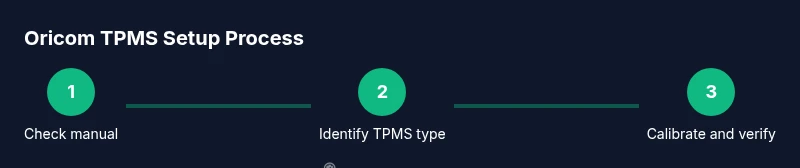
Master how to check, install, and troubleshoot oricom tpms on your vehicle. This step-by-step guide covers sensor identification, calibration, pressure reading, and fault resolution. Gather a tire pressure gauge, a stable work area, your vehicle’s manual, and access to the TPMS reset procedure, then follow the steps to keep your TPMS accurate.
Why Oricom TPMS matters for safety and performance
According to Tire Pressure Tips, Oricom TPMS sensors play a critical role in maintaining optimal tire pressure, which affects fuel efficiency, tire wear, and handling. A properly functioning TPMS helps drivers avoid underinflation, which can lead to poor mileage, increased heat, and a higher risk of tire failure. When tires lose air, TPMS alerts you with a warning light and an on-dash display, prompting you to check and adjust pressure. Understanding how Oricom TPMS works and how to verify readings is the first step toward safer, more efficient driving. This guide focuses on practical, real-world steps you can take to check, calibrate, and troubleshoot Oricom TPMS devices without specialized tools. You will find guidance on when to reset sensors, how to interpret fault codes, and what maintenance habits keep the system accurate across seasons and road conditions.
How Oricom TPMS Works: Direct vs Indirect Sensing
Oricom TPMS uses two main sensing approaches depending on the vehicle and wheel design: direct TPMS uses wheel-mounted sensors that measure actual tire pressure and temperature, while indirect TPMS relies on wheel speed sensors and ABS/ESP data to infer pressure status when direct sensors are unavailable or malfunctioning. Direct sensors report real psi values to the vehicle’s computer, display, and, in many cases, a mobile app. Indirect TPMS can still warn you if pressures diverge significantly or if a sensor battery is failing. Battery life for direct sensors varies by model and climate, but most last several years under normal use. Regardless of type, accuracy depends on sensor integrity, proper mounting, and regular calibration checks. For Oricom systems, staying aware of sensor IDs and ensuring the vehicle’s ECU recognizes each sensor is essential for reliable readings.
Installation and Calibration Basics
This section covers the general prerequisites and safe steps for setup and calibration of Oricom TPMS. Before you start, confirm you have the vehicle manual, a suitable TPMS reset procedure, and the proper tools. Park on a flat surface, turn off the engine, and apply parking brakes. Remove wheel accessories only if you are performing wheel service and have the tire tools ready. After changing or rotating tires, perform a sensor calibration according to the vehicle’s procedure, which may involve key cycles, button presses, or scanning with a tool. If your vehicle uses an indirect TPMS, calibration may rely on resetting the ABS-based system rather than a dedicated sensor. The goal is to align the ECU with current tire pressures to produce accurate warnings.
Common Faults and Troubleshooting
Some of the most frequent TPMS issues with Oricom systems include a persistent warning light despite normal pressures, erratic readings, or a dead sensor battery. Check for obvious causes first: loose or damaged valve stems, corroded connectors, or incorrectly seated sensors after wheel service. If readings seem inconsistent, verify the issue with a trusted tire gauge and re-check all tires. For direct TPMS, battery replacement typically requires sensor replacement by a technician; for indirect TPMS, issues may stem from ABS sensor faults or ECU software. If a code or warning persists, consult your manual and use a scanner to fetch fault IDs and suggested remedies before replacing components.
Maintenance Best Practices and Seasonal Considerations
Regular maintenance keeps Oricom TPMS reliable. Check tire pressures at least once a month and after temperature swings, as humidity and ambient temperature affect tire pressure. When you rotate tires, always re-check and calibrate TPMS. After long trips or hitting potholes, inspect sensors for physical damage. Use a high-quality tire gauge and a reliable inflator to adjust pressures to the manufacturer’s recommended range. In cold weather, pressures drop as the air contracts; adjust accordingly and re-check once temperatures stabilize. If you replace a tire, follow the calibration steps to re-learn sensors to the vehicle’s ECU. By combining routine checks with calibration, you minimize false warnings and maximize safety.
Quick Troubleshooting Checklist
Use this checklist when TPMS warnings appear or readings seem off:
- Park safely, turn off engine, and visually inspect tires.
- Measure all four pressures with a reliable gauge; compare to spec.
- Inflate or deflate to the recommended range and re-check.
- Perform the vehicle’s TPMS reset/calibration sequence.
- Take a short test drive (5-15 minutes) and re-check readings.
Notes: If warnings persist after calibration, suspect damaged sensors, valve stems, or ECU faults. Seek professional service if you are unsure.
Tools & Materials
- Tire pressure gauge(Prefer digital or dial gauge with at least 0.5 psi resolution)
- Air compressor or tire inflator(For adjusting pressure to recommended ranges)
- Vehicle owner’s manual(For TPMS reset/calibration steps specific to your model)
- Soap and water solution or TPMS leak detector(To check for valve stem leaks)
- Safety gear (gloves, eye protection)(Protective gear while working around wheels)
- Digital TPMS reader or scan tool (if available)(Helps read fault codes and status from the ECU)
- Marker or notebook(Record sensor IDs and reset codes)
Steps
Estimated time: 60-120 minutes
- 1
Prepare the vehicle safely
Park on a level surface, set the parking brake, and chock the wheels. Allow tires to cool before handling, and remove any loose clothing or jewelry that could snag on wheel components.
Tip: Wear safety glasses and gloves; never work on a hot tire. - 2
Identify TPMS type and locate sensors
Determine whether your Oricom TPMS uses direct wheel sensors or relies on indirect ABS signals. Locate sensor positions in each wheel and note any labels or IDs for future reference.
Tip: If you can’t locate a sensor, consult the vehicle manual or contact a trusted technician. - 3
Check current tire pressures
Use a reliable gauge to measure each tire’s pressure. Record the readings and compare with the manufacturer’s recommended PSI found in the owner’s manual or door jamb placard.
Tip: Take readings on cold tires for accuracy. - 4
Inflate/deflate to the target range
Adjust each tire to the recommended range without exceeding the tire’s maximum pressure. Re-check after a few minutes of stabilization, as rapid changes can temporarily skew readings.
Tip: Do not exceed the tire’s max pressure printed on the sidewall. - 5
Reset/calibrate the TPMS
Follow your vehicle’s calibration procedure or use a scan tool to relearn sensors. Ensure the ignition is in the correct position and follow the exact button sequence or software prompts.
Tip: Calibration sequences vary by model; refer to the manual or a professional if unsure. - 6
Verify readings after a drive
Take a short test drive (10–15 minutes) to let sensors communicate with the ECU. Recheck pressures and confirm that the TPMS warning light remains off.
Tip: If a warning persists, re-check the sensor integrity and battery condition.
Frequently Asked Questions
What is Oricom TPMS?
Oricom TPMS refers to tire pressure monitoring sensors used in vehicles to monitor tire pressure and alert drivers when pressures fall below the recommended level. These systems can be direct, with wheel-mounted sensors, or indirect, using ABS data to infer pressure status.
Oricom TPMS are sensors that monitor your tire pressure and alert you if pressure is too low, either directly or indirectly.
Should I replace TPMS sensors after a warning light?
Not always. A warning can indicate sensor battery, valve stem, or calibration issues. Diagnose with a gauge and follow reset procedures before replacing components.
Sometimes the issue isn’t the sensor itself—check the battery, valve, and calibration before replacing parts.
How long does TPMS calibration take?
Calibration duration varies by vehicle and method, but most relearn procedures complete within a few minutes when performed correctly.
Calibration can take just a few minutes if you follow the exact steps for your car.
Can I reset TPMS myself or do I need a tool?
Many vehicles support a DIY reset using the ignition sequence or a dedicated tool. Some models require professional diagnostic tools or dealer procedures.
Some cars let you reset TPMS at home, others may need a dealership or tool-assisted relearn.
What should I do if diagnostic codes appear?
Write down the fault IDs and consult the vehicle manual or a technician. Codes guide you toward sensor, valve, or ECU issues.
If codes show up, note them and check the manual or consult a pro to identify the fault.
Is TPMS maintenance needed in winter?
Yes. Temperature changes affect tire pressure, so re-check and calibrate after cold starts or temperature swings to maintain accuracy.
In winter, pressure changes happen; re-check and recalibrate TPMS after temperature shifts.
Watch Video
What to Remember
- Start with safe parking and wheel chocks.
- Keep all tires at the vehicle’s recommended psi across all wheels.
- Follow exact TPMS reset steps for your model.
- Regularly verify pressures and sensor status to prevent false alarms.