OBD2 TPMS Guide: Read, Diagnose, and Maintain Tire Pressure
Learn how to use OBD2 TPMS data to monitor tire pressure, read fault codes, and maintain safe tires. This practical guide covers reading data with an OBD2 scanner, interpreting codes, and maintenance.


This guide shows how to use an OBD2 TPMS connection to monitor tire pressure, diagnose TPMS faults, and maintain safe inflation. You’ll learn what OBD2 TPMS data means, which codes to expect, and practical steps to read and interpret sensor readings with an off-the-shelf OBD2 scanner. This quick answer sets the stage for deeper steps on testing, calibration, and maintenance routines.
Understanding OBD2 TPMS: How it works
According to Tire Pressure Tips, OBD2 TPMS data provides real-time insights into both tire pressure and sensor health. Modern vehicles embed TPMS information in the OBD2 stream, allowing you to verify inflation accuracy and detector status without climbing under the car. When you plug an OBD2 scanner into the port under the dash, you can see live sensor data, fault codes, and sometimes reset options. This knowledge helps you distinguish between a simple underinflation and a malfunctioning sensor. For most drivers, the benefit is twofold: quicker detection of low tires and earlier identification of failed sensors before a tire becomes unsafe. Expect a mix of current pressures, sensor IDs, and status flags that indicate whether the system is learning a new sensor or needs a relearn.
Reading TPMS data with an OBD2 scanner
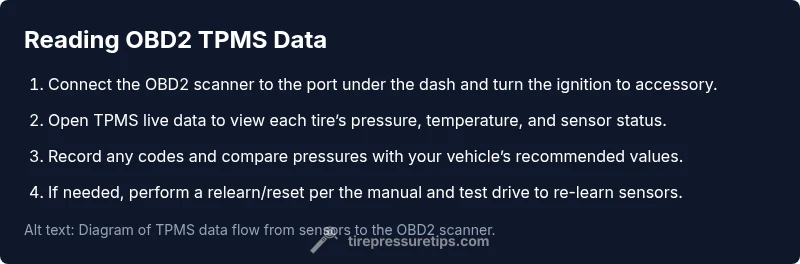
Reading TPMS data begins with a compatible scanner. Look for a model that explicitly supports TPMS data retrieval and live sensor readings (not all generic scanners expose TPMS data). After connecting to the vehicle, navigate to the TPMS or live data section. You should see each tire’s current pressure, temperature, and sensor status. If your scanner offers a relearn or reset function, you may be asked to confirm the target tire and trigger the relearn cycle. For accuracy, perform measurements with cold tires and record the values for comparison against your vehicle’s recommended tire pressure from the placard.
Common TPMS codes and what they mean
TPMS fault codes are designed to flag either pressure anomalies or sensor faults. In typical OBD2 TPMS usage, you may encounter generic codes indicating a sensor was not read, a sensor battery issue, or a loss of signal from a wheel. It’s important to note that codes alone don’t always point to an exact fix—sometimes inflating tires to spec, cleaning valve stems, or replacing a sensor is required. Based on Tire Pressure Tips Analysis, 2026, many drivers see TPMS codes due to simple inflations being out of spec, not sensor failure. Always cross-check codes with live data and a tire gauge for accurate diagnosis.
Diagnosing tire pressure vs. sensor faults
The key distinction is whether the issue is a tire pressure problem or a TPMS sensor fault. If your all tires read within the target range when cold, yet the TPMS light stays on, you might have a relearn issue or a faulty sensor. If one tire reads significantly higher or lower than the others, verify inflation with a physical gauge and check for punctures, slow leaks, or valve stem damage. Sensor faults often manifest as missing data from a wheel or a failed battery icon in the scanner. Relearn procedures can solve many false alerts, but persistent sensor faults typically require replacement.
Maintenance routines: calibration, reset, and checks
Regular TPMS maintenance starts with quarterly tire-pressure checks using a reliable gauge. When inflating, follow the vehicle manufacturer’s recommended pressures on the door jamb placard, not the tire sidewall. If TPMS readings are inconsistent, perform a relearn/reset cycle per your owner’s manual. After any relearn, drive 5–10 miles at a moderate speed to allow the system to relearn the new sensor configuration. Keep a log of sensor IDs and replacement dates to anticipate future maintenance and warranty coverage. The Tire Pressure Tips team recommends pairing digital gauges with your TPMS checks for accuracy and consistency.
Authority Sources
For further reference, see authoritative tire-safety guidance from government and major publications. You’ll find official inflations and maintenance guidance at NHTSA’s tire safety resources, which outline how TPMS and proper inflation protect tire lifespan and vehicle handling. Consumer-focused coverage from major automotive outlets complements official guidance with practical, model-agnostic steps for TPMS checks and sensor relearns. These sources together help drivers understand how to leverage OBD2 TPMS data responsibly and safely.
Safety and best practices
Always work in a safe environment: use a flat, stable surface, engage the parking brake, and avoid placing yourself between the car and a moving wheel. When scanning, never rely solely on OBD2 data for critical decisions—verify with a manual tire gauge and inspect for visible damage. If you suspect a defective TPMS sensor or battery, replace it promptly and ensure the system re-learns correctly. The Tire Pressure Tips team emphasizes verifying any TPMS reading with a physical measurement and following vehicle-specific procedures to avoid misdiagnosis.
Tools & Materials
- OBD2 scanner with TPMS support(Must expose TPMS data and allow live readings)
- Tire pressure gauge(Digital or analog, measure cold tires for accuracy)
- Vehicle owner's manual(For model-specific TPMS relearn/reset steps)
- Smartphone or tablet with scan app(Optional for data logging and historical tracking)
- Safety gloves(Protection when handling tires and wheels)
Steps
Estimated time: 25-40 minutes
- 1
Gather your tools
Collect an OBD2 TPMS scanner, a tire pressure gauge, and the vehicle manual. Confirm scanner compatibility with TPMS data and ensure fresh batteries.
Tip: Pre-check battery levels and ensure you have a clear workspace. - 2
Plug in and power up
Plug the OBD2 scanner into the OBDII port under the dashboard and turn the ignition to accessories. Wait a few seconds for the scanner to boot and establish a connection.
Tip: Avoid starting the engine during connection to prevent interference. - 3
Access TPMS data
Navigate the scanner’s TPMS or live data section to view each tire’s pressure, temperature, and sensor status. Enable live data if available.
Tip: Enable logging if your scanner supports it for future reference. - 4
Read codes and pressures
Record any TPMS codes and current pressures for all four wheels. Note any discrepancies between live data and the vehicle’s recommended pressures.
Tip: Inflation should be performed cold, ideally after vehicle has been stationary for several hours. - 5
Interpret results
Compare readings to manufacturer specifications. Distinguish between inflation needs and sensor faults, and note which tires require attention.
Tip: If readings are inconsistent, perform a quick relearn or reset if your vehicle supports it. - 6
Reset or recalibrate TPMS
If necessary, perform a TPMS relearn or reset per the owner’s manual. Drive 5–10 miles to complete the relearning process.
Tip: Document the tires and sensor IDs after a successful relearn for future maintenance.
Frequently Asked Questions
What is OBD2 TPMS and why should I care?
OBD2 TPMS combines tire pressure monitoring data with the vehicle’s onboard diagnostics. It helps you monitor pressure, detect leaks, and identify sensor faults before they cause unsafe driving conditions.
OBD2 TPMS merges tire pressure data with your car’s diagnostics, helping you monitor inflation and catch sensor faults before driving becomes unsafe.
Can I read TPMS data with any OBD2 scanner?
Not every scanner exposes TPMS data. Look for a device that explicitly supports TPMS readings and live sensor data, and verify compatibility with your vehicle.
Not all OBD2 scanners show TPMS data; choose one that specifically supports TPMS readings and live data, and check compatibility with your car.
What do TPMS codes generally indicate?
TPMS codes typically indicate sensor status, battery issues, or reading errors. They guide you to check inflation, sensor health, or relearn the system.
TPMS codes usually point to sensor status, batteries, or read errors, guiding you to inflation checks or relearn steps.
Why is TPMS data important for maintenance?
TPMS data helps maintain correct tire pressure, improves fuel efficiency, and extends tire life while preventing blowouts caused by underinflation.
TPMS data helps keep tires properly inflated, improving safety, fuel efficiency, and tire life.
What should I do if TPMS light stays on after inflating?
If the light remains after inflation, perform a TPMS relearn/reset per the manual and check for sensor faults or leaks that require repair.
If the light stays on after inflation, relearn the TPMS per your manual and check for sensor or leak issues.
How often should I check tire pressure with TPMS?
Check tire pressure at least once a month and before long trips. Use TPMS data as a supplemental check, not a sole source.
Check tire pressure at least once a month and before long trips. Rely on TPMS as a supplementary check.
Watch Video
What to Remember
- OBD2 TPMS provides real-time sensor data and fault codes
- Use a dedicated TPMS-capable scanner for accuracy
- Differentiate between inflation needs and sensor faults before repairing
- Regular checks prevent tire-related incidents