Honda Pilot Tire Pressure Reset Guide
Learn how to reset the Honda Pilot TPMS after inflating tires to the recommended cold pressures. This comprehensive guide covers why resets matter, the official methods, driving cycles, troubleshooting, and maintenance tips for year-round tire pressure reliability.


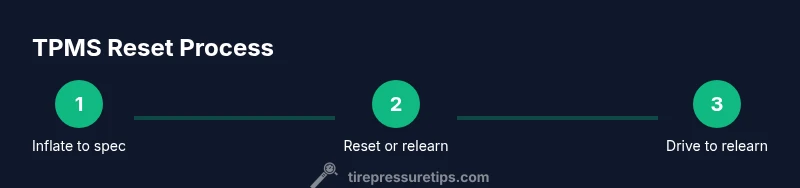
Here’s how to reset the Honda Pilot’s TPMS after inflating tires to the recommended cold pressures. Start by verifying all tires match the placard, then use the TPMS reset sequence or drive the vehicle as advised in the owner’s manual. This quick guide outlines the exact steps and what to expect, with safety tips throughout.
What resetting TPMS does for your Honda Pilot
Resetting the Tire Pressure Monitoring System (TPMS) on a Honda Pilot helps the vehicle correctly interpret current tire pressures, which supports safe handling, better fuel economy, and longer tire life. According to Tire Pressure Tips, a proper reset ensures the system relearns the current pressures after you adjust inflation or rotate tires. This is not just about clearing an icon—it confirms the sensor data read by the ECU is up to date. In practice, you’ll verify cold pressures first, inflate if needed, and perform the relearn procedure described in your owner’s manual. Our goal here is to give you a clear, step-by-step approach so you can complete the reset confidently and safely.
Understanding Honda Pilot TPMS basics and why a reset matters
The Honda Pilot’s TPMS monitors tire pressures to warn you if a tire is under-inflated. When you adjust tire pressures—whether after a routine rotation, seasonal change, or a visible drop in PSI—a reset helps the system learn the new baseline. Without a proper reset, the TPMS may continue to show a warning or ignore an actual under-inflation condition. This section covers how TPMS learns, what triggers a reset, and why following the factory procedure matters for reliability and safety.
Safety and preparation before you begin
Before touching anything, ensure you’re in a safe, well-lit area away from traffic. Park on a level surface, engage the parking brake, and turn off the engine. Gather your tools and data: a reliable tire gauge, the Honda Pilot’s owner’s manual, and the placard with recommended cold tire pressures. Verify that all tires—including the spare if you plan to check it—are within a reasonable tolerance of the target PSI. This reduces the chance of repeating a reset due to inaccurate initial readings and protects you from driving on under-inflated tires.
Getting the numbers right: tire pressures and the placard
To set up for a successful TPMS reset, you must know the recommended cold pressures for your Honda Pilot. These numbers are on the door jamb placard and sometimes in the owner’s manual. Always measure tires when they are cold (not after a long drive) and use a trusted gauge. If a tire is above or below spec, adjust it accordingly, then proceed with the reset. Correct pressures ensure the sensor data the ECU uses is valid, which minimizes nuisance warnings and helps maximize fuel efficiency and tire wear life.
Step-by-step context: prepping for a reset
Resetting TPMS is a mechanical-electrical procedure that benefits from careful preparation. Start by confirming all tires are inflated to the placard values. If your Pilot has a dedicated TPMS/reset button, locate it—often near the steering wheel, dash, or center console—or consult the owner’s manual for the exact sequence. If your model relies on a drive relearn rather than a button, you’ll need to complete a short trip to let the system relearn the new baseline pressures. Understanding the context helps you avoid common missteps and ensures a smooth reset.
The official reset process options (button vs. drive relearn) explained
Honda generally provides two approaches depending on the model year and trim: a TPMS reset button, or a drive-cycle relearn. If your Pilot has a reset button, press it according to the manual, release, and then drive at a steady speed to confirm the relearn. If your model uses a drive relearn, inflate to spec, drive for a short distance at moderate speeds, and watch the TPMS indicator. In either case, consult your owner’s manual for exact steps and any model-specific nuances.
Driving to complete the relearn and verify results
After performing the reset, take a controlled drive to allow the system to relearn the new baseline pressures. A 10–15 minute drive on highways or well-maintained roads is usually sufficient, but follow the manual’s guidance for your year. During the drive, monitor the TPMS indicator and check that it extinguishes once the system recognizes the current pressures. If the light stays on, recheck the tires for leaks, consider resealing or replacing sensors, or reperform the reset.
Troubleshooting: what to do if TPMS won’t reset
If the light remains after a reset attempt, recheck tire pressures, re-inflate if needed, and consider sensor issues or a faulty sensor battery. A damaged stem, a corroded sensor, or a dead battery can prevent a successful reset. In such cases, consult the Honda dealer or a certified technician to diagnose potential TPMS sensor faults. Remember: a failed reset isn’t a failure of you—it’s a signal that deeper inspection may be required.
Maintenance and temperature considerations for tire pressure
Tire pressure is sensitive to ambient temperature. Colder weather can lower PSI, triggering TPMS warnings even if tires were properly inflated in warmer conditions. Conversely, hot temperatures can raise pressure slightly. A simple maintenance routine is to check tire pressures before winter and summer transitions and after long trips. Keeping an up-to-date record of your pressures helps you spot unusual changes early and ensures your TPMS reset remains valid across seasons.
Tools & Materials
- Tire pressure gauge(Digital preferred for accuracy; calibrate regularly)
- Air pump or access to a compressor(Make sure you can reach all four tires and the spare if needed)
- Honda Pilot owner's manual(Locate the exact TPMS reset instructions for your year/model)
- Tire placard with recommended cold PSI(Found on door jamb or in owner’s manual)
- Clean cloth or rag(Useful for wiping stems and sensors if needed)
Steps
Estimated time: 30-45 minutes
- 1
Inspect and inflate tires to the recommended cold pressures
Park in a safe, level area and turn off the engine. Use a trusted gauge to measure each tire when cold. Compare readings to the door jamb placard and adjust pressures as necessary. Inflate all tires to the recommended cold PSI before proceeding, including the spare if you plan to rotate or utilize it soon.
Tip: Ensure tires are cold for an accurate baseline; check after at least 3 hours of inactivity. - 2
Locate the TPMS reset method in the owner’s manual
Review the manual to confirm whether your Honda Pilot uses a dedicated TPMS reset button or a drive-relearn procedure. Some models require a dash button labeled TPMS/SET, while others rely on a specific sequence or a drive cycle. If you’re unsure, check the model-year guidance inside the manual.
Tip: If you can’t find the option, your vehicle may relearn automatically after a short drive. - 3
Perform the TPMS reset or relearn sequence
Follow the manual’s exact steps: press the TPMS/SET button (if present) or initiate the drive relearn by starting the correct sequence. Do not reset if any tire shows a persistent leak; address the leak before attempting a reset.
Tip: Avoid resetting with damaged or leaking tires; this can mask real pressure issues. - 4
Drive to complete the relearn
After the reset, drive at stable speeds on a clear road for about 10–15 minutes. The TPMS light should begin to flash or extinguish as the system relearns. If you’re in a cold climate, allow extra time for the learning cycle.
Tip: Keep speeds moderate and avoid aggressive braking during the relearn period. - 5
Re-check pressures and confirm the result
Bring the vehicle to a stop and re-check all four tires with your gauge. Re-adjust if necessary and re-run the relearn cycle if the light reappears. Document the final PSI to help track changes over time.
Tip: Record the final baseline pressures for future reference. - 6
Troubleshooting and next steps
If the TPMS light stays on after a full relearn, inspect sensors for damage, check battery life, or consult a professional. A faulty sensor or damaged stem can prevent a successful reset.
Tip: Sensor replacement should be done by a certified technician to ensure proper calibration.
Frequently Asked Questions
Do I always need to reset TPMS after inflating tire pressures on a Honda Pilot?
Not always, but you should reset or relearn if you change tire pressures or rotate tires. This ensures the system reads the new baseline pressures correctly.
You typically reset or relearn TPMS after inflating or rotating tires, so the system has an updated baseline to read from.
How long does a TPMS relearn typically take?
A typical relearn completes during a short drive, usually 10–15 minutes at steady speeds. Some models may require more time per the manual.
Usually about 10 to 15 minutes of steady driving, depending on your model year.
What should I do if the TPMS light stays on after resetting?
Recheck tire pressures, inspect for leaks or damaged sensors, and consider a sensor diagnostic if the warning persists.
If the light stays on, recheck pressures and inspect sensors; you may need professional diagnostic.
Is a reset different from a tire pressure check?
Yes. Checking pressure verifies current values; resetting teaches the system these values as the new baseline.
Resetting teaches the system the new baseline after you adjust the pressures.
Can temperature affect TPMS readings?
Yes. Cold temperatures can lower PSI and trigger warnings; warm weather can raise readings. Check pressures seasonally.
Temperature changes can affect readings, so monitor and adjust seasonally.
If a tire is damaged or leaking, should I reset TPMS?
No. Repair the tire first, then reset. A damaged tire will keep triggering warnings regardless of TPMS status.
Don’t reset if a tire is damaged—fix it first, then reset.
Watch Video
What to Remember
- Check all tires to the placard values before resetting.
- Follow the owner's manual for your model year to perform the reset.
- Drive the vehicle after reset to complete the relearn cycle.
- If the light persists, inspect sensors or seek professional help.
- Weather affects tire pressure; monitor seasonally.