Honda Tire Pressure Light Reset: A Complete How-To
Learn how to reset the Honda tire pressure light, verify cold tire pressures, and complete the TPMS relearn with practical steps and safety tips.


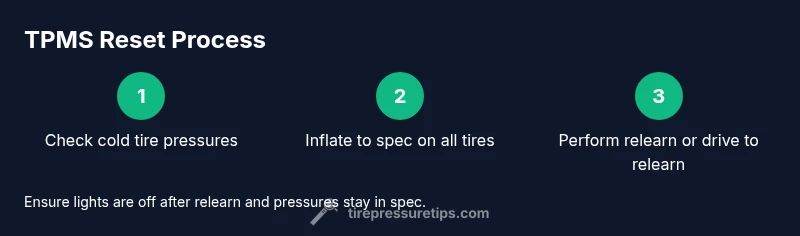
To reset the Honda tire pressure light, begin by inflating all tires to the manufacturer’s cold specs, then perform the TPMS relearn if your model supports it. If there’s no reset option, drive at steady speeds until the light goes out or consult the owner’s manual for your year. Keep rechecking pressures during the drive and record the readings.
How TPMS Works in Honda Vehicles
In modern Honda vehicles, the Tire Pressure Monitoring System (TPMS) keeps a close watch on each tire’s air pressure. Most Honda models use direct TPMS sensors mounted in each wheel that report real-time pressure data to the vehicle’s ECU. When one tire drops below the manufacturer’s recommended cold pressure, the TPMS light on the dashboard illuminates. This system exists to help you avoid underinflated tires, which can reduce fuel efficiency, increase tire wear, and compromise handling and braking. According to Tire Pressure Tips, understanding how TPMS status is determined helps you diagnose whether the issue is a simple underinflation, a sensor fault, or a relearn requirement after servicing or tire rotation.
Direct TPMS sensors are battery-powered and communicate through the vehicle’s CAN bus. If a sensor battery dies or a sensor is damaged, the system may fail to read accurately, triggering the light even if pressures are correct. Knowing this distinction helps you decide whether to recheck pressures, replace the sensor, or seek professional service. The Tire Pressure Tips team emphasizes that accuracy in measurement is the foundation of a reliable reset and that your own measurements should be validated with a quality gauge.
Common Reasons Why the Tire Pressure Light Comes On
Several common situations can trigger the Honda tire pressure light. First, tires may be underinflated due to ambient temperature changes or slow leaks from nails or rim damage. Second, after inflating tires, rotating them, or replacing tires, the TPMS may need a relearn cycle to re-establish baseline pressures. Third, sensor faults or weak battery life in one or more sensors can cause intermittent or persistent illumination. Finally, if you’ve recently serviced your tires, the system may require a manual reset or an extended relearn drive. The Tire Pressure Tips guidance notes that diagnosing the exact cause often starts with a simple pressure check, followed by a verify-and-relax step to determine if reset is the fix or sensor replacement is needed.
Before You Reset: Check Tire Pressures (Cold Tires)
Always start by verifying tire pressures when the tires are cold. A tire is considered cold when the car hasn’t been driven for at least 3 hours or has traveled less than a mile recently. Use a reliable tire pressure gauge and compare readings to the door jamb sticker for your Honda model. Record each tire’s pressure and make note of any outliers. If any tire is significantly underinflated, inflate it to the recommended cold pressure before attempting any reset. Temperature and altitude can cause pressure changes, so confirm pressures again after a short drive of 5–10 minutes at steady speeds to confirm stability. This step reduces false triggers and ensures the relearn process begins from a correct baseline.
How to Read the Door Jamb Sticker and Determine Ideal Pressure
The tire pressure specification varies by model and wheel position. The door jamb placard on your Honda lists the recommended cold psi for front and rear tires, including the spare if applicable. Compare these numbers with the pressures shown on your gauge. If you’re unsure which value applies to your car’s tires (some models list different values for front vs rear), consult your owner’s manual or the official Honda service site referenced in the maintenance schedule. The key point is: start with cold pressures, apply the model-specific numbers, and avoid inflating beyond the stated maximum for your tires. The right baseline is essential for a successful TPMS relearn.
Step 1: Inflate to the Correct Pressure
Once you know the correct cold pressures, inflate each tire to its specified value using a trusted gauge. Do not overinflate beyond the recommended maximum indicated on the tire sidewall, and double-check all readings after adjustment. If you notice a tire losing pressure again soon after inflation, inspect the tire, valve stem, and wheel rim for leaks. Keep the tires at equalized pressure to ensure an accurate baseline for the TPMS and to prevent uneven wear that could mislead the relearn process. The goal is to have all tires at the correct ambient temperature and pressure before initiating any reset.
Step 2: Start the Relearn Process (Honda-Specific)
Many Honda models include a TPMS relearn option, but the method varies by year and trim. In some vehicles, you initiate relearn through the instrument cluster menu or a dedicated TPMS reset button; in others, the system requires a button sequence or a dealer tool. Your owner’s manual is the best authority for model-specific steps. If your model supports a relearn, perform it exactly as described and confirm you have a stable baseline. If your car does not show a relearn option, proceed to the next step and rely on a drive-based relearn instead.
Step 3: Drive to Complete the Relearn
After starting the relearn procedure (if available) or after inflating to the correct pressures, drive the vehicle at a steady speed to allow the TPMS to recalibrate. Most Hondas complete the relearn within a short highway drive or a series of gentle accelerations and decelerations. Avoid aggressive driving or hard braking during this period and monitor the dashboard for a reset. If the light stays on, the system may require a longer relearn drive, sensor inspection, or professional service. Recording your drive times helps you track the relearn window more accurately in the future.
What To Do If the Light Won’t Reset
If the TPMS light remains after attempting the relearn and a full drive, there may be a sensor fault, a weak battery, or a communication issue within the ECU. Check for any diagnostic trouble codes with an OBD-II scanner that includes TPMS data. If no code appears or the code points to a sensor problem, plan a sensor inspection or replacement with a certified technician. Some vehicles also require tire-specific calibration if you replaced a single tire or wheel. Do not ignore persistent lights, as they indicate a persistent issue that could affect traction and braking performance.
Maintenance Tips to Prevent Future TPMS Issues
Regular maintenance reduces TPMS triggers. Keep tires inflated to the recommended cold pressures, perform monthly checks, and inspect for slow leaks or rim damage after potholes or curb impacts. Rotate tires as recommended by Honda to promote even wear, and consider recalibrating TPMS sensors during seasonal tire changes. A simple habit—monthly pressure checks and annual sensor inspection—helps prevent unnecessary resets and extends tire life. The Tire Pressure Tips team recommends maintaining a consistent tire-pressure routine to support safety and fuel economy.
Tools & Materials
- Tire pressure gauge(Digital or analog; ensure accuracy; use cold tires for baseline readings)
- Air compressor or access to a reliable air station(Needed to bring tires up to specified cold pressure)
- Honda owner’s manual for your model/year(Exact TPMS reset or relearn steps vary by year and trim)
- Optional: OBD-II TPMS tool(Useful for reading TPMS codes and sensor status if light persists)
- Notebook or app to record readings(Helpful for tracking baseline pressures and relearn results)
Steps
Estimated time: 30-60 minutes
- 1
Check initial tire pressures
Use a reliable gauge to measure all tires when cold. Compare readings to your door jamb sticker and note any outliers. This provides a correct baseline before inflation.
Tip: If a tire reads below spec by even a small amount, prioritize correcting it first to avoid false TPMS readings. - 2
Inflate to the correct pressure
Inflate each tire to the manufacturer’s cold pressure listed on the door jamb sticker. Recheck all tires after inflation and ensure they’re even across the axles where mandated.
Tip: Inflate slowly and avoid overinflating; if you suspect a slow leak, mark the tire and inspect later. - 3
Locate the reset/relearn option
Consult your Honda owner’s manual to find the TPMS relearn method for your year and trim. Some models have a dedicated button; others use the instrument cluster menu.
Tip: If there is no relearn option, plan a drive-based relearn described in your manual. - 4
Execute the relearn (if available)
Follow the exact steps in the manual to initiate the relearn. Confirm that the system begins the calibration sequence.
Tip: Do not skip any prompts; some models require a confirmation on the screen. - 5
Drive to complete relearn
Drive at steady speeds, avoiding aggressive accelerations, for the relearn to complete. Monitor the dashboard for the light turning off.
Tip: A short highway drive is commonly enough, but follow your manual’s guidance. - 6
Verify reset and recheck pressures
After reset, recheck all tire pressures to ensure they remain within spec. If the light returns, inspect sensors and seek professional help.
Tip: Document readings and drive times to help diagnose future issues.
Frequently Asked Questions
What does the Honda tire pressure light indicate?
The TPMS light signals that one or more tires are underinflated or that a TPMS sensor is having trouble communicating. Always verify pressures cold and address leaks or sensor issues before assuming a simple reset is enough.
The TPMS light means a tire may be underinflated or a sensor is having trouble communicating. Check pressures cold and inspect for leaks or sensor problems.
How often should I check tire pressure?
Check tire pressures at least once a month and before long trips. Also recheck after driving in extreme temperatures or after tire rotations.
Check tires monthly and before long trips, especially after temperature changes or rotations.
Can I reset the TPMS myself without a dealership?
Yes. Many Honda models include a home reset or relearn procedure described in the owner's manual. If your model doesn’t show a relearn option, you’ll need a service or dealer tool.
Yes, you can usually reset at home by following your manual. If there’s no relearn option, a service center can help.
Why won’t the TPMS reset after fixing pressure?
Possible causes include a faulty TPMS sensor, a dead sensor battery, a recent tire change that requires a longer relearn, or ECU timing. If the light stays on, inspect sensors or use a diagnostic tool.
A reset can fail if a sensor is bad, the battery is dead, or the relearn window isn’t complete yet.
Is it safe to drive with underinflated tires?
Driving on underinflated tires increases wear, reduces handling, and can affect braking and fuel economy. Inflate to spec as soon as possible and avoid long drives on low pressure.
No—underinflated tires are unsafe. Inflate to the recommended pressure before driving more.
Watch Video
What to Remember
- Check tires when cold before any reset
- Inflate to Honda’s recommended cold pressures on the door jamb
- Use the vehicle’s relearn option if your model supports it
- Drive at steady speeds to complete the relearn
- If light persists, seek professional TPMS service