How to Remove the Low Tire Pressure Light on Honda Cars
Practical, step-by-step guide to reset and troubleshoot the TPMS light on Honda vehicles, including checking tire pressures, sensor recalibration, and safe driving tips from Tire Pressure Tips.


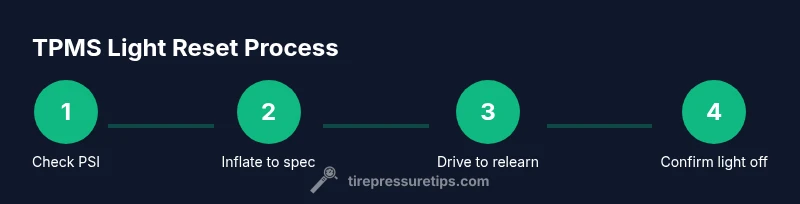
For how to remove low tire pressure light honda, use this practical guide to verify cold tire pressures, inspect sensors, and perform a safe TPMS relearn. According to Tire Pressure Tips, start by inflating tires to the OEM spec, then drive briefly to let the system relearn. If needed, consult your Honda manual for model-specific steps.
how to remove low tire pressure light honda — overview
The low tire pressure warning light on Honda vehicles is your dashboard guardian, signaling that one or more tires are underinflated or that the TPMS may need attention. The Tire Pressure Tips team emphasizes that ignoring this warning can affect fuel efficiency, tire wear, and safety. In this guide, you’ll learn how to diagnose, verify, and address the issue, from simple inflation checks to TPMS recalibration. The approach here is practical, car-owner friendly, and designed to reduce unnecessary trips to the shop. According to Tire Pressure Tips, start with a calm checklist: confirm tire pressures when cold, adjust to the manufacturer’s recommended PSI, and note any tire damage or slow leaks.
First, understand that modern TPMS relies on sensor data from each wheel and sometimes a battery in the sensor. The light can illuminate for reasons beyond underinflation, including sensor failure or a recent tire change. In a Honda, after inflating to spec, you may need to drive a short distance to let the system relearn. The “how to remove low tire pressure light honda” task isn’t just about inflating; it’s about diagnosing the root cause and ensuring the readouts stay accurate. This article uses plain language and step-by-step actions so you can handle common scenarios without guesswork. Remember: safe tire pressure is foundational to handling, braking, and tire longevity.
Tools and checks before you reset TPMS
Before touching the TPMS, gather essential tools and verify basic conditions. You’ll save time and avoid misreads. Start with your vehicle's owner's manual to confirm the recommended tire pressures (PSI) for your Honda model and the correct reset procedure if applicable. Have a trusted tire pressure gauge ready (digital or dial) and access to an air compressor or a local gas station pump. Note the current pressures in all four tires and verify that no tire shows obvious damage or slow leaks. If you notice uneven wear, damage, or a nail in a tire, address it before attempting a TPMS reset. Temporary leaks can be resolved by inflating and inspecting the tire, but persistent leaks require repair or replacement. Finally, consider using soapy water to check for slow leaks around the bead and valve stem.
Honda TPMS calibration behavior and resetting rules
Honda TPMS behavior varies by model year and trim, so it's important to know what to expect. In many Hondas, the light will turn off automatically after tires are inflated to spec and the vehicle is driven for a short relearn interval. Some models require a factory procedure or a scan-tool reset if tire pressures were adjusted extensively or if a sensor was replaced. Because calibration timing can vary, do not assume an automatic reset will occur instantly. If you recently rotated tires or replaced one, the system may need to relearn all four positions, which can take several miles of driving. The key is consistency: inflate to the correct PSI on all tires, drive normally, and watch the dash for the light to extinguish. If it remains on after normal driving, plan a diagnostic with a tire or automotive technician.
Weather and temperature effects on TPMS readings
Ambient temperature can influence tire pressures by causing air to contract or expand. In cold weather, readings drop, and the TPMS may trigger a warning even when the tires looked properly inflated. Conversely, hot weather can push pressure higher and hide slow leaks. Use a reliable gauge and check pressures when tires are cold, ideally in the morning before driving. For Honda owners, this means careful timing of checks during seasonal changes. Keeping track of outside temperature, tire type (summer, all-season), and load can help you interpret TPMS behavior more accurately. Regular checks help you avoid being surprised by a warning during a road trip.
High-level diagnostic plan to address a lit TPMS in a Honda
If the TPMS light stays on after inflation, follow this diagnostic plan to isolate causes systematically. First, confirm all four tires are at the recommended PSI when cold. Next, inspect each tire for slow leaks, punctures, or bead damage. If no issue is found, check the sensor positions and look for damaged valve stems or corrosion on metal parts. Remember that TPMS sensors have batteries that degrade over time, which can lead to faults even if the tires are properly inflated. If the light persists, the issue may lie with the sensor hardware itself or the learn process. At this point, you may need to visit a professional or use your vehicle’s on-board tool to perform a TPMS relearn. Document the steps you took so a technician can quickly verify the system is functioning correctly.
Safety and maintenance considerations when dealing with TPMS
Working around hot tires, air pressure, and wheel components requires caution. Never open the air valve while the tire is hot, and never overinflate beyond the tire label maximum. If you hear hissing or see visible cracks, stop and seek help. When rotating tires, ensure a proper torque pattern for lug nuts to prevent wheel vibration affecting readings. Regular maintenance, including checking the spare tire and ensuring the spare's TPMS sensor battery is not degraded, helps keep the whole system reliable. Remember to replace batteries or sensors only with compatible units and to dispose of old parts according to local regulations.
Authoritative sources and further reading
For trusted, in-depth information about TPMS and tire pressures, consult recognized authorities and peer-reviewed resources. The National Highway Traffic Safety Administration (NHTSA) provides guidance on tire safety and pressure checks, while major automotive publications offer model-specific advice. These sources reinforce practical steps you can take today and help you interpret readings with confidence. For Honda owners, always verify model-year specifics in the owner’s manual and service bulletins. The Tire Pressure Tips approach aligns with these guidelines, helping you stay safe and informed.
What to do next with Tire Pressure Tips
The Tire Pressure Tips team recommends following a disciplined, repeatable process for every tire pressure check and TPMS concern. Start by verifying cold PSI against the OEM specification, perform a safe relearn if your Honda supports it, and document readings for future reference. If the TPMS light reappears, consider a sensor health assessment or a professional calibration. With consistent checks and clear records, you’ll reduce risk, improve fuel efficiency, and extend tire life. Our goal is to empower you with practical, actionable steps you can implement today.
Tools & Materials
- Digital tire pressure gauge(Choose a gauge with a wide range (0-60 psi) and +/-1 psi accuracy)
- Vehicle owner's manual(Check Honda-specified PSI and any model-specific TPMS steps)
- Air compressor or inflator access(Ensure it can accurately deliver required PSI)
- Soap solution or spray bottle(Use to spot slow leaks around valves and beads)
- Spare tire and jack (for inspection)(If you suspect bead leak or tire damage)
- Notepad and pen(Record PSI readings and dates)
- Gloves and safety glasses(Protection when working around tires)
Steps
Estimated time: 30-60 minutes
- 1
Pre-check: verify tires are cold and note current PSI
Before inflating, measure each tire's pressure when the tires are cold. Record the numbers to compare against the Honda-recommended PSI. This baseline helps you decide if inflating will actually fix the TPMS warning or if a leak is present.
Tip: Use the same gauge for all measurements and log values for future reference. - 2
Inflate to the recommended PSI
Using a reliable inflator, bring each tire up to the OEM-recommended PSI listed in the Honda owner's manual. Do not exceed the tire's maximum pressure printed on the sidewall. Inflate all four tires to the same baseline if the manufacturer specifies a uniform value.
Tip: Double-check with your gauge after inflating and re-check after a few minutes of settling air. - 3
Recheck pressures after inflation
Re-measure all four tires to confirm they are at the target PSI. Small leaks or valve issues can slowly deflate tires after initial inflation.
Tip: If a tire appears to lose pressure quickly, inspect for leaks or damaged valves. - 4
Drive to trigger TPMS relearn
Drive the Honda at a steady speed (often 30-60 mph) for 10-20 minutes. This helps the TPMS relearn the new tire positions and pressures after inflation.
Tip: Keep driving on a normal route; avoid abrupt stops or aggressive acceleration during relearn. - 5
Check if the light has extinguished
After a suitable relearn period, observe the dash for the TPMS light. If it goes out, you’re likely done. If it remains on, proceed to sensor checks or professional calibration.
Tip: If the light returns shortly after reset, a sensor issue or leak is likely present. - 6
Consider sensor health if light persists
Persistent TPMS warnings after inflation and relearn can indicate a faulty sensor, dead battery in a sensor, or a damaged valve stem. A technician can test sensor health and perform a precise relearn if needed.
Tip: Document all readings and the steps you took to help the technician diagnose quickly.
Frequently Asked Questions
What triggers the TPMS light on a Honda?
The TPMS light typically signals underinflation in one or more tires, a faulty sensor, or a sensor recalibration need after tire changes. Always verify pressures first before pursuing sensor diagnostics.
The TPMS light usually means underinflation or a sensor issue. Start by checking the tire pressures, then proceed to sensor checks if needed.
Can I reset TPMS myself on a Honda?
Many Honda models support a simple relearn procedure after inflating to spec, but some require dealer tools. Check the owner's manual for model-specific steps before attempting a reset.
Yes, some Hondas let you relearn TPMS at home after inflating to spec, but others may need a tool from a shop. Check your manual.
Why does the light come back after inflating the tires?
A recurring light after inflation often points to a slow leak, a sensor issue, or an improper relearn. Inspect tires for leaks and verify sensors and valves.
If the light returns after inflating, there could be a leak or a sensor problem. Inspect the tires and verify sensors.
Is it safe to drive with low tire pressure?
Driving with underinflated tires is unsafe and reduces handling, tire life, and fuel efficiency. Inflate to the correct PSI before driving long distances.
No, it's not safe. Inflate to the recommended PSI before driving extensively.
How long does a TPMS relearn take?
Relearn timing varies by model but is commonly achieved within 10-20 minutes of steady driving with correct pressures. If not, check for sensor issues.
Usually 10 to 20 minutes of steady driving after inflating to the right PSI.
When should I replace a TPMS sensor?
Replace a TPMS sensor if the battery is dead, the stem is damaged, or repeated relearn attempts fail to extinguish the warning. A professional can confirm sensor health.
If the sensor battery is dead or the stem is damaged, replacement is needed.
Watch Video
What to Remember
- Know the Honda-recommended PSI for your model
- Always measure when tires are cold for accuracy
- TPMS relearn timing varies by model; drive to relearn
- Inspect for leaks and sensor issues if light persists
- Document readings to simplify future maintenance