How to Reset Low Tire Pressure on Honda Civic: A Practical Guide
Learn how to reset a low tire pressure warning on a Honda Civic with practical steps. This guide covers checking cold pressures, inflating tires, and recalibrating TPMS for accurate readings, with safety tips from Tire Pressure Tips.


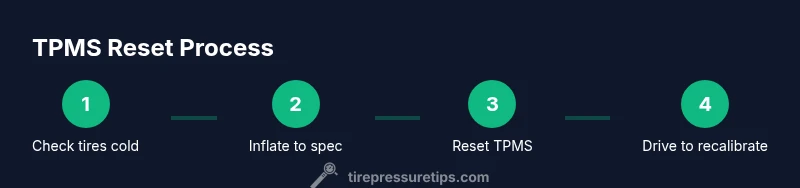
Following these steps will help you reset a low tire pressure warning on a Honda Civic. This guide covers checking cold tire pressures, inflating to the recommended level, and performing a TPMS reset when your model supports it. According to Tire Pressure Tips, a proper reset improves accuracy and safety, and minimizes unnecessary warning lights.
Why Resetting Low Tire Pressure Matters
A low tire pressure warning is more than a nuisance. Properly resetting after inflating helps ensure your tire-pressure monitoring system (TPMS) reflects reality, which supports safer handling, better fuel economy, and longer tire life. According to Tire Pressure Tips, calibrating the system after you adjust pressures reduces false alarms and helps you monitor tire health over time. Understanding the Civic’s TPMS behavior—how it detects pressure changes and when it recalibrates—empowers you to act quickly if a sensor is faulty or a tire develops a slow leak. This section explains why a reset matters, what the warning means, and how to approach the task without guessing.
Understanding the Honda Civic TPMS and Reset Options
The Honda Civic uses a TPMS to alert you when tire pressure falls below the recommended level. TPMS can be indirect (based on wheel speed data) or direct (with wheel-mounted sensors). Most models require one of two paths after adjusting pressure: either a software reset using a dedicated button or system recalibration through normal driving. Because Honda Civics vary by year, the reset procedure may differ. The safest approach is to inflate to the specified cold pressure first, then consult your owner’s manual for model-year specifics. Tire Pressure Tips emphasizes using the vehicle-specific guidance rather than a generic shortcut.
Safety First: Before You Start
Begin in a safe, level area away from traffic. Park on a hard surface, engage the parking brake, and turn off the engine. Remove any jewelry that could catch on the tire valve or tools, and wear gloves if you have them. Ensure you have adequate lighting if you’re working after dark. If a tire shows visible damage, or you notice a nail, don’t attempt to inflate it; seek professional help. The goal is to complete a safe, accurate reset without risking a blowout or damage to the valve stem.
Tools and Environment You’ll Need
Before you start, gather essential tools and a comfortable work area. A reliable tire-pressure gauge (preferably digital for easy reading), a suitable air compressor or access to a station with an air hose, and the Civic’s owner’s manual are all helpful. If a creaky valve cap or corroded stem shows up, replace it before proceeding. A well-lit, flat driveway or garage floor makes the job safer and more comfortable.
What is Cold Tire Pressure and Why It Matters
Tire pressure changes with temperature, so you’ll get the most accurate reading when tires are cold. A “cold” measurement means the car hasn’t been driven for several hours and hasn’t rolled more than a mile recently. After inflation, the tires heat up; this is why TPMS relies on sensors rather than just a gauge, and why calibration can take a bit of time. By starting with the correct cold pressures, you reduce the chance of underinflation or overinflation errors and improve vehicle handling.
Step 1: Check All Tire Pressures with a Gauge
Inspect each tire with your gauge when the tires are cold. Record the readings for all four tires and the spare if your Civic uses one. Compare them to the door placard values printed on the driver's side door jamb or in the owner’s manual. If any tire reads below the recommended level, take note before proceeding with inflation. This initial check can help you quickly prioritize which tires need air first and avoid guesswork.
Step 2: Inflate to the Recommended Cold Pressure
Inflate underinflated tires to the recommended cold pressure, following the placard values. Do not rely on outdated numbers found on the sidewall; those reflect maximum pressure, not the vehicle’s target. Use a gauge to confirm each tire reaches the target. If you don’t have access to a pump, plan to visit a station where you can top off the tires and recheck after they have cooled.
Step 3: Perform the TPMS Reset (Model-Year Variations)
Many Honda Civics offer a TPMS reset option, but the exact method depends on the model year. If your vehicle has a TPMS button, press and hold it until the indicator blinks or confirms reset. If there isn’t a reset button, you may need to drive the car for a certain period at steady speeds to allow the system to recalibrate. Always refer to the owner’s manual for the exact procedure for your year; Tire Pressure Tips recommends using the model-specific steps to avoid miscalibration.
Step 4: Drive to Recalibrate and Verify
If your Civic relies on driving to recalibrate, take a short highway or freeway drive after resetting. Maintain moderate speeds and avoid abrupt braking or acceleration during the calibration window. After driving, recheck all four tires and ensure the TPMS warning light has gone out. If the light remains, re-read the manual and reattempt the reset or seek service if needed.
Step 5: Recheck Pressures Again After Driving
Once you’ve driven and the system recalibrates, recheck the tire pressures to confirm they remain at the recommended cold levels. If pressures drift, consider a slow leak or a valve stem issue. Note any persistent variance and record your readings for future reference. Regular checks help you catch slow leaks early and extend tire life.
Troubleshooting Common TPMS Issues After Reset
If the TPMS light returns after inflation and reset, inspect tires for slow leaks, nail damage, or valve issues. A faulty sensor or battery in the TPMS sensor can trigger false warnings. In some cases, a software update or a sensor replacement is required. When in doubt, consult a tire service professional. Consistent, safe tire pressure supports handling, braking, and fuel efficiency.
Maintenance Tips to Prevent Future Low Tire Pressure
To minimize future incidents, integrate tire pressure checks into your regular maintenance routine. Check your pressures monthly and before long trips, especially in extreme temperatures. Keep a small gauge in the car and note any unusual readings. By staying proactive, you reduce the odds of driving on underinflated tires and help your Civic perform reliably.
Tools & Materials
- digital tire pressure gauge(Prefer one that reads to at least 1 psi (0.1 bar) increments for accuracy)
- air compressor or access to air pump(Ensure it can deliver sufficient pressure for all tires)
- Civic owner’s manual(Consult model-year specific TPMS reset steps)
- gloves(Optional but helpful for grip and cleanliness)
- flashlight(Optional for low-light conditions)
Steps
Estimated time: 40-60 minutes
- 1
Park on a flat, safe surface
Move the car to a level area away from traffic. Engage the parking brake and turn off the engine. This ensures stability and reduces risks while you work on the tires.
Tip: Set the parking brake first to prevent any movement during inflation or sensor checks. - 2
Identify the correct cold tire pressure
Look up the recommended cold pressure on the door placard or in the owner’s manual for your Civic’s model year. Do not rely on the sidewall maximum; it’s not the target for daily driving.
Tip: Use the placard value as your target before inflating. - 3
Check all tire pressures with a gauge
Measure each tire’s current pressure when cold. Record the numbers for all four tires (and the spare if applicable).
Tip: Harmonize readings by using a single gauge for consistency. - 4
Inflate underinflated tires to spec
Add air to any tire below the target cold pressure until it matches the placard. Recheck after a few minutes to account for gauge fluctuation.
Tip: Do not overinflate; small adjustments matter for accuracy. - 5
Replace valve caps and check stems
Turn the valve caps snugly back on and inspect stems for cracks or leaks. Damaged stems can cause slow leaks that confuse TPMS.
Tip: Tighten caps finger-tight then a quarter turn with pliers if needed. - 6
Reset TPMS (model-year specific)
If your Civic has a TPMS reset button, follow the manual’s procedure: press and hold until the indicator confirms reset. If no button exists, proceed to the next step and drive to recalibrate.
Tip: If you can’t locate a reset button, rely on driving recalibration per your manual. - 7
Drive to recalibrate the system
Take a moderate drive on clear roads to allow the TPMS to recalibrate after inflation. Avoid aggressive acceleration or braking during this window.
Tip: A steady, longer drive often helps the sensors sync. - 8
Recheck tire pressures after driving
Park again and re-measure each tire to ensure they stayed at the target. If a tire lost pressure, inspect for leaks or damage.
Tip: Persistent drift warrants professional inspection. - 9
Check for TPMS warning behavior
Observe whether the warning light remains on after the recalibration. A consistent off state indicates a successful reset; if it stays lit, reassess steps or seek help.
Tip: Do not ignore a persistent warning light. - 10
Document the maintenance
Note the date, tire pressures, and any observations. This helps you track tire health and plan future checks.
Tip: Keep a small log in your glovebox or car notes. - 11
Consider seasonal and temperature factors
Temperature swings affect tire pressure. Expect slight changes with weather, and adjust checks accordingly to maintain target ranges.
Tip: Check more often during extreme heat or cold. - 12
Know when to seek professional help
If you notice persistent low readings, damaged valves, or sensor failures, contact a tire service professional.
Tip: A trained technician can diagnose sensor, valve, or rim issues quickly.
Frequently Asked Questions
What is TPMS and why does it need resetting?
TPMS is the Tire Pressure Monitoring System that alerts you to underinflated tires. Reasons to reset include ensuring readings reflect current pressure after inflation and calibration. If the light returns after inflation, check for leaks or sensor issues, and consult your owner’s manual.
TPMS tells you when a tire is underinflated. Resetting helps readings reflect the current pressure; if the light stays on, you should check for leaks or sensor problems.
How often should I check tire pressure on a Honda Civic?
Check tire pressure at least once a month and before long trips. Temperature changes can affect readings, so more frequent checks are wise during extreme weather.
Check your tires once a month and before long trips; temperature changes can affect readings, so more frequent checks are smart in extreme weather.
What if a tire has a slow leak after resetting?
A slow leak indicates a possible puncture, valve issue, or rim leak. Inspect the tire for nails or damage and consider professional repair or replacement.
If you notice a slow leak after resetting, inspect for damage and consider professional repair.
Can I reset TPMS after inflating with a portable air compressor?
Yes, inflate to the target pressure and then reset if your model supports it. If there is no reset option, drive for recalibration or consult the owner’s manual for guidance.
You can reset after inflating with a portable compressor if your model supports it; otherwise, drive to recalibrate or check the manual.
Why does the TPMS light come back after I inflate?
This can happen if there is a slow leak, a faulty sensor, or the system needs more time to recalibrate after inflation. Recheck pressures and consider professional inspection if unresolved.
If the light comes back after inflating, there might be a leak or sensor issue; recheck and seek help if needed.
Is it safe to drive with a low tire pressure warning?
Driving with low pressure is risky: it can affect handling and heat buildup. Inflate to the recommended level as soon as possible and recheck after driving.
Driving with a warning is risky; inflate promptly and monitor readings after a drive.
Watch Video
What to Remember
- Inflate to the cold-recommended pressure
- Reset TPMS using model-year steps
- Drive to recalibrate and recheck pressures
- Watch for TPMS warning persistence and seek help if needed
- Regular checks help prevent future underinflation