Ford Explorer Tire Pressure Sensor Fault: Diagnosis and Fixes
Urgent guide to diagnosing and fixing a Ford Explorer tire pressure sensor fault. Learn practical steps, safety tips, and when to seek professional help from Tire Pressure Tips.


According to Tire Pressure Tips, a Ford Explorer tire pressure sensor fault is most often caused by a weak TPMS sensor battery, a faulty wheel sensor, or corrosion at the sensor mount. Start with inflations check and reset the TPMS, then inspect the valve stem and sensor for damage. If the warning persists, a professional diagnosis is advised.
Understanding the Ford Explorer Tire Pressure Sensor Fault
The Ford Explorer is equipped with TPMS to monitor each tire's pressure and alert you to under- or over-inflation. A fault in this system — often described as 'ford explorer tire pressure sensor fault' — can stem from sensor battery wear, a damaged wheel sensor, or corrosion at the contact point. Tire Pressure Tips notes that most TPMS warnings are triggered by sensor condition or communication issues rather than purely incorrect pressure. The aim is to rule out the easiest causes first: tire pressures, then a reset, then sensor health. The approach minimizes unnecessary service visits while keeping you safe on the road. As you work through diagnostics, remember that TPMS components and procedures can vary by model year and trim.
Common Causes of Ford Explorer TPMS Fault
Most Ford Explorer TPMS faults fall into a few predictable categories. A weak or dead TPMS sensor battery inside a wheel can trigger the warning even if pressures are correct. A faulty wheel sensor or damaged valve stem can also fail to communicate with the ECU. Corrosion on contacts or a compromised sensor seal can lead to intermittent readings. After a tire rotation or wheel service, the system may need a relearn; failure to relearn can show a fault. Temperature swings can temporarily trigger readings, but persistent faults call for closer inspection. Tire Pressure Tips analysis shows that battery degradation and sensor faults are common culprits across SUVs, including the Ford Explorer.
How TPMS Works in Ford Explorer and Why Faults Appear
Direct TPMS sensors are mounted in each wheel and periodically transmit pressure data to the vehicle's ECU. The ECU compares current readings to expected baselines and triggers a warning if a discrepancy is detected. Sensor batteries power transmissions for years, and wear, corrosion, or damaged seals can disrupt data. Tire Pressure Tips analysis shows that sensor health and battery condition are frequent sources of TPMS faults in modern vehicles, aligning with real-world owner experiences in 2026 models. Understanding this helps you identify whether the fault is sensor-related or simply a pressure issue.
Quick Checks You Can Do Before Visiting a Technician
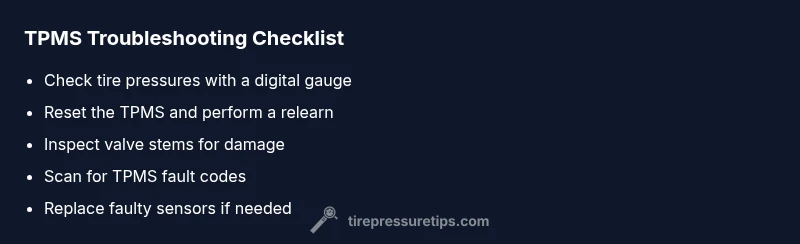
Before you call for service, perform a few quick checks. First, verify all four tires are inflated to the vehicle’s recommended pressures when they are cold. Next, try the TPMS relearn/reset procedure found in your Explorer’s menu or owner's manual. Inspect valve stems for visible damage or corrosion and look for obvious wiring or sensor mounting problems after any tire work. If you recently rotated tires, ensure a proper relearn was completed. If the warning persists after these steps, you’re likely dealing with a sensor issue that may require replacement.
Diagnostic, Troubleshooting, and Next Steps
This section outlines a practical approach for diagnosing a TPMS fault in a Ford Explorer. Start with the easiest checks and progress to more involved steps. Always document the readings you observe so you can share them with a technician if needed. A systematic flow reduces guesswork and helps you decide whether the issue can be addressed at home or requires professional service. Remember, safety is the top priority when manipulating tires and sensors; if in doubt, seek expert help.
Safety, Warnings, and When to Call a Pro
Working with TPMS components involves wheel areas and potentially high-pressure systems. Avoid deflating tires beyond recommended levels or attempting sensor removal without proper tools. If you notice damaged sensor hardware, exposed wiring, or suspect a battery leak, stop and consult a professional. A TPMS fault can sometimes indicate deeper issues with the wheel assembly or ECU; professional diagnostics ensure accurate identification and safe, reliable repairs.
Prevention: Keeping Your Ford Explorer TPMS Healthy
Regular maintenance is the best defense against TPMS faults. Check tire pressures monthly, rotate tires as recommended, and have TPMS sensors inspected during major tire service. After any wheel work, ensure the system is relearned. Keep the sensors clean and protected from corrosion by inspecting valve stems and sensor seals. Keeping a spare TPMS reset method or tool on hand can save time during future maintenance events.
What Affects TPMS Readings: Temperature, Load, and Road Conditions
Ambient temperature, fast driving, and changes in load can all influence tire pressure readings. The Ford Explorer’s TPMS may signal a fault if readings drift outside expected ranges after temperature swings or heavy loads. It’s normal for readings to vary slightly with temperature, but persistent drift or warnings indicate a sensor or ECU issue that should be diagnosed promptly.
Steps
Estimated time: 30-60 minutes
- 1
Check baseline tire pressures
Measure all four tires when cold using a reliable digital gauge. Compare readings to the door jamb placard or owner's manual. If any tire is out of range, adjust to the recommended level before proceeding.
Tip: Record exact pressures to reference during each step. - 2
Reset or relearn the TPMS
Use the Explorer’s settings menu or ignition-based relearn procedure to reset the system after confirming tire pressures. This can clear false warnings if the sensors are communicating correctly.
Tip: Some 2016-2026 models require a specific sequence; consult the manual for your trim. - 3
Inspect sensors and valve stems
Visually inspect each wheel for damaged valve stems, corrosion on the sensor contacts, or loose mounting. If you notice damage, the sensor or stem may need replacement.
Tip: Use a flashlight and magnifier to spot corrosion at contact points. - 4
Scan for TPMS fault codes
Connect a scan tool with TPMS capabilities to read fault codes and sensor IDs. This helps identify a specific sensor that may be failing and narrows down replacement needs.
Tip: Note the sensor ID and replacement part numbers if needed. - 5
Replace or service the sensor
If fault codes point to a faulty sensor or battery, replace the sensor or its battery and reinstall with proper torque on lug nuts and sensor mounts. Relearn after replacement.
Tip: Ensure the new sensor is compatible with your Explorer's TPMS. - 6
Test drive and verify
After servicing, drive for a short distance to allow the system to refresh data. Confirm the TPMS light stays off and the readings appear stable.
Tip: If the light returns, recheck for air leaks and confirm the relearn process completed correctly.
Diagnosis: TPMS warning light or fault message on Ford Explorer indicating a tire pressure sensor fault
Possible Causes
- highWeak or dead TPMS sensor battery
- mediumFaulty wheel sensor or wiring to the ECU
- lowDamaged valve stem or sensor seal
Fixes
- easyReset the TPMS and perform a relearn using the vehicle’s system
- mediumInspect wheel sensors and valves; replace damaged components or reseal as needed
- hardTest and, if necessary, replace the TPMS sensor or battery and re-learn the system
Frequently Asked Questions
What does TPMS stand for and why does it fault?
TPMS stands for Tire Pressure Monitoring System. A fault typically means a sensor issue, battery wear, or communication problems between the wheel sensor and the ECU. It’s not always a tire underinflation problem.
TPMS stands for Tire Pressure Monitoring System. The fault usually means a sensor or battery issue rather than only low pressure.
Why would TPMS fault appear after a tire rotation on a Ford Explorer?
After a rotation, the TPMS may need to relearn with the new sensor positions. If relearn isn’t completed, the system can show a fault or warning.
Sometimes you must relearn the TPMS after a tire rotation. If you skip it, a warning may appear.
Can I reset TPMS myself?
Yes, many Ford Explorers support a built-in TPMS reset or relearn procedure in the vehicle menus. Refer to the owner’s manual for exact steps for your year and trim.
You can often reset TPMS using the car’s menu; check the manual for exact steps.
How long do TPMS sensors last?
TPMS sensors are designed to last several years, but battery wear or sensor damage can shorten lifespan. Regular inspection helps catch issues early.
TPMS sensors last several years, but batteries wear out and sensors can get damaged.
Should I replace all sensors if one fails?
Not necessarily. A single faulty sensor can be replaced, but if others are old or show codes, a broader sensor service may be considered. A diagnostic readout helps decide.
Usually you replace only the faulty sensor, unless several are aging.
Is TPMS dangerous or unsafe to ignore?
Ignoring TPMS warnings can be unsafe, as underinflated tires raise the risk of tire failure and poor handling. Treat persistent faults seriously and seek professional advice when needed.
A TPMS warning is a safety signal—don’t ignore it for long.
Watch Video
What to Remember
- Verify tire pressures first, then address sensor health
- Use TPMS reset and relearn after any tire work
- Inspect sensors, stems, and wiring for damage
- If in doubt, consult a professional for TPMS sensor replacement