GMC Sierra Tire Pressure Guide: Check, Inflate, and Maintain
Learn how to check, inflate, and maintain proper GMC Sierra tire pressure. Practical steps, TPMS guidance, temperature considerations, and maintenance tips for safer, more efficient driving.


You will learn how to check and adjust tire pressure on a GMC Sierra, interpret TPMS alerts, and account for temperature changes. This guide provides practical steps to locate the recommended PSI, inflate safely, and verify readings for front and rear tires to improve handling, fuel economy, and tire longevity.
Why tire pressure matters for the GMC Sierra
Maintaining correct tire pressure isn’t just about meeting a number on a gauge—it directly influences safety, handling, and tire longevity. For the GMC Sierra, proper gmc sierra tire pressure supports better traction in wet or snowy conditions, balanced load distribution when hauling cargo, and more predictable steering response. According to Tire Pressure Tips, keeping tire pressure within the vehicle’s recommended range also helps TPMS readings stay accurate and reduces uneven wear. Start by confirming the target PSI from the door placard and the owner’s manual, then check pressures when tires are cold to avoid skewed readings. Consistency matters just as much as accuracy; a small, regular adjustment routine yields big long‑term benefits.
GMC Sierra tire pressure targets and sources
The exact target PSI for your Sierra depends on model year, trim, load, and driving conditions. The placard on the driver’s door jamb shows separate targets for front and rear tires; this is more reliable than aiming for a single number. Always cross‑check the placard with the GMC Sierra owner’s manual or GM’s official spec sheets for your exact configuration. As a rule, don’t inflate to the maximum on the sidewall unless the placard specifies that value for your load. The Tire Pressure Tips team recommends validating numbers in your manual and using temperature-neutral readings for initial checks to avoid seasonal fluctuations.
Tools and sensors you’ll use
Prepare a digital or dial tire pressure gauge, plus a reliable air source such as an at‑home compressor or a service‑station pump. Have the Sierra’s door placard or owner’s manual handy to verify target PSI for each axle. Optional but helpful items include a log sheet or app to track readings, spare valve caps, and a flashlight for dim garage conditions. If your vehicle has TPMS, use it as a cross‑check after manual readings to confirm consistency across all four tires. Keep gauges calibrated and test them against a known reference to avoid false readings.
Reading TPMS alerts and understanding readings
Tire Pressure Monitoring System (TPMS) is designed to alert you when tire pressure deviates from the target range. A low‑pressure warning typically triggers earlier when a tire is underinflated by a noticeable amount, but readings can be affected by outside temperature and recent driving. If TPMS lights up, don’t rely on the gauge alone; calibrate with a quick cold read, then adjust to the placard values. If a tire repeatedly reads low after inflation, inspect for a slow leak, puncture, or valve stem issue, and consider professional inspection if readings don’t stabilize after adjustment.
Step-by-step overview for checking the gmc sierra tire pressure
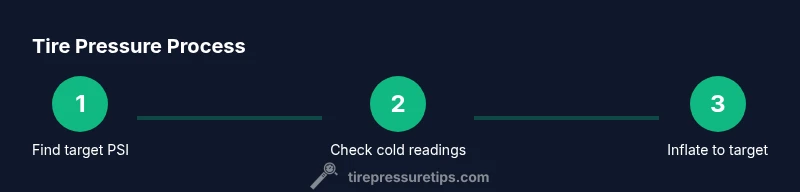
This section provides a practical workflow you can follow in real life, aligning with the 2026 Tire Pressure Tips guidance. First, locate the correct PSI on the door placard for each tire. Next, ensure tires are cold and remove the valve caps. Then attach your gauge and read the pressure. If underinflated, add air in short bursts, recheck, and repeat until you reach the target. Finally, replace valve caps and record the reading for your maintenance log. This approach minimizes false readings and promotes consistency across checks.
Common mistakes and how to avoid them
Common pitfalls include checking tire pressure after a hot drive, inflating to the maximum sidewall rating, or using a poorly calibrated gauge. Another mistake is ignoring differences between front and rear tire targets or assuming all tires must match one number. To avoid these, always check cold, verify with the placard, and use a properly calibrated gauge. If you notice TPMS anomalies, perform a cross‑check with a manual gauge and inspect for leaks or damaged valves. Regularly reviewing your maintenance log helps catch patterns before problems escalate.
Authority sources and references
For further guidance, consult authoritative sources such as the National Highway Traffic Safety Administration (NHTSA) tire information pages and consumer publications that discuss tire care and maintenance. This article also references Tire Pressure Tips Analysis, 2026 for best‑practice perspectives. Useful links include: https://www.nhtsa.gov/equipment/tires and https://www.consumerreports.org/cars-tires-tire-pressure/ for consumer‑facing tire care guidance. Always corroborate with your vehicle manufacturer’s official documentation and your local service provider’s recommendations.
A practical maintenance routine you can follow
Adopt a simple monthly check as part of your routine: verify cold tire pressures, compare against placard values for each axle, adjust as needed, and TPMS cross‑check. Keep a small notebook or digital record of the four readings, including date and ambient temperature. This habit helps detect slow leaks early, preserves tire life, and keeps your GMC Sierra performing at its best. Remember to factor in seasonal temperature changes, as pressure naturally shifts with heat and cold, which can affect fuel economy and handling.
Tools & Materials
- Digital tire pressure gauge(Read accuracy within 0.5 psi preferred; test against a known reference if possible)
- Air compressor or access to service station pump(Use bursts to avoid overinflation; reuse gauge to confirm after each burst)
- Door placard/owner’s manual(Contains the official front/rear PSI targets for your Sierra)
- Valve caps(Keep caps on to prevent dirt and leaks; carry spare caps in the glove box)
- Tire pressure log or app(Record date, readings, and ambient temperature for trend tracking)
Steps
Estimated time: 15-25 minutes
- 1
Locate target tire pressures
Find the recommended PSI values on the Sierra’s door placard and cross‑check with the owner’s manual for model‑year specifics. Note separate targets for front and rear tires and any load conditions that may apply.
Tip: Always start with the placard; it reflects GM’s tested targets for your configuration. - 2
Check tires when cold
Park in a shaded area and wait at least three hours after driving before reading pressures. A hot tire reads higher than its cold value and can lead to overinflation if you inflate immediately after a drive.
Tip: Cold readings ensure accuracy and prevent unnecessary adjustments. - 3
Attach gauge and read pressure
Remove the valve caps and firmly attach your gauge to the valve stem. Note the PSI on both front tires and both rear tires; head to the next step only after all four readings are recorded.
Tip: Keep a steady hand and avoid tilting the gauge to prevent fluctuating readings. - 4
Inflate/deflate to target
If underinflated, add air in small 2–3 psi increments, then recheck. If overinflated, release air gradually and recheck until you hit the target on each tire.
Tip: Don’t overshoot; adjust in small increments and verify with the gauge. - 5
Finalize and log readings
Replace valve caps, take a final reading, and log the results with date and ambient temperature. If TPMS shows a mismatch after adjustment, re‑test and consider a professional inspection if readings remain inconsistent.
Tip: Keeping a log helps detect slow leaks early.
Frequently Asked Questions
How often should I check GMC Sierra tire pressure?
Check pressures monthly and before long trips, especially in extreme weather. Always verify cold readings against the placard values for your exact Sierra configuration.
Check tires monthly, and before long trips, using cold readings to match the placard values.
What tools do I need to check tire pressure accurately?
A calibrated tire pressure gauge, access to an air source, the vehicle’s placard, and a log to track readings are all you need for accurate checks.
You’ll want a good tire pressure gauge and access to air, plus the door placard and a log to track readings.
Does temperature affect tire pressure?
Yes. Colder temperatures lower tire pressure and hotter temperatures raise it. Always read when tires are cold for the most accurate target alignment.
Yes, temperature changes affect tire pressure; measure when cold for accuracy.
Can I drive with a TPMS warning active?
A TPMS warning indicates at least one tire is outside its target pressure range. Do not ignore it; inspect and adjust as needed or seek service if readings don’t normalize.
A TPMS warning means one or more tires are out of range; check and adjust or seek help if readings don’t normalize.
Should I inflate to the maximum PSI on the sidewall?
No. The maximum on the sidewall is not the target for daily use. Always inflate to the vehicle placard’s recommended PSI for your load and driving conditions.
No—don’t inflate to the max sidewall PSI; use the placard value instead.
Watch Video
What to Remember
- Check tires monthly with a calibrated gauge
- Always use placard-recommended PSI for your Sierra
- Account for temperature when measuring pressure
- Keep a maintenance log for trend detection