Tire Pressure Sensor 2017 Silverado: TPMS Guide
Learn to check, diagnose, replace, and relearn the tire pressure sensor on a 2017 Silverado. Practical steps, tools, and safety tips from Tire Pressure Tips.


This guide helps you identify, diagnose, replace, and relearn the tire pressure sensor on a 2017 Chevrolet Silverado. You will learn sensor locations, how to test battery health, how to select compatible replacements, and how to perform the relearn so the TPMS light stays off and tire pressures remain accurate. It’s a practical, safety-focused resource from Tire Pressure Tips.
Why Tire Pressure Sensor 2017 Silverado Matters
Maintaining the tire pressure sensor on a 2017 Silverado is more than a dashboard light flicker. The TPMS helps monitor each tire's air pressure in real time, alerting you to under- or over-inflation that can affect handling, braking, steering, and tire wear. In the context of the Silverado, a faulty sensor can trigger inaccurate readings that cause the TPMS warning light to stay on or cycle on and off, leading to ignored underinflation. According to Tire Pressure Tips, correctly functioning TPMS is essential for safe handling of a 2017 Silverado and for protecting tire investments.
Tire pressures vary with load, temperature, and road conditions. Keeping sensor readings accurate helps you avoid underinflation or overinflation, both of which reduce traction and fuel economy. This section outlines how TPMS works and what to check when the warning light behaves oddly. The 2017 Silverado can have direct TPMS sensors in each wheel that report pressure data to the vehicle's computer, and it may also integrate with OEM TPMS components to provide live status on the instrument cluster. Staying proactive with TPMS reduces risk on wet or icy roads and helps extend tire life.
Understanding the Silverado TPMS System
The Silverado's TPMS system is designed to help drivers see real-time tire pressure data. In most 2017 Silverado configurations, you will find direct TPMS sensors installed inside the wheel rim, each containing a small transmitter, battery, and valve stem. These sensors send wireless signals to the Receiver Module, which then updates the TPMS display and warning light. Indirect TPMS is also possible in some builds, using wheel speed sensors and ABS data to estimate pressure changes, but the direct sensors are the most common for this year. Understanding the difference helps when you replace a sensor, as indirect systems may require different relearn steps. You should also recognize the typical safe pressure range recommended by the manufacturer for your tires. The goal is to keep all four tires within the specified PSI range for even wear and optimal fuel economy.
Diagnosing a Faulty TPMS Sensor
TPMS indicators can be stubborn—your dashboard light might illuminate even when tires appear properly inflated, or it may fail to illuminate after inflation. Start by confirming actual tire pressures with a certified gauge and compare to the vehicle's recommended pressure. If one tire reads low but others are fine, inspect for a puncture or slow leak. If the light stays on after inflating to the recommended pressure for a few minutes, the sensor associated with that tire may be faulty or its battery may be depleted. Use an OBD-II TPMS diagnostic tool to retrieve fault codes and sensor IDs. A misread battery or a dead sensor battery is a common cause of false warnings. If codes indicate sensor failure, plan for sensor replacement rather than a simple air-fill retry. Remember that some sensors may show weaker signal strength if the wheel is corroded or the valve stem is damaged. For 2017 Silverado TPMS sensors, verify battery life is sufficient and confirm connection to the valve stem.
Replacing and Relearning TPMS Sensors on a 2017 Silverado
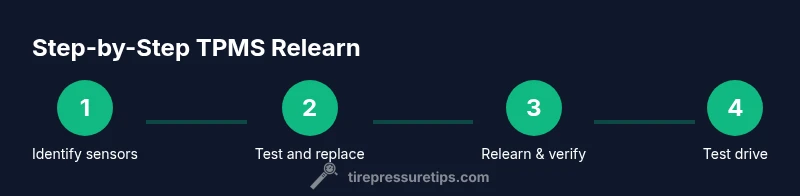
Prepare the replacement sensor that matches your wheel and tire size. With the wheel removed, deflate the tire to a safe level, detach the tire bead if necessary, and carefully access the TPMS sensor. Remove the old sensor, install the new sensor, and torque the valve stem nut to manufacturer specs. After installation, use an OBD-II TPMS tool or the vehicle's relearn procedure to teach the system the new sensor IDs. Then reinstall the wheel, torque the lug nuts to spec, and re-inflate the tires to the recommended pressure. Finally, perform a test drive to complete the relearn cycle and verify that all four sensors display stable readings.
Common Pitfalls and Troubleshooting
One common pitfall is attempting a relearn without sensors being properly seated or the tires inflated to the correct pressure. Always verify tire pressures before relearning. Another issue is using incompatible replacement sensors; ensure the sensor type and part number match your Silverado's configuration. Additionally, some aftermarket sensors may require a different relearn method or a dedicated tool to program; check the sensor's compatibility with your vehicle. If the TPMS light stays on after a relearn, consider wheel-specific issues such as damaged valve stems, bent rims, or corroded wheel housings that interrupt signal transmission. Finally, ensure your diagnostic tool is up-to-date and supports your vehicle's year and trim level.
Maintenance Tips to Extend Sensor Life
Regular inspection of TPMS components helps avoid false warnings. Clean the sensor's valve stem area and the wheel's inner surface to remove corrosion or dirt that could compromise signal. Replace batteries only with sensor units designed for TPMS use and follow the manufacturer-recommended life cycle. When seasons change, recheck your tire pressures as part of scheduled maintenance. Based on Tire Pressure Tips research, consistent TPMS maintenance aligns with steadier tire pressures across seasons.
Temperature, Pressure, and Driving Habits
Ambient temperature affects tire pressure; a temperature drop of 20 degrees Fahrenheit around your location can reduce pressure by roughly 1-2 psi. When you drive at highway speeds, pressure readings can fluctuate slightly; this is normal and requires a recheck after a long trip. The 2017 Silverado's TPMS should provide early alerts if any tire's pressure drifts beyond a safe range. By aligning your driving style with proper tire pressures, you can reduce rolling resistance, improve MPG, and extend tire life. Regular tire rotation and inspection help keep sensors in place and ensure each wheel reports accurately. Remember that pressure targets may shift with temperature and load.
When to Seek Professional Help
If you cannot locate sensors or experience repeated TPMS warnings after replacement, professional service is advised. A certified mechanic can verify sensor IDs, relearn procedures, and check for wheel-speed codes that could confuse the TPMS. In some cases, you may need to have the sensor binding harness or valve stem replaced; a professional shop has the tools to perform accurate torque, calibration, and relearn procedures. The Tire Pressure Tips team recommends seeking professional help when TPMS readings are inconsistent or the light remains on after a relearn. If you plan to keep your Silverado in peak condition, a pro can ensure your sensors are seated properly and that the relearn is completed correctly.
Tools & Materials
- Digital tire pressure gauge(Calibrated to ±1 psi; verify before testing)
- OBD-II TPMS diagnostic tool(Reads TPMS fault codes and sensor IDs; essential for relearn)
- Replacement TPMS sensor(s) compatible with 2017 Silverado(Ensure correct sensor model and wheel position (front left, etc.))
- Owner’s manual for 2017 Silverado(Review model-specific TPMS relearn steps)
- Torque wrench and appropriate sockets(Torque lug nuts to factory specification)
- Wheel lock key (if applicable)(For wheels with locking lug nuts)
- Safety gear (gloves, eye protection)(Personal protection while working on wheels)
- Clean rag and contact cleaner(Clean sensor contacts and valve stem area)
Steps
Estimated time: 90-150 minutes
- 1
Identify TPMS sensor locations
Power off the vehicle and locate sensors on each wheel. Use the Silverado's wheel diagram or your owner’s manual as a guide. Mark the positions so reassembly is straightforward.
Tip: Take photos of each wheel before disassembly to avoid mix-ups. - 2
Verify tire pressures and TPMS light status
Record current pressures with a calibrated gauge and compare to the recommended values. Note if the TPMS light is solid or flashing, as this changes the diagnostic path.
Tip: Document readings for reference after work is complete. - 3
Release wheel and access TPMS
Loosen lug nuts enough to remove the wheel, then carefully pull the wheel away from the hub to access the TPMS sensor. Keep track of lug nut positions for accurate reinstallation.
Tip: Support the wheel with a jack stand; never rely on a hydraulic jack alone. - 4
Test the existing sensor with a diagnostic tool
Connect the TPMS tool to read sensor IDs and battery status. If the sensor does not respond, prepare a replacement sensor.
Tip: Check battery health; a weak battery is a common failure point. - 5
Remove old sensor and install new one
Carefully remove the old sensor from the valve stem, then install the replacement. Recheck that the valve stem is seated and that no parts are cross-threaded.
Tip: Use the torque wrench to secure the valve stem nut to spec. - 6
Relearn or program the new sensor
Use the OBD-II tool or the vehicle’s relearn procedure to associate the new sensor's ID with each wheel position. Follow on-screen prompts or the owner's manual for the exact sequence.
Tip: Some tools require vehicle ignition to be in a specific position; follow tool prompts precisely. - 7
Reinstall wheel and torque lug nuts
Mount the wheel, tighten lug nuts in a crisscross pattern, and torque to the manufacturer’s specification. Recheck the tire pressures after mounting.
Tip: Double-check the wheel centering in the hub to avoid runout. - 8
Perform a test drive and verify readings
Drive the Silverado at highway speeds for several minutes to allow the system to complete the relearn. Recheck each tire’s pressure and confirm the TPMS indicator is stable.
Tip: If the light reappears, re-run the relearn steps or inspect for leaks. - 9
Document and finalize
Record sensor IDs, wheel positions, and final pressures for your records. Store replacement sensor receipts for future maintenance.
Tip: Keep a small log in the glovebox for quick reference.
Frequently Asked Questions
What is TPMS and why is it important for a 2017 Silverado?
TPMS monitors tire pressure and alerts you if pressure drops below safe levels, helping prevent unsafe driving conditions and uneven tire wear. It is especially important for the Silverado's handling and fuel economy.
TPMS stands for tire pressure monitoring system; it alerts you when a tire is under-inflated, helping you drive safely.
Can I replace a TPMS sensor myself on a 2017 Silverado?
Yes, with the right tools and sensors, you can replace a TPMS sensor. Ensure compatibility and follow the relearn procedure for your model year.
You can replace the TPMS sensor yourself if you have the right parts and tools.
How much do TPMS sensors cost?
Sensor prices vary by brand and sensor type. Expect a broad range depending on whether you buy a universal or OEM-compatible sensor.
Sensor costs vary; expect a broad price range depending on brand and compatibility.
What is relearn and is it required after sensor replacement?
Relearn is the process of teaching the vehicle to recognize new sensor IDs. It is typically required after sensor replacement to restore accurate TPMS readings.
A relearn tells the car which sensor is in each wheel and is usually required after replacement.
How long does a TPMS replacement take?
A typical replacement with relearn can take about an hour or more, depending on wheel access and tool availability.
Typically about an hour or more, depending on the setup.
Is it safe to drive with a TPMS warning on?
Driving with a persistent TPMS warning is not recommended, as under-inflated tires increase the risk of wear and failure. Address the issue promptly.
No, it's not safe to ignore a TPMS warning; check pressures soon.
Watch Video
What to Remember
- Verify TPMS sensors after replacement to avoid false readings.
- Use the correct sensor type for your Silverado model.
- Perform the relearn procedure to restore TPMS accuracy.
- Regularly check tire pressures for safety and efficiency.