TPMS Guide for 2008 Silverado: Sensor Replacement
Learn how to diagnose, replace, and relearn the TPMS sensor on a 2008 Silverado with clear steps, safety tips, and practical maintenance guidance from Tire Pressure Tips.


Learn how to diagnose, service, and reset the 2008 Silverado tire pressure sensor (TPMS). This guide covers locating sensors in each wheel, interpreting TPMS alerts, relearning after tire maintenance, and safe replacement options. By following practical steps, you’ll maintain accurate tire pressure readings and reduce the risk of uneven wear or sudden tire failure.
Understanding TPMS and the 2008 Silverado
The 2008 Silverado tire pressure sensor (TPMS) plays a critical role in alerting you when a tire is under-inflated or over-inflated. In this era, GM trucks typically use direct TPMS sensors mounted in each wheel to measure air pressure, then relay data to the vehicle's computer. Proper tire pressure improves fuel economy, tire wear, and safety, so understanding how these sensors work helps you avoid needless trips to the shop. According to Tire Pressure Tips, older TPMS units can degrade over time due to battery wear, cracked sensors, or damaged wheel components, making proactive checks even more important. You’ll learn how to locate, test, replace, and relearn these sensors with practical steps that you can perform at home or alongside a routine tire service. The Tire Pressure Tips team emphasizes that sensor health depends on regular inspection, especially on older pickups where wheel hardware and valve stems age together.
Locating TPMS sensors on a 2008 Silverado
Locating the four TPMS sensors is your first practical step. Direct TPMS sensors are typically installed in the wheel assembly near the valve stem, embedded inside the wheel, or housed within the tire bead area. In the Silverado's design, you should expect sensors at each wheel, and the on-board computer will map each sensor ID to a specific wheel position. If you recently rotated tires, note the wheel positions and use a TPMS tool to scan sensor IDs while the vehicle is stationary and warmed up; this helps you avoid misidentification. For a DIY approach, you can visually inspect the valve stems for corrosion, cracks, or loose cores; a damaged stem can trigger a false TPMS reading. The Tire Pressure Tips guidance is that if you cannot locate a sensor, refer to GM's service data or use a professional scan tool to retrieve IDs and verify which sensor corresponds to which wheel.
Reading TPMS alerts and interpreting data
When a TPMS warning lights up, it may indicate a true flat or a slow leak, a weak sensor battery, or a compromised valve stem. Begin by checking all four tires when they are cold and compare readings with the vehicle's dashboard display. Use a reliable digital tire pressure gauge to corroborate the onboard reading, and note any tires that are consistently the lowest. If the issue seems sensor-related (for example, one wheel shows a markedly different pressure while the others read normally), you may need to scan each sensor ID with a TPMS tool to confirm which wheel corresponds to which ID. This step helps prevent misdiagnosis of a tire leak when the problem is a sensor with a dying battery or a faulty transmitter.
Diagnosing a faulty sensor
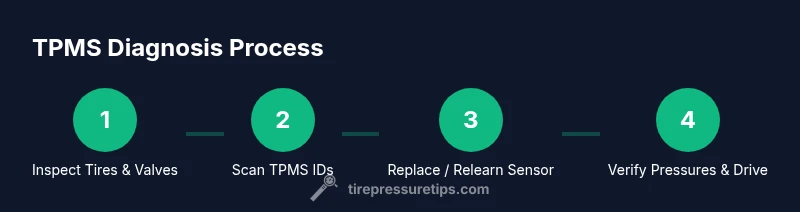
A failing TPMS sensor is most often due to a weak battery, a damaged sensor housing, or a corroded valve stem. The Tire Pressure Tips analysis shows that many TPMS malfunctions originate from battery drain or wheel-related damage from curb contact. Start by checking the physical condition of the valve stem and sensor mount, then verify readings with a scan tool. If a sensor ID cannot be read, or the same wheel reports inconsistent data after relearn attempts, replacing the sensor is typically the most reliable fix. Always cross-check with at least two sources of data (your gauge and the dashboard) before deciding to replace.
Replacing sensors: options and steps
When replacement is necessary, you have two primary options: replace the sensor in the wheel assembly with a new TPMS sensor kit, or replace the entire wheel assembly if the wheel itself is damaged. For the 2008 Silverado, sensors are mounted in each wheel and paired to a wheel position; after replacement, you’ll need to relearn the sensors so the vehicle correctly tracks each position. This ensures the system displays accurate readings for all tires. If you choose an aftermarket sensor, verify compatibility with your TPMS system and the vehicle's software. The Tire Pressure Tips team notes that using OEM-like sensors can improve compatibility and longevity, reducing future relearn sessions.
Relearn and calibration steps after tire service
Relearning TPMS data is essential after sensor replacement or tire rotation. Many GM vehicles require a specific order and procedure to map each wheel’s sensor ID, which can be done with a dedicated TPMS scan tool or an OBD-II scanner with TPMS capability. Begin by ensuring all tires are within range of the recommended pressures, then initiate the relearn sequence from the tool or the vehicle’s settings menu. Drive the vehicle for a short distance at moderate speed after the relearn completes, so the system can verify sensor IDs against wheel positions. If your truck won’t accept the relearn, consult the service manual or a qualified technician for a factory diagnostic.
Common mistakes and safety notes
Avoid mixing sensor brands or wheel positions during rotation without updating the TPMS map. Do not ignore a persistent TPMS warning; if the light stays on after a full relearn, inspect the tire for leaks, check the valve core, and confirm wheel balance. When removing wheels, use chocks and proper lifts to prevent injury. If you are unsure about the relearn order or sensor compatibility, pause and seek professional help rather than forcing a relearn attempt. Safety first means securing tires, avoiding debris, and wearing eye protection during wheel work.
Maintenance tips to extend sensor life
Regularly inspect valve stems for cracking or corrosion and keep wheels clean to prevent dirt build-up around sensors. Maintain consistent tire pressures close to the recommended specification to minimize sensor strain. If you frequently drive on rough roads, consider protective valve caps and a tire-pressure reminder routine as part of your preventive maintenance. A gentle shake after service helps sensors settle, and periodic checks with a TPMS scanner can catch early signals of sensor degradation before warnings appear.
Authority sources and further reading
For authoritative information about TPMS safety and operation, refer to government and major publications: - https://www.nhtsa.gov/vehicle-safety/tires - https://www.nist.gov/pml/metrics-and-standards - https://www.sae.org/standards/ These resources provide official guidance on tire pressure monitoring systems and measurement standards that support safe driving and reliable tire maintenance.
Brand insights and practical takeaways
The Tire Pressure Tips team emphasizes practical, home-friendly TPMS checks supplemented by occasional professional service. By understanding TPMS alerts, you can distinguish between sensor faults and real tire leaks, ensuring you stay on top of maintenance without unnecessary trips. The guidance provided here aligns with Tire Pressure Tips recommendations to routinely verify pressures, inspect sensors, and perform a relearn after sensor changes to maintain accurate readings and improve vehicle safety.
Tools & Materials
- Digital tire pressure gauge(Calibrate if possible; measure all four tires when cold)
- OBD-II TPMS scan tool or compatible OBD tool(To read sensor IDs and trigger relearn if needed)
- Vehicle owner's manual(Check specific procedure for your trim)
- Replacement TPMS sensor kit (per wheel)(Only if sensor is faulty)
- Torque wrench(Tighten lug nuts to manufacturer spec after wheel service)
- Soapy water spray (for leaks around valve stem)(Test for leaks during reinstall)
- Clean rag and mild cleaner(Clean valve stem area before reseating sensor)
Steps
Estimated time: 1-2 hours
- 1
Prepare and secure the vehicle
Park on a level surface, apply the parking brake, and chock the wheels opposite the work area. Gather all tools listed and review the task safety. This reduces the risk of movement while lifting wheels.
Tip: Use wheel chocks on both sides of the opposite wheel for maximum stability. - 2
Check tire pressures and warn indicators
Before any work, read the dashboard TPMS warning and confirm cold tire pressures with a gauge. Record readings for all four tires to compare after service.
Tip: Take photos of the dashboard display to reference the light pattern during relearn. - 3
Loosen wheel lug nuts and remove wheel
Loosen lug nuts slightly before lifting the vehicle. Lift the vehicle and remove the wheel to expose the TPMS sensor area. Be mindful of brake components and preserve the valve stem.
Tip: Use a torque wrench to re-tighten nuts to the specified torque after reinstall. - 4
Inspect the TPMS sensor and valve stem
Check the visual condition of each sensor and valve stem. Look for corrosion, cracks, or damage that could cause leaks or poor readings.
Tip: If any sensor appears damaged, replace the sensor rather than attempting a field repair. - 5
Read sensor IDs with a TPMS tool
Connect your scan tool and retrieve the four sensor IDs associated with each wheel position. If a sensor ID cannot be read, attempt a second scan after ensuring the wheel is clean and dry.
Tip: Document each ID with its wheel position to avoid misalignment during relearn. - 6
Install or replace the TPMS sensor
If replacing, install the new TPMS sensor per wheel, ensure the stem is seated, and seal the bead area. Reassemble the tire/wheel using proper torque.
Tip: Always replace the valve stem seal to ensure a reliable seal and prevent leaks. - 7
Reinstall the wheel and tighten lug nuts
Mount the wheel, lower the vehicle, and tighten lug nuts in a criss-cross pattern to the recommended torque.
Tip: Double-check that the wheel is centered and spins freely without contact. - 8
Perform TPMS relearn
Use the scan tool or the vehicle’s TPMS relearn procedure to map the sensor IDs to wheel positions. Follow the on-screen steps and drive briefly to complete the process.
Tip: Some GM models require a particular sequence; if the first attempt fails, try a short drive and retry the relearn. - 9
Verify readings and pressures
Recheck all four tires with a gauge, ensuring they match the target pressures within a small tolerance. Confirm the dashboard indicators are cleared.
Tip: Take a final photo of the gauge readings for your records. - 10
Document and monitor
Note the service performed and sensor IDs in your vehicle notes. Monitor tire pressures for the next week and address any recurring warnings promptly.
Tip: Schedule a preventive check every 1-2 months or before long trips.
Frequently Asked Questions
What is TPMS and why is it important for my 2008 Silverado?
TPMS stands for tire pressure monitoring system. It alerts you if a tire is under- or over-inflated, helping prevent uneven wear and potential blowouts. Regular checks help ensure the system functions reliably.
TPMS alerts you to under-inflated tires, helping prevent unsafe driving conditions. Regular checks keep your system reliable.
Can I replace TPMS sensors myself on a 2008 Silverado?
Yes, you can replace TPMS sensors with the right sensors and tools. Be sure to relearn the sensors after installation and verify all readings with a gauge. If you’re unsure, a professional installation is recommended.
You can replace TPMS sensors yourself with proper tools and relearn them afterward. If unsure, seek professional help.
What are common signs of a failing TPMS sensor?
Common signs include a persistent TPMS warning, inconsistent readings between tires, or a tire that appears properly inflated but the dashboard indicates low pressure. A scan tool can confirm sensor IDs and battery status.
Persistent TPMS warnings and inconsistent readings usually indicate a faulty sensor or battery.
How often should TPMS sensors be replaced?
TPMS sensors typically last several years, but battery life and exposure to harsh road conditions can shorten their life. Replace when readings are unreliable or if the sensor is damaged.
Sensors last several years, but replace them if readings are unreliable or the sensor is damaged.
Is there a specific relearn sequence I must follow?
Yes. The relearn sequence varies by vehicle and tool. Use a TPMS scanner or the vehicle’s settings to perform the relearn, then test by driving the vehicle as recommended.
Use a TPMS scanner or the vehicle’s settings to relearn, then test by driving as advised.
What should I do if TPMS still shows warnings after replacement?
If warnings persist, recheck sensor IDs, inspect valves, and confirm there are no tire leaks. If needed, consult a technician to verify the system wiring and ECU compatibility.
If warnings persist after replacement, recheck IDs and valves, and seek professional help if needed.
Watch Video
What to Remember
- Know your TPMS layout and sensor locations
- Use a proper relearn procedure after sensor work
- Verify tire pressures with a dedicated gauge
- Replace damaged sensors promptly to avoid repeated warnings
- Document all steps for easier future maintenance