Tire Pressure Monitoring System GM: A Practical Guide for Drivers
Learn how GM's Tire Pressure Monitoring System works, how to diagnose warnings, reset TPMS, and maintain tires safely with practical steps and tips.


You will learn how GM's Tire Pressure Monitoring System (TPMS) works, what the warning lights mean, and how to check and reset TPMS sensors for GM vehicles. Before you start, gather a tire gauge, access to your owner's manual, and a basic tool kit. This guide covers common GM TPMS scenarios, troubleshooting steps, and safety tips.
Understanding GM TPMS Basics
GM's Tire Pressure Monitoring System (TPMS) is designed to alert you when a tire's pressure deviates from the manufacturer-recommended range. In many GM models, TPMS uses wheel-mounted sensors that report pressure data to the vehicle's computer, which then triggers warning lights if a reading falls outside the safe range. For drivers working with tire pressure monitoring system gm, understanding the basics is essential to prevent underinflation and its risks. According to Tire Pressure Tips, grasping how direct TPMS sensors and the vehicle control module interact helps you interpret warnings and plan maintenance. This section explains the core concepts in plain language and sets up the practical steps that follow.
How GM TPMS Senses Pressure
Most GM vehicles rely on direct TPMS sensors embedded in each wheel to monitor pressure in real-time. The sensors transmit data to the vehicle's control unit, which compares readings to the on-vehicle reference values. If a sensor detects a drop below the recommended level, the TPMS warning light illuminates on the dashboard. This system also helps track pressure changes due to temperature, driving, or load. Being familiar with this mechanism helps you distinguish between a routine warning and a sensor fault.
Interpreting TPMS Warning Lights and Messages
When the TPMS system detects low pressure, you will typically see a tire pressure warning icon or a dedicated message on the instrument cluster. In addition to low pressure alerts, a TPMS fault or sensor fault message can appear if a sensor isn’t reporting correctly. Some GM models indicate differences between front and rear tires, or signal a sensor battery issue. Always cross-check with a gauge to verify the actual pressure and avoid assuming the light means only a leak.
Practical Checks You Can Perform Today
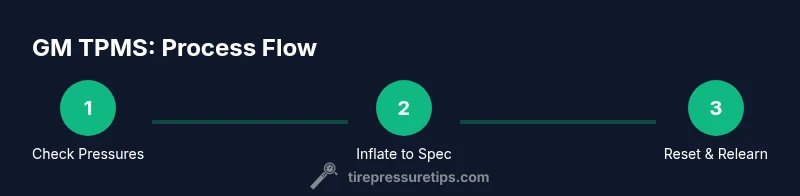
Start with a level, safe inspection of all tires. Gather a tire gauge and a reliable inflator. Compare measured pressures to the GM-recommended figures, usually shown on the driver’s door jamb label. If any tire sits below spec, inflate to the correct PSI and recheck with the gauge. Don’t forget the spare tire if your vehicle has one, as some systems monitor that wheel too. Temperature can affect readings, so cold tires provide the most accurate baseline.
Resetting GM TPMS: When and How
Reset procedures vary by GM model year and trim. Some GM vehicles relearn TPMS automatically after driving for 10-15 minutes at highway speeds or within a defined drive cycle. Others require a manual reset via the vehicle’s settings menu or a dedicated reset button. Always consult the owner’s manual for your specific model’s procedure. If you recently changed tires or rotated wheels, a relearn is often necessary to ensure accurate readings.
Common Problems and How to Troubleshoot
If the TPMS light stays on after you’ve inflated tires to the correct level, the issue may be a faulty sensor, a damaged valve stem, or a dead battery in the sensor. Corrosion around sensor mounts can also trigger faults. Inspect wheels for damage and ensure wheel nuts are properly torqued. If you suspect a sensor fault, professional service may be required to diagnose and replace the sensor or battery.
Maintenance and Best Practices for GM TPMS
Regular checks are your best defense against false alarms. Check tire pressures monthly and before long trips, especially when temperatures change. Rotate tires according to the GM schedule and recheck pressures after rotation. Keep a portable gauge in your vehicle for daily quick checks. If you observe frequent TPMS warnings despite correct pressures, consult a dealer or an automotive technician with experience in GM TPMS sensors.
Safety Considerations When Handling Tire Pressure
Never attempt tire work on a vehicle that is not securely parked. Use wheel chocks and stable stands if you must work near the road. Avoid overinflating tires, which can cause a blowout or uneven wear. If the TPMS warning appears after servicing, re-check all four tire pressures and ensure sensors are correctly seated. When in doubt, seek professional help to prevent injuries or damage.
What To Do If You Think TPMS Is Malfunctioning or Sensor Needs Replacement
If you suspect a TPMS fault after basic checks, verify there’s no mechanical issue with the sensors or valves. A faulty sensor often warrants replacement. The GM TPMS replacement process typically follows the vehicle’s service procedure and may require programming or relearn steps. In any case, use genuine or compatible TPMS sensors and follow the GM maintenance guidelines.
Tools & Materials
- Tire pressure gauge(With precision ±1 psi; digital preferred)
- Air compressor or inflation station(For adjusting tire pressures to recommended PSI)
- GM owner's manual or vehicle specifications sheet(To verify TPMS sensor positions and relearn procedures)
- Safety gloves(For grip and protection)
- Basic tool kit(For wheel lug access if sensor location requires access)
- Notebook or digital device(Record pressures and notes for tracking changes)
Steps
Estimated time: 30-60 minutes
- 1
Check current tire pressures
Park on a level surface and let tires cool. Use a reliable gauge to measure each tire (including the spare if applicable). Record the readings for reference, noting any unusually low numbers. This establishes your baseline before adjustments.
Tip: Use a digital gauge for faster, consistent readings. - 2
Find the GM recommended pressure for each tire
Locate the door jamb label or the owner's manual to confirm the recommended PSI for front and rear tires. Remember that numbers may differ by tire position and load. Do not rely on the maximum PSI printed on the tire sidewall.
Tip: Check for differences between front and rear specifications on the label. - 3
Inflate or deflate to the specified PSI
If a tire is below spec, inflate gradually and recheck with your gauge. If it’s over, release air in small increments and recheck. Ensure all four tires, plus the spare if applicable, meet the recommended pressures.
Tip: Inflate when tires are cold to ensure accuracy. - 4
Reset TPMS after pressure adjustments
Many GM models relearn automatically after a drive cycle; others require manual steps through the vehicle menu or a reset button. Follow your model's exact procedure from the manual to ensure sensors re-sync.
Tip: If unsure, consult the manual or dealer for the correct relearn method. - 5
Drive to confirm sensor re-learn
Take a short test drive, typically 5-15 minutes, at moderate speeds. Observe the dash for the TPMS light to extinguish. If the light remains, re-check pressures and perform the relearn again per GM guidance.
Tip: Avoid aggressive driving before the light settles. - 6
Inspect sensors and wheel hardware if warnings persist
If warnings persist after a relearn, inspect valve stems, sensors, and battery condition. Look for corrosion or damage. If you cannot identify the issue, have a professional inspect and replace faulty sensors.
Tip: Do not force sensor removal; improper handling can cause damage.
Frequently Asked Questions
What does the TPMS warning light mean on a GM vehicle?
The TPMS warning light usually indicates a tire is under-inflated or a sensor is not reporting correctly. Always verify with a gauge and adjust to the recommended PSI before driving further.
The TPMS warning light usually means a tire is under-inflated or a sensor isn’t reporting correctly. Check the pressure and adjust to the recommended level.
Do GM TPMS sensors require a relearn after changing tires?
Some GM models need a TPMS relearn after changing tires or rotating wheels. Check your owner's manual for the exact steps or visit a dealer if you’re unsure.
Yes, some GM models require a relearn after changing tires. Check the manual or consult a dealer for the correct steps.
Can I drive with the TPMS warning on?
If the warning indicates low pressure, address it promptly. Short, careful driving to a location where you can adjust and recheck the pressures is advisable.
If the TPMS warning is on, fix the tire pressure as soon as possible and drive slowly to a safe place if needed.
Why is my TPMS light on even when pressures seem correct?
This could indicate a faulty sensor, damaged valve stem, or battery issue in the sensor. Inspect, and if unresolved, seek professional service.
The light can mean a sensor fault or battery issue; inspect or consult a technician if it won’t clear.
How often should I check tire pressure?
Check tires monthly and before long trips, especially when temperature changes. This helps keep TPMS readings accurate and tires safe.
Check your tire pressure about once a month and before long trips, especially if temperatures shift.
Can I reset TPMS without tools?
Many GM models reset automatically through a drive cycle, but some require manual steps via the settings menu. Use the manual for your specific model.
Some GM vehicles relearn automatically after driving; others need a manual reset per the manual.
Watch Video
What to Remember
- Know GM TPMS basics and how it alerts you
- Check pressures against the GM specification label
- Reset TPMS after changes and re-learn when required
- Address persistent warnings with sensor inspection or professional help