How to Use a Tire Pressure Monitor Tool: A Step-by-Step Guide
Learn how to use a tire pressure monitor tool to read TPMS data, diagnose sensor faults, and verify tire pressure for safer driving, improved fuel efficiency, and longer tire life.


A tire pressure monitor tool is a diagnostic device used to read TPMS sensor data and verify tire pressure accuracy. It helps you confirm that TPMS readings match a physical gauge, locate faulty sensors, and guide calibration or replacement. Regular use reduces guesswork, saves fuel, and promotes even tire wear.
What is a tire pressure monitor tool and why it matters
A tire pressure monitor tool (TPMS tool) is a handheld device or software-based scanner that helps you access the data from your vehicle's TPMS sensors. These tools are designed for DIY enthusiasts and professional technicians alike. They can read sensor IDs, monitor battery health, display current tire pressures, and sometimes initiate sensor relearn or calibration sequences. Using a TPMS tool gives you a clear, objective view of your tire pressures and sensor status, which is essential for maintaining safety, fuel efficiency, and tire longevity. According to Tire Pressure Tips, incorporating a TPMS diagnostic tool into routine maintenance helps drivers validate TPMS readings against a trusted mechanical gauge and reduces guesswork when pressures drift. The result is more consistent tire wear and fewer surprises on the road.
- Quick checks for the basics: ensure you know your vehicle’s target pressures and any model-specific relearn steps.
- Types of adapters: universal scanners cover many makes, while vehicle-specific tools may offer deeper data.
- When to use: at home, at a shop, or during tire changes to confirm accuracy before driving off.
This section sets the foundation for understanding how TPMS tools fit into your overall tire maintenance plan.
How TPMS works and what a tool can diagnose
Tire Pressure Monitoring Systems (TPMS) rely on sensors in each tire to monitor pressure (and sometimes temperature). A TPMS tool communicates with those sensors—either directly via a sensor protocol or through the vehicle’s onboard diagnostics (OBD) interface—extracting data like current pressure, sensor ID, and status flags. A quality TPMS tool can diagnose sensor health (battery life, communication errors), identify misreads due to sensor drift, and help you verify whether the tires need air. It can also guide relearn procedures after sensor replacement or tire service, ensuring the system recognizes fresh sensors and reports accurate pressure values. For many drivers, this capability reduces the guesswork that often follows an illuminated TPMS warning and supports safer, more efficient driving. In Tire Pressure Tips analysis, cross-checking TPMS readings with a reliable gauge is highlighted as a best practice to confirm accuracy and catch sensor faults early.
- Key data points include pressure, sensor ID, and status indicators.
- Relearn procedures vary by manufacturer; some tools automate the process, others require manual steps.
- Real-world benefits include quicker diagnostics and fewer service surprises at the dealership.
Understanding how a TPMS tool communicates with sensors helps you interpret readings more effectively and plan the right next steps for maintenance.
Common scenarios where a tire pressure monitor tool helps
TPMS tools prove most useful in several everyday scenarios. A sudden TPMS warning light can indicate underinflated tires, a slow leak, or sensor fault. A TPMS tool lets you pull real-time data to determine whether a tire actually has low pressure or if the sensor is misreporting. After a tire rotation or replacement, relearning sensors ensures the system recognizes new or moved sensor IDs and starts reporting correctly. If a sensor battery is failing, a TPMS tool can help you spot the symptom before a tire becomes unsafe to drive on. Tire Pressure Tips analysis shows that drivers who regularly verify readings with a TPMS tool reduce the risk of driving on underinflated tires and catch issues sooner—before heat buildup or road hazards escalate.
- Use the tool when the warning light comes on or before long trips.
- Check all tires, including the spare if your car supports a TPMS on that wheel.
- Pair readings with a physical gauge for accuracy checks.
This section covers common use cases to help you plan preventive maintenance around TPMS checks.
Choosing the right tire pressure monitor tool
There are several tiers of TPMS tools, from basic handheld devices to advanced scanners with vehicle-specific databases and cloud updates. When selecting a tool, you should prioritize compatibility with your vehicle, the ability to read sensor IDs and pressures, relearn or calibration support, and whether it can read the data via OBD or directly from the sensors. A good TPMS tool should provide clear readings, a straightforward relearn process, and a data log so you can track changes over time. Cost varies by feature set; budget-conscious users can start with a basic, portable scanner and upgrade as needed. According to Tire Pressure Tips, investing in a tool that covers your vehicle type and includes a relearn feature yields the best long-term value.
- Look for coverage of your make/model and an up-to-date sensor database.
- Check for a relearn or reset feature and how it’s performed (automatic vs. manual).
- Consider whether you need OBD integration or direct sensor access.
A thoughtful choice reduces frustration and increases the usefulness of your TPMS maintenance routine.
Using the tool in practice: real-world workflows
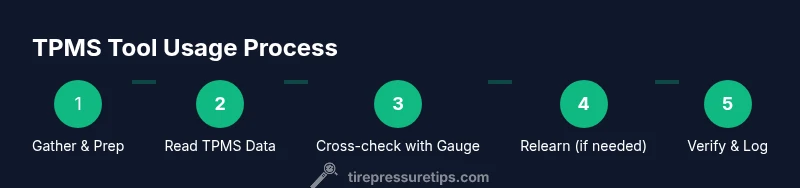
A typical workflow starts with powering the device, selecting your vehicle, and pulling current TPMS data. You’ll then confirm readings against a trusted digital tire gauge and decide whether to inflate to the target PSI or address a sensor issue. If a sensor reports low battery or a fault, you may need to replace that sensor or perform a relearn if prompted by the vehicle or tool. Tools with relearn steps often guide you through the process in sequential prompts, which helps avoid missing crucial steps. Logging readings over time can reveal gradual shifts in sensor accuracy or tire behavior, enabling proactive maintenance and better budgeting for tire care. Tire Pressure Tips notes that consistent cross-checking yields more reliable tire data and reduces the likelihood of failed inspections.
- Collect baseline readings on all tires.
- Use the gauge to verify actual pressure before adjusting.
- Follow your vehicle’s relearn procedure after sensor work.
This section translates theory into practical, repeatable workflows you can perform in your driveway or at a shop.
Interpreting readings and actions you can take
Once you pull readings with a TPMS tool, interpret them against your vehicle’s recommended tire pressures found in the owner’s manual or door jamb placard. If a tire reads low, inflate to the recommended PSI and recheck with the tool. If the TPMS shows a fault or inconsistent data, consider sensor replacement or re-learn; some drivers use soapy water to check for leaks around valve stems and sensors, though this is a supplementary check rather than a diagnostic method. Always correlate TPMS data with a physical gauge for accuracy and remember that extreme temperature changes can affect readings, making rechecks especially important after a cold soak or highway driving. Tire Pressure Tips emphasizes that tracking changes in readings over time helps you schedule maintenance before issues become critical.
- Prioritize safety by addressing low-pressure tires immediately.
- Confirm readings with a calibrated gauge before making adjustments.
- Use relearn instructions when sensors have been replaced.
Clear interpretation turns data into actionable steps and safer driving.
Maintenance, calibration, and safety considerations
Regular maintenance of your TPMS tools ensures long-term reliability. Calibrate the tool as recommended by the manufacturer, especially after sensor replacement or tire service. Store the device in a dry place, away from direct heat, and update its sensor database when new models appear. If your tool requires OBD access, ensure your vehicle’s ignition sequence is followed to avoid data conflicts. Safety-wise, always perform tire adjustments on a flat, stable surface and never work under a lifting vehicle without proper jack stands. The best practice is to verify readings twice (before and after inflation) to avoid misreads and to maintain safe, appropriate tire pressures. Tire Pressure Tips highlights that consistent use of a TPMS tool builds a reliable habit and reduces last-minute road trip worries.
- Calibrate per manufacturer guidance.
- Update sensor databases when possible.
- Always recheck pressure after adjustments.
This section covers practical maintenance steps and safety considerations to keep your TPMS tool accurate and reliable.
Cost considerations, models, and buying wisely
TPMS tools span a wide price range. If you’re just starting out, a compact handheld scanner with essential features (readouts, basic relearn options) can be a cost-effective entry point. For fleets or enthusiasts who want deeper diagnostics, consider models with extensive vehicle coverage, updated databases, and cloud-based data logs. When budgeting, factor in replacement sensors, whether you’ll need a spare valve stem kit, and potential app subscriptions for data management. The right choice depends on how you plan to use the tool: occasional checks vs. regular, multi-vehicle maintenance. The Tire Pressure Tips team notes that a well-chosen tool with relearn capability often saves more time and money over the long term than a cheaper, limited option.
Common mistakes and misconceptions
- Relying on TPMS readings alone without cross-checking with a physical gauge. This can hide sensor drift or calibration errors.
- Ignoring relearn requirements after sensor work. Without relearning, the system may not register new sensors correctly.
- Assuming all TPMS tools are universal. Compatibility varies by vehicle make, model, and whether the device supports relearn or specific sensor protocols.
- Not maintaining the tool’s database. Sensor IDs and data formats change; update regularly to avoid stale readings.
By avoiding these missteps, you’ll get more accurate data, safer tires, and longer equipment life.
Tools & Materials
- Handheld tire pressure monitor tool (TPMS scanner)(Choose a model that covers your vehicle make/model and supports relearn if needed)
- Digital tire pressure gauge(Calibrated and easy to read; prefer one with tenths of PSI)
- Air compressor with proper nozzle(For inflating to target PSI; ensure it’s rated for the pressure range you use)
- Vehicle owner’s manual or relearn procedure sheet(Helps complete vehicle-specific relearn steps)
- Soapy water spray(Optional leak check around valve stem and sensor seals)
- Notebook or app to log readings(For tracking changes and maintenance history)
Steps
Estimated time: 20-40 minutes
- 1
Gather tools and prep
Place all required equipment on a clean, flat surface. Check tire pressures cold and ensure the vehicle is on level ground before starting.
Tip: Double-check that you have the relearn instructions for your vehicle model handy. - 2
Power on the TPMS tool and select vehicle
Turn on the scanner and navigate to your vehicle profile. If the tool supports multiple VINs, verify you’ve chosen the correct one.
Tip: If your tool has a car make/model database, verify the database is up to date. - 3
Read TPMS data
Connect to each wheel’s sensor (or read via OBD if required) and record current tire pressures and sensor IDs.
Tip: Note any sensor status flags such as low battery or fault codes. - 4
Cross-check with a physical gauge
Measure each tire with a calibrated gauge and compare results to the TPMS readings.
Tip: If readings differ significantly, re-check with a second gauge to confirm accuracy. - 5
Inflate/deflate to target PSI
Using the air compressor, bring each tire to the manufacturer’s recommended PSI, then recheck with both devices.
Tip: Avoid overinflation; use a slow, controlled approach and recheck after 1–2 minutes of stabilization. - 6
Relearn or calibrate sensors if needed
Follow your vehicle or tool prompts to relearn sensors after service or replacement.
Tip: Some vehicles require ignition on, others need drive cycles; consult the owner’s manual. - 7
Document results and finish
Log final pressures and sensor IDs in your notes or app. Confirm the TPMS light stays off after your adjustments.
Tip: Keep the log for future reference and maintenance planning.
Frequently Asked Questions
What is a tire pressure monitor tool, and do I really need one?
A TPMS tool is a diagnostic device used to read TPMS sensor data and verify tire pressure accuracy. It’s especially helpful for diagnosing faulty sensors and confirming readings to prevent unsafe tire conditions.
A TPMS tool helps you read sensor data and verify readings, making it a smart addition for safe, reliable tire maintenance.
Can a TPMS tool relearn sensors?
Many TPMS tools include a relearn or calibration feature. Check your tool’s capabilities and follow your vehicle’s relearn procedure to ensure the system recognizes new or moved sensors.
Yes, many tools support relearning; follow the vehicle and tool prompts to complete the process.
Will this replace my TPMS system?
No. A TPMS tool supplements your system by diagnosing, reading data, and guiding maintenance. It does not replace the vehicle’s built-in TPMS.
No, it supplements TPMS by helping you diagnose and maintain the system.
How often should I check TPMS readings?
Check TPMS readings during routine maintenance, before long trips, and after tire service or sensor work. Regular checks reduce the risk of driving on underinflated tires.
Check TPMS readings with each tire service and before long trips to stay safe.
Are TPMS tools universal across all cars?
Some tools are universal, others are vehicle-specific. Always verify compatibility and relearn support for your make and model.
Tools vary by car; check compatibility and relearn features before buying.
What safety precautions should I take?
Work on a flat surface with wheels chocked. Keep tires cool, and do not exceed vehicle specifications when inflating.
Always work on level ground with wheels secured and follow tire pressure specs.
Watch Video
What to Remember
- Verify TPMS readings with a physical gauge.
- Follow vehicle relearn procedures after sensor work.
- Choose a tool compatible with your vehicle and needs.
- Regular TPMS checks improve safety and fuel efficiency.