Hyundai Tire Pressure Display: TPMS Guide and Maintenance
Learn how Hyundai tire pressure display (TPMS) works, how to read warnings, reset sensors, and maintain correct tire pressure with practical steps from Tire Pressure Tips.


Hyundai tire pressure display (TPMS) helps you monitor each tire’s air pressure and alerts you when a tire is underinflated or a sensor is faulty. This guide explains how TPMS works across Hyundai models, how to read warning lights, and step-by-step checks to verify pressures, reset the system, and maintain safe, efficient driving. Expect practical examples and maintenance tips from Tire Pressure Tips.
What Hyundai tire pressure display is and why it matters
The Hyundai tire pressure display (TPMS) is a tire health monitor that keeps track of air pressure in all four tires and notifies you when any tire drops below the recommended level. In Hyundai vehicles, TPMS can be direct, with wheel-mounted sensors transmitting real-time PSI data, or indirect, using wheel-speed sensors to infer pressure changes. Understanding how this display works helps you avoid flats, uneven wear, and reduced fuel efficiency. According to Tire Pressure Tips, you should still verify pressures with a manual gauge, especially after temperature shifts or long trips. This section lays the groundwork so you can interpret warnings accurately and avoid chasing false alarms. You’ll learn where to find the recommended pressures (often on the driver’s door jamb and in the owner manual) and how to read dash indicators when a tire is low or a sensor malfunctions. Treat TPMS as a helpful alert, not a substitute for regular tire checks. A solid baseline lets you diagnose issues quickly and decide if you need to adjust, repair, or replace a tire or sensor.
How Hyundai TPMS works across models
Hyundai implements TPMS with two common approaches. Direct TPMS uses wheel-mounted sensors that measure actual pressure and temperature, sending signals to the vehicle’s computer and instrument cluster. Indirect TPMS, more common in older or budget configurations, monitors differences in wheel rotation speeds to infer pressure changes. In either case, the system is designed to warn you through a dashboard light and, on many models, an infotainment display with the approximate PSI. Across Hyundai lineups, the precise relearn or reset procedures can vary by year and trim, so consult the owner’s manual for model-specific steps. For drivers, the practical takeaway is consistency: check cold pressures against the recommended spec, keep sensors in good condition, and rely on the TPMS as a supplemental check rather than the sole source of truth. Tire Pressure Tips notes that variance between gauge readings and TPMS readings is normal, especially after tire rotations or changes in ambient temperature.
Interpreting the warning lights and messages
TPMS warnings fall into a few common categories. A steady low-pressure light typically signals one or more tires are underinflated. A flashing TPMS light may indicate a fault in the system, such as a sensor factory fault or a dead battery in a sensor. In Hyundai dashboards, you might also see a message in the information display listing which tire needs air. Some models show a numeric PSI readout tied to each tire in the instrument cluster or infotainment screen. If a tire warning persists after topping up to the recommended pressure, or if multiple tires trigger alerts after a temperature drop, it’s wise to inspect for leaks, damaged valves, or sensor issues. Always confirm with a physical gauge for accuracy and consider a professional inspection if readings don’t align with expectations. Tire Pressure Tips emphasizes verifying any warning with a manual measurement and not relying solely on the display.
Diagnosing a persistent TPMS alert
Begin by confirming all four tires are inflated to the manufacturer’s spec using a calibrated gauge. If pressures are correct, drive the car for 10–15 minutes and recheck; some systems require a short drive to reset. If the TPMS warning remains, inspect tires for bubbles, nails, or punctures, and check valve stems for leaks. Rotate tires if applicable, then verify that the sensor IDs on the vehicle match those in the TPMS database. In some Hyundai models, you may need to relearn the sensors via the instrument cluster or a hand-held scanner. If there’s no obvious cause, the issue may lie with a faulty sensor or a degraded battery in a wheel sensor. In that case, plan a diagnostic visit. Tire Pressure Tips notes that persistent alerts warrant a professional TPMS diagnostic to prevent unsafe driving.
Resetting or recalibrating TPMS on Hyundai
Reset or relearn procedures vary by year and trim level. In many Hyundai models, the process involves using the instrument cluster’s TPMS menu: select TPMS or Relearn, or follow a dedicated reset sequence after inflating tires to spec. Some vehicles require a diagnostic tool or dealer visit to reprogram sensor IDs. If your car shows a “relearn” prompt, follow the on-screen instructions, which typically involve inflating to spec, driving at a moderate speed for several minutes, and then rechecking. Always ensure the tires are cold before starting, and document the exact pressures you set for future reference. If you are unsure, consult the service manual or contact a Hyundai-certified technician. Tire Pressure Tips suggests keeping a repair manual handy to confirm exact steps for your model year.
Seasonal and temperature effects on TPMS readings
Ambient temperature affects tire pressure because air expands in heat and contracts in the cold. A drop in outside temperature can cause a noticeable decrease in tire PSI, potentially triggering a TPMS warning even if the tires were within range in the morning. Conversely, a warm day can raise pressure beyond the recommended level. This is especially true after long drives or in extreme weather. The key practice is to check tire pressures regularly when seasons change and to adjust to the door placard values. Tire Pressure Tips advises rechecking after a 30–60 minute drive or at the end of a workday to confirm consistency, especially if you notice warning lights during seasonal shifts.
Best practices for tire pressure maintenance and safety
Establish a simple weekly or biweekly pressure check routine using a quality gauge. Always measure tire pressure when the tires are cold, ideally before the car has been driven for several hours. Carry a portable gauge and a small creation pad to log PSI readings for each tire. Maintain even wear by rotating tires per Hyundai’s recommended schedule. If you frequently transport heavy loads or drive in extreme climates, adjust inflation accordingly. Keep TPMS sensors clean and inspect valve stems during seasonal tire swaps to prevent slow leaks. Remember: TPMS is a safety alert, not a substitute for direct pressure verification. Tire Pressure Tips encourages drivers to treat the TPMS as part of a broader tire maintenance plan.
What to do if the TPMS sensor fails or cannot be relearned
If a sensor failure is suspected, verify the battery life in the sensor and check the wheel for physical damage. A failed sensor may require replacement, which is typically handled by a dealership or qualified tire service center. In some cases, you may need to replace the sensor in a specific wheel and then relearn or calibrate the system. If a relearn procedure doesn’t resolve the issue, or if you see a fault code from an OBD-II scanner, plan a professional diagnostic. Until the system is confirmed working, maintain manual pressure checks and avoid driving with significantly underinflated tires.
Final note: You’re not alone—professional support is available
TPMS involves electronic components that can fail or drift over time. If you’re unsure about any warning or the system seems inconsistent, contact a Hyundai-certified technician. Keeping accurate tire pressures protects your safety, improves fuel economy, and extends tire life. The Tire Pressure Tips team recommends regular manual checks along with TPMS monitoring to ensure reliable operation across all seasons and driving conditions.
Tools & Materials
- Tire pressure gauge (dial or digital)(Calibrated; measure cold tires before driving)
- Vehicle owner's manual & Hyundai service information(Check recommended cold tire pressures and TPMS specifics)
- Access to a reliable tire inflation station(For accurate measurements)
- OBD-II scan tool or dealer diagnostic tool(Used to read TPMS fault codes)
- TPMS reset tool (model-specific)(Some Hyundai models require dealer tool; check manual)
Steps
Estimated time: 30-60 minutes
- 1
Check tires when cold
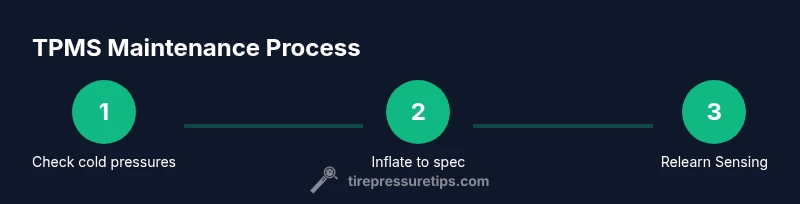
Begin with a cold tire check using a calibrated gauge. Compare measured pressures to the Hyundai-recommended values from the door placard or owner manual. Inflate any underinflated tires to spec before driving. This avoids composition errors from heat buildup during a test drive.
Tip: Record the four tire pressures for future reference. - 2
Inflate to the recommended pressure
Inflate each tire to the exact specification listed on the placard. Do not rely on the TPMS display alone. Use the gauge reading to set the correct PSI, then recheck after inflation.
Tip: Inflate only when tires are cold for accuracy. - 3
Inspect tires for damage and wear
Look for visible punctures, leaks, cracks, or bulges. A tire that won’t hold pressure or shows rapid loss needs immediate attention. If you suspect a leak, mark the area and perform a second check after a short drive.
Tip: Even slight leaks can cause TPMS warnings. - 4
Rotate and balance if needed
If tire wear is uneven, rotate tires per Hyundai’s recommended schedule. After rotation, recheck pressures and drive briefly to allow the TPMS to relearn if required.
Tip: Rotation can affect sensor learning; plan a relearn if prompted. - 5
Check for sensor issues
If warning persists after pressures are correct, inspect sensor valves for damage or corrosion. A faulty sensor battery or dead sensor can trigger a fault code.
Tip: Sensor issues often require professional service. - 6
Reset or relearn TPMS
Access the TPMS reset or relearn option in the instrument cluster or via a diagnostic tool. Follow on-screen prompts and drive for a short period to complete the relearn.
Tip: Do not skip the relearn if the system asks for it. - 7
Test drive and re-check
After reset or relearn, drive 10–15 minutes under normal conditions, then recheck all tire pressures to verify the system reads correctly.
Tip: If the light returns, escalate to a technician. - 8
Schedule maintenance if needed
If any sensor or system fault remains unresolved after troubleshooting, schedule a service appointment with a Hyundai-certified shop.
Tip: Regular TPMS service can prevent surprises on the road.
Frequently Asked Questions
What does Hyundai TPMS display tell you about tire pressure?
The TPMS display indicates if any tire is underinflated or if there is a fault in the system. It may show a warning light and, on some models, a readout of tire pressures. Always verify with a gauge and refer to the owner's manual for model-specific meanings.
The TPMS display warns you about low tire pressure or system faults. Check the gauges and refer to your manual for what each warning means.
Can I drive with TPMS warning lights on?
If a TPMS warning is on, check all tires and inflate to spec before driving long distances. If the light stays on after inflation, have the system checked by a technician to rule out sensor faults or leaks.
You should not drive far with a TPMS warning. Check pressures, then get the system inspected if the warning remains.
How often should I check tire pressure if I don’t drive much?
Check tire pressures at least once a month and before long trips, especially if ambient temperatures have recently changed.
Check every month and before long trips, especially with big temperature shifts.
Do I need a dealer to reset TPMS after inflating tires?
Some Hyundai models allow resetting via the instrument cluster, while others may require a diagnostic tool or dealer service. Check your owner’s manual for the exact steps for your year and trim.
In many cases you can reset via the car’s menu, but some models need a dealer tool.
Does temperature affect TPMS readings?
Yes. Temperature changes can cause tire pressures to rise or fall, triggering TPMS alerts even when tires are within the correct range. Recheck pressures after temperature shifts.
Temperature changes can affect the readings, so recheck pressures after weather shifts.
What if a TPMS sensor fails?
If a sensor fails, you may need a sensor replacement and relearn. This is common with older sensors or batteries nearing end of life. A professional can confirm and perform the relearn.
If a TPMS sensor fails, you’ll likely need a sensor replacement and relearn at a shop.
Watch Video
What to Remember
- Check cold pressures against spec before driving
- TPMS complements but does not replace manual checks
- Rotate and relearn TPMS after tire work or rotations
- Temperature changes affect tire pressure and TPMS readings
- If TPMS stays on after checks, seek professional diagnostic