How to Reset Tire Pressure Sensor Subaru (TPMS)
Learn how to reset a Subaru TPMS sensor, perform a relearn, and troubleshoot common issues. This practical guide covers in-vehicle and tool-assisted methods with safety tips and verification steps.


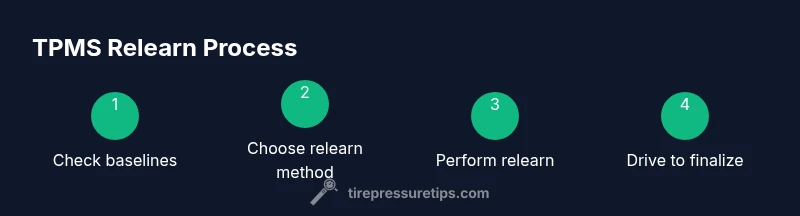
This guide shows you how to reset and relearn a Subaru TPMS sensor, ensuring accurate tire pressure readings. You’ll confirm cold tire pressures, choose a relearn method (in-vehicle or tool-assisted), and complete the process by driving or following tool prompts. Model/year variations exist, so consult your manual or a TPMS relearn tool for exact steps.
What TPMS is and why reset matters
TPMS stands for Tire Pressure Monitoring System. In Subaru models with direct TPMS, sensors mounted in each wheel measure and report tire pressure to the vehicle’s computer. Accurate TPMS readings help optimize fuel efficiency, tire wear, braking performance, and overall safety. A misread or false alert can occur after tire changes, rotations, or sensor maintenance. When this happens, resetting or relearning TPMS ensures the system recognizes the current sensor IDs and actual tire pressures. According to Tire Pressure Tips, TPMS relearns help prevent false positives and ensure accurate readings after tire changes. The reset process can vary by year and model, but the core idea remains the same: confirm wheel pressures, clear old data, and reestablish a reliable sensor-to-tire link. This article focuses on practical steps you can apply to reset a Subaru TPMS sensor safely and effectively.
Before you start: check tire pressures and gather tools
Before attempting a TPMS reset on your Subaru, assemble the essential items and confirm the numbers you’ll use. You’ll need a digital tire pressure gauge, a reliable TPMS relearn tool or an OBD-II scanner that supports TPMS relearn, and the vehicle’s owner’s manual for model-specific instructions. Set aside a calm workspace and, if possible, perform the process with cold tires to get an accurate baseline. Measure and record the pressures on all four corners, and check the spare if your relearn method includes it. Printing or jotting the recommended pressures from the door placard helps prevent mistakes. Tire Pressure Tips analysis shows that most relearn attempts succeed when you start with solid, verified baselines. Also inspect tires for cuts, bulges, or leaks that could skew readings during the process.
Determine the relearn method for your Subaru year/model
Subaru relearn methods vary by year and trim, but two broad approaches cover most models: (1) vehicle learning mode (on-car relearn) and (2) external tool relearn (OBD-II or dedicated TPMS tool). Start by checking the owner’s manual for your exact year/model; if the manual is vague, assume the vehicle learning method first and be prepared to switch to a tool-based approach if needed. The goal with either method is the same: remove old sensor data, reestablish sensor IDs, and confirm the system recognizes each tire. If you’re uncertain, a quick search using your model year alongside “TPMS relearn” often yields model-specific sequences.
Relearn using the car's built-in learning mode (vehicle-based method)
If your Subaru supports an on-vehicle TPMS learning mode, you’ll usually begin with the tires inflated to spec and the ignition in the proper position. Access the TPMS learning option via the vehicle’s instrument cluster menu or a dedicated TPMS button, then initiate the learning sequence. The indicator on the dash may blink or change color to show learning is active. Complete the process by following on-screen prompts or the owner’s manual instructions. A successful relearn is typically confirmed when the TPMS light stops blinking and remains off. Pro tips: some models require you to drive briefly after starting the learning mode to complete the process, while others require a precise button sequence.
Relearn using an external tool (OBD-II scanner or TPMS tool)
Using a relearn tool can simplify stubborn cases or models with no built-in learning mode. Connect the scanner to the OBD-II port under the dashboard, turn the ignition to the accessory or run position, and select the TPMS relearn option. Follow the tool prompts to begin the relearn, which may involve selecting each tire or having the car perform a read. After the tool indicates success, drive the car to allow the sensors to finalize their IDs with the ECU. If you’re unsure about compatibility, verify the tool supports Subaru TPMS relearn for your year.
Inflate tires to spec and verify readings
With the relearn completed, recheck all four tires to the recommended pressures on the door placard or owner’s manual. Use a reliable gauge and record the numbers. If the readings aren’t within spec, top off or adjust as needed and re-verify. This step helps ensure there is no lingering variance that could trigger a future alert. Remember, excessive variation or underinflation can degrade fuel efficiency and tire life, making accurate pressure checks a daily habit worth adopting.
Drive to complete learning and confirm TPMS status
Many Subaru models finalize the TPMS relearn after a short drive following the relearn attempt. If your car’s light goes out and remains off after this drive, you’ve probably completed the relearn correctly. If the light persists, consider repeating the relearn steps or trying an alternate method (manual vs tool) as some vehicles require a specific sequence. Avoid abrupt accelerations or cornering during the relearn drive to prevent triggering false alerts. After the drive, recheck pressures again to confirm stability.
Troubleshooting common issues
If the TPMS light remains on after relearn, or if readings are inconsistent between tires, several issues could be at play. Sensor batteries can fail, sensors may be damaged by impact, or wheel torque during installation could have affected sensor IDs. Check for tire leaks or nail damage that may cause fluctuating pressures. If you rotated tires recently, the system may still need to relearn their new positions. In persistent cases, a professional TPMS diagnostic can identify faulty sensors or calibration errors that the basic relearn cannot resolve.
Aftercare and maintenance tips
Once you’ve successfully reset and relearned the TPMS, establish a routine: check tire pressures monthly, especially before long trips or seasonal changes. Keep a small gauge in your glovebox for quick checks, and always inflate to the door placard specification, not what you guess. If you rotate tires, repeat the relearn procedure to ensure the system recognizes new positions. Keeping the tire pressures stable improves fuel efficiency, prolongs tire life, and reduces the likelihood of false warnings. The Tire Pressure Tips team recommends adding TPMS checks to your regular vehicle maintenance.
When to seek professional help
If you’ve attempted both relearn methods and the TPMS light remains on, there could be a sensor battery issue, a damaged sensor, or a faulty TPMS control module. A professional technician can perform a diagnostic with factory-grade tools to identify sensor IDs, battery health, and wiring concerns. Subarus with aftermarket wheels or tire changes require careful sensor programming; a pro can ensure there’s no cross-talk between sensors or mismatch in IDs.
Tools & Materials
- OBD-II scanner with TPMS relearn capability(Ensure it supports Subaru TPMS relearn for your year)
- Digital tire pressure gauge(Use to confirm all tires are within the manufacturer’s spec when cold)
- Owner's manual (Subaru model)(Check for model-year specifics and relearn steps)
- Wheel chocks(Optional safety measure when working on a parked vehicle)
Steps
Estimated time: 60-90 minutes
- 1
Confirm tire pressures to spec
Measure all tires with the car parked on a level surface and cold tires. Compare readings to the door placard and record each value. This baseline helps ensure a successful relearn and highlights any pre-existing pressure issues.
Tip: Keep a written record or photo of the placard values for reference during the procedure. - 2
Identify relearn method for your model
Refer to the Subaru owner's manual to determine whether your year uses vehicle learning mode or an external relearn tool. If the manual is unclear, be prepared to perform both methods in sequence.
Tip: If you own a dedicated TPMS tool, confirm it lists your Subaru model and year in its supported vehicle list. - 3
Inflate tires to spec
With the tires cold, inflate each tire to the recommended pressure shown on the door placard. Do not exceed the tire’s maximum sidewall pressure when inflating. Re-check after inflation to ensure accuracy before starting the relearn.
Tip: Record exact pressures and verify again after a short drive to ensure stability. - 4
Initiate vehicle learning mode (if supported)
Access the TPMS relearn option in your Subaru’s instrument cluster menu or via a dedicated button. Start the learning sequence and follow on-screen prompts. If the light blinks, you’re in learning mode; complete the prompts to exit learning.
Tip: If your vehicle doesn’t show a TPMS option, skip to the tool-based method. - 5
Use a relearn tool if needed
Connect your OBD-II scanner or TPMS relearn tool and select the TPMS relearn option. Follow the prompts to relearn each sensor and confirm success.
Tip: Some models require you to drive a short distance after relearn for the IDs to register. - 6
Drive to finalize the relearn
Take a gentle drive at moderate speed for a short period, allowing the sensors to communicate with the ECU and complete the learning cycle. Avoid aggressive driving in this phase.
Tip: If the light remains after the drive, repeat the relearn or switch methods. - 7
Verify TPMS status
Check the dashboard indicator. If the TPMS light is off, the relearn is likely successful. If it remains on, double-check pressures and sensor IDs or perform another relearn attempt.
Tip: A remaining warning can indicate a faulty sensor or a mismatch in IDs. - 8
Recheck all pressures
Re-measure each tire to ensure it’s still within spec after the relearn and after any driving period. Adjust if necessary and recheck again.
Tip: Pressure can drop after the initial relearn drive as temperatures change. - 9
Document results and monitor
Record the final tire pressures and the method used for relearn. Monitor the TPMS indicator over the next few days and recheck periodically to catch any drift early.
Tip: If the light returns later, schedule a sensor diagnostic to rule out sensor battery or hardware issues.
Frequently Asked Questions
What is TPMS relearn?
TPMS relearn is the process of re-syncing wheel sensors with the car's computer after changes like tire rotation, replacement, or sensor service. It ensures the system accurately reports tire pressures.
TPMS relearn syncs wheel sensors with the car after tire changes or sensor service.
Do I need a relearn after rotating tires on a Subaru?
Yes, most cars require a relearn after tire rotation to ensure the system recognizes the new positions. Check your owner's manual for Subaru-specific steps.
Rotation often requires relearn; check your Subaru manual.
Can I relearn TPMS with the spare tire?
Some models include the spare in the relearn sequence; many do not. Refer to Subaru manual or your scanner prompts to confirm.
Spare tires may or may not be included; refer to the manual.
What if the TPMS light stays on after relearn?
If the light remains after relearn, there may be a sensor battery issue, a damaged sensor, or a failed procedure. Verify sensor IDs and inspect for leaks.
If the light stays on, there might be a sensor or procedure issue.
Is driving required to complete the relearn?
Many Subaru relearns finalize during a short drive. Follow the manual or tool prompts and then check the light.
A short drive often finalizes the relearn.
Watch Video
What to Remember
- Verify baseline pressures before starting
- Choose relearn method based on model/year
- Use proper tool or vehicle mode to relearn
- Drive after relearn to finalize sensor IDs
- If light returns, inspect sensors and seek professional help