How to Reset Tire Pressure Light on Honda CR-V
Clear, practical guidance to reset the tire pressure light on Honda CR-V. Inflate tires to spec, recalibrate TPMS, and troubleshoot persistent warnings with tips from Tire Pressure Tips.


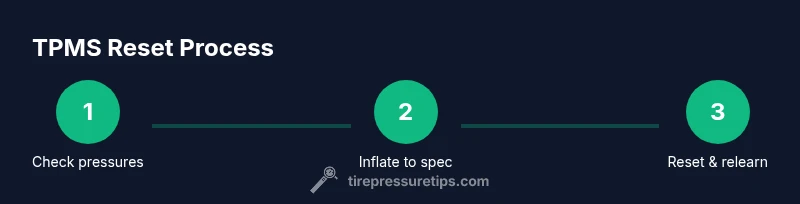
To reset the tire pressure light on a Honda CR-V, first inflate every tire to the recommended PSI and verify with a gauge. Then drive a few miles to trigger recalibration. If the light stays on, use the TPMS reset option in the instrument cluster or consult the owner's manual for year-specific steps. When in doubt, have the TPMS inspected.
Understanding TPMS and the Reset Process
TPMS, or Tire Pressure Monitoring System, is designed to alert you when a tire's pressure falls outside the safe range. Resetting the light isn't about telling you the tire is damaged; it's about teaching the system the correct baseline after you adjust pressures. According to Tire Pressure Tips, a typical reset starts with confirming all tires are inflated to the vehicle's recommended PSI, allowing the system to re-evaluate once the tires settle. The reset behavior can vary by year and trim, so a successful reset often combines accurate inflation, a short drive to trigger sensors, and using the built-in TPMS tools in the Honda CR-V's infotainment or instrument cluster. This section explains why inflating to spec, driving to recalibrate, and using the proper reset path matters. It also highlights common misconceptions that simply replacing a tire fixes the warning.
-]
Confirming Tire Pressures Before Reset
Before you reset the TPMS light on your Honda CR-V, confirm that every tire is within its specified range. Locate the recommended PSI on the driver-side door jamb sticker and use a reliable tire pressure gauge to check cold pressures. Don’t rely on the dash readout alone, which can be skewed by recent driving. Record readings for all four tires (and the spare if your model monitors it). If any tire is significantly out of spec, bring it up or down to the recommended level and recheck after a few minutes of settling. A correct baseline reduces the chance of a false reset or repeated warnings.
-]
How to Prepare Your Honda CR-V for a Reset
Park on a flat surface, engine off, and parking brake engaged. Remove any obvious sources of pressure loss (e.g., a slow leak from a valve stem). If your CR-V is equipped with a TPMS reset procedure, know where it lives in the instrument cluster or menu system. Having the manual handy helps because reset steps vary by year and trim. Prepare by gathering the tools you need: a reliable gauge, an air source, and access to the owner’s manual. A calm, well-lit space makes the process smoother and reduces the risk of skipping steps.
-]
Inflate to the Recommended PSI Using a Gauge
Use a precise tire pressure gauge to measure each tire cold. Inflate each tire to the PSI recommended on the door placard. Take note of variations between front and rear tires if your model has different specs. After inflating, recheck all four tires to confirm they hold steady within a small margin of error—usually within 1–2 psi. If you hear air hissing around a valve, stop and seal any leaks before continuing. Proper inflation is the foundation of a reliable TPMS reset.
-]
The Driving Step: Let the System Recalibrate
Most TPMS recalibrates after a minor period of driving. Drive the Honda CR-V at a steady speed on an unobstructed road for about 10–20 minutes, avoiding aggressive braking or rapid cornering. The goal is to let the sensors communicate the new pressures to the ECU and confirm the new baseline. If the light blinks or remains steady after the drive, the reset may be complete. Remember that ambient temperature and recent road conditions can influence TPMS readings.
-]
Using the Honda CR-V TPMS Reset Menu
Some Honda CR-V models provide a dedicated TPMS reset option in the vehicle’s settings or trip computer. Navigate to the TPMS or Vehicle Settings menu and select Reset, Relearn, or Calibrate as shown in your owner’s manual. If you don’t see a reset option, the system may rely on the drive-to-relearn method described above. Always perform the reset after confirming all four tires are at spec.
-]
Year-Specific Variations for Honda CR-V TPMS
TPMS procedures can differ by model year and trim. Older Honda CR-Vs may use a button or menu-driven relearn, while newer models often rely on automatic relearn after inflation and a drive cycle. When in doubt, consult the owner’s manual or a reputable guide specific to your year. A quick check helps avoid trying a method that isn’t compatible with your vehicle.
-]
When the Light Won’t Reset: Troubleshooting
If the light persists after inflation and a standard reset, consider these checks. Ensure there are no slow leaks, nails, or damaged valves; check the battery in any TPMS sensors if you’ve recently replaced wheels; inspect the wheel and tire for valve stem integrity. Some issues require professional sensor relearns or replacement of a faulty sensor. A persistent warning may indicate an actual tire problem rather than a calibration issue.
-]
External Factors: Temperature, Load, and Road Conditions
Temperature changes, heavy loads, and frequent short trips can affect TPMS readings. Cold weather tends to reduce tire pressure, while hot days raise it. If you’ve traveled a long distance with the tires underinflated, you may see a delayed reset. Plan resets in moderate temperatures and recheck pressures after driving in varying conditions to ensure consistency.
-]
Maintenance to Prevent Future Resets
Regularly check tire pressure at least once a month and after long trips. Keep a small gauge in your glovebox for quick checks and update the recommended PSI in your notes after any air-top-ups. Rotating tires and inspecting TPMS sensors during tire service can prevent sensor failures or faulty readings. Staying proactive reduces the frequency of resets and ensures optimal handling.
-]
Common Mistakes to Avoid During Reset
Avoid inflating tires beyond the recommended PSI or only relying on the dash readout. Don’t skip the reset step if the system asks for it, and avoid driving at high speeds immediately after inflation if the tires are not settled. Also, refrain from using damaged or illegal gauge tools, which lead to inaccurate readings and incorrect resets.
-]
Final Checklist Before a Road Test
- Confirm all tires at spec with a gauge.
- Complete the reset in the instrument cluster or via the manual relearn, if applicable.
- Drive 10–20 minutes to allow recalibration.
- Verify the TPMS light remains off after the drive.
- Note any sensor warnings and address them promptly with a tire professional.
The Tire Pressure Tips team recommends following the above steps closely to ensure a reliable reset and continued tire safety.
-]
What to Do If You Still See the Warning After All Steps
If the TPMS warning persists after performing the outlined steps, it’s time to seek professional help. A trained technician can perform a comprehensive relearn, check sensor batteries, and test for leaks or sensor faults. Persistent warnings can indicate a sensor that is failing or a tire that continues to lose pressure. Don’t ignore the warning—the safety of your drive depends on accurate monitoring.
Tools & Materials
- Tire pressure gauge(Verify cold psi with high accuracy.)
- Air compressor or inflator(Bring each tire to its recommended PSI, as listed on the door placard.)
- Honda CR-V owner's manual (year-specific TPMS steps)(Check for year-specific reset method.)
Steps
Estimated time: 20-40 minutes
- 1
Check current tire pressures
Begin by recording the current pressures for all tires with your gauge. Compare each reading to the door placard specification and note any variances. This establishes a baseline before any adjustment.
Tip: Accurate baseline prevents guessing during the reset. - 2
Inflate to the recommended PSI
Using an air source, bring each tire to the manufacturer’s spec. Do not rely on visual estimates—use the gauge for precise pressure.
Tip: Inflation should be done when tires are cold for accuracy. - 3
Recheck all pressures
After inflating, remeasure every tire to confirm that the readings are within 1–2 psi of the target range.
Tip: Small discrepancies matter for TPMS accuracy. - 4
Access the TPMS reset option
If your CR-V has a menu-based reset, navigate to TPMS or Vehicle Settings and select Reset/Calibrate. If there is a dedicated button, use it as described in the manual.
Tip: Some models reset automatically after a drive instead of a manual step. - 5
Initiate or complete the reset
Follow the on-screen prompts or button sequence to initiate the relearn. Confirm the reset completes before driving further.
Tip: If no reset option exists, rely on the drive cycle method. - 6
Drive to recalibrate
Drive 10–20 minutes at moderate speeds to allow sensors to relearn. Avoid aggressive driving during this phase.
Tip: A steady drive speeds up recalibration. - 7
Verify the light is off
After the drive, check the dashboard for the TPMS indicator status. If off, the reset succeeded.
Tip: If it blinks, you may need additional drive time. - 8
Handle a stubborn light
If the light remains, consult your manual for a manual relearn method or visit a tire shop for sensor testing.
Tip: Sensor faults may require replacement or battery service. - 9
Document and monitor
Record tire pressures and the reset event for future reference. Monitor PSI changes over the next week.
Tip: Knowledge aids future maintenance.
Frequently Asked Questions
Do I need to reset TPMS after inflating tires?
Yes. After inflating to the correct PSI, perform the reset so the system relearns the new baseline. If there is no reset option, a drive cycle may suffice.
Yes. Inflate to spec, then reset or drive to relearn.
Is it safe to drive with a TPMS warning?
If TPMS shows a warning, check tire pressures immediately. If a tire is underinflated, reduce driving speed and seek to re-inflate before continuing.
Drive cautiously and address the warning promptly.
Why is my TPMS light flashing after a reset?
A flashing TPMS light often indicates a system learning in progress or a detected fault. If it continues, inspect sensors and consult a professional.
A flashing light usually means it’s relearning or a fault occurred.
Will replacing TPMS batteries fix the light?
A weak battery can trigger TPMS warnings. If you recently replaced wheels or sensors, consider checking or replacing sensor batteries.
Battery health matters; consider sensor service if warnings persist.
Does the spare tire affect TPMS?
Some systems monitor only mounted tires. If the spare isn’t monitored, it won’t trigger TPMS warnings, but always verify all mounted tires.
Spare tires may not be monitored by TPMS in all cars.
How long does a TPMS reset take?
A typical reset with inflating and a short drive takes about 20–40 minutes, depending on the model year and how quickly the sensors relearn.
Usually around twenty to forty minutes.
Watch Video
What to Remember
- Inflate all tires to spec before resetting.
- Use the vehicle's TPMS menu or reset button if present.
- Drive to recalibrate and verify the light goes out.
- If unresolved, check sensors or battery or contact a tire tech.
- Regular tire maintenance prevents repeated resets.