How to Fix Tire Pressure Sensor Fault Ford Explorer
A practical, step-by-step guide to diagnose and fix TPMS faults on Ford Explorer. Learn how to check pressures, inspect sensors, relearn TPMS, and when to seek professional help.


In this guide, you'll learn how to fix tire pressure sensor fault ford explorer. This step-by-step approach covers diagnosing TPMS faults, verifying tire pressures, inspecting or replacing sensors, and relearning TPMS after service. You'll need a tire pressure gauge, basic hand tools, and access to your Ford's relearn procedure. Follow safety steps and avoid driving with a known TPMS fault.
Understanding TPMS Faults on the Ford Explorer
When the TPMS light in your Ford Explorer illuminates, it can be due to a sensor failure, a dead battery, or a relearn requirement after tire service. According to Tire Pressure Tips, most TPMS faults arise from sensor battery degradation or a missed relearn rather than a universal failure of the system. Recognizing the difference between a temporary pressure warning and a true sensor fault helps you decide whether you can handle the issue at home or should seek professional help. In many cases, the fix is straightforward and involves verifying tire pressures, inspecting the wheel sensors, and completing a relearn sequence in the vehicle. This guidance is designed to help you stay safe, save time, and keep tires properly inflated for optimal fuel efficiency and handling.
Diagnosing the Cause: Why the TPMS Light Comes On
The TPMS system uses wheel-mounted sensors to monitor pressure and communicates with the vehicle’s computer. A fault can originate from several sources: low tire pressure that doesn’t trigger an equalization, a weak or dead sensor battery, a damaged valve stem, a corroded or loose sensor wiring harness, or a failed relearn process after a tire service. Start by checking all tires with a high-quality gauge and comparing against the Ford Explorer’s recommended pressure. If any tire is low, correct it to spec and observe whether the light remains. If the light stays on after pressures are correct, you likely have a sensor or relearn issue. Remember, even if the light is on, you should not ignore underinflated tires, as it affects safety and tire life.
Tools, Parts, and Safety Considerations
Before you begin, assemble a basic toolkit and any parts you might need. A digital tire pressure gauge with quick-release chuck helps ensure accurate readings. A torque wrench and a valve core tool make sensor maintenance safer and more precise. You may need replacement TPMS sensors or a sensor battery, depending on the fault. Safety first: work on a flat, stable surface with the vehicle in park, the parking brake engaged, and the ignition off. Wear gloves to protect your hands from sharp edges and hot components, and never work beneath a car that is supported only by a jack.
Step-by-Step Overview
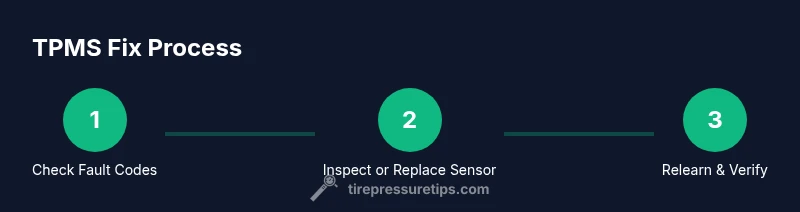
This section provides a high-level workflow to guide you through the process. It’s intended as a roadmap; the detailed, step-by-step instructions are in the dedicated STEP-BY-STEP block below. Expect to spend 45–90 minutes depending on your familiarity with tools and sensor replacement. The core sequence is: verify the fault with a scan tool, check tire pressures, inspect or replace the TPMS sensor, perform a relearn, and test-drive to confirm the light is off. Documentation of the process helps future maintenance and reduces repeated trips to the shop.
Common Scenarios and Solutions
- Sensor battery is dead: Replacement is usually needed. Choose an OEM or high-quality aftermarket sensor and ensure the replacement is compatible with your Explorer’s year and trim. After install, perform a relearn to re-establish communication.
- Damaged valve stem or sensor: Inspect for corrosion, cracks, or loose wiring. Replace the sensor and valve stem as a unit if necessary to ensure a reliable seal and signal.
- Failed relearn: Some dealers or tools require a specific sequence; if the relearn fails, double-check wheel position, battery power, and whether the steering angle or road conditions could interfere. A re-initiation with the vehicle in the correct mode often resolves it.
- Incorrect tire pressures: Even with a sensor functioning, mis-set pressures can trigger warnings. Always set all tires to the manufacturer’s recommended PSI on the placard and re-check after a short drive.
When to Seek Professional Help
If you cannot identify the fault, the TPMS light remains on after pressures are verified, or you notice sensor damage, seek professional help. A trained technician can safely lift the vehicle, inspect the sensors, reprogram or relearn the system, and verify wheel alignment and tire integrity. In some cases, a factory scan tool is required to clear codes and perform a complete TPMS relearn for Ford vehicles.
Authority Sources and Further Reading
- TPMS basics and safety guidance from the National Highway Traffic Safety Administration (NHTSA): https://www.nhtsa.gov/vehicle-safety-and-defects/tyre-pressure-monitoring-system-tpms
- Tire safety and maintenance resources from major automotive publications: https://www.consumerreports.org/cars-t-drivers/tire-pressure-monitoring-systems-tpms/
- General tire maintenance guidelines and helper tips for Ford owners: https://www.ford.com/support/maintenance/tire-pressure/
Tools & Materials
- Digital tire pressure gauge(High accuracy (±1 psi preferred), check all four tires)
- Torque wrench(To torque TPMS sensor or wheel fasteners to spec)
- Valve core tool(For removing/replacing valve cores without damage)
- Replacement TPMS sensor(s) or battery(Only if sensor is confirmed faulty)
- TPMS relearn tool or OBD-II scan tool(Needed to perform relearn on Ford Explorer)
- Work gloves(Protection from sharp edges and hot components)
- Jack stands or ramps(Use if you need to access wheels safely off the ground)
Steps
Estimated time: 45-90 minutes
- 1
Confirm TPMS fault and read codes
Use a TPMS scan tool to pull fault codes and confirm which wheel or sensor is problematic. Note the code for later reference and to verify if the issue is sensor-related or a system-level fault.
Tip: Record the exact sensor location and code to guide replacement decisions. - 2
Check all tire pressures
With the vehicle on a stable surface, check each tire’s pressure against the Ford-recommended spec on the door placard. Inflate or deflate to spec, then re-check. This helps distinguish simple underinflation from a genuine sensor fault.
Tip: Take note of variations between tires and consider seasonal pressure changes. - 3
Inspect sensors and valves
Carefully inspect the TPMS sensors, valve stems, and surrounding wheels for corrosion, cracks, or loose connections. If you see damage, plan sensor replacement rather than attempting a temporary fix.
Tip: Handle sensors with care; avoid bending or dropping them during service. - 4
Replace faulty sensor or battery
If the fault indicates a bad sensor or depleted battery, replace the sensor or the battery with an OEM or high-quality equivalent. Recompare the codes after replacement to confirm the fault is resolved.
Tip: Torque sensor to spec and avoid overtightening the valve stem nut. - 5
Relearn TPMS in Ford Explorer
Run the Ford relearn procedure using your scan tool or the vehicle’s built-in menu. The process may require key-on engine-off cycles and a short drive to complete.
Tip: Follow the exact sequence in your owner’s manual; wrong steps can fail the relearn. - 6
Test and verify
Drive for 10–15 minutes to allow the system to detect the new sensor data. Confirm the TPMS light stays off and recheck tire pressures after the drive.
Tip: If the light returns, recheck wheel positions and codes; you may have a secondary issue. - 7
Document and monitor
Record the steps taken, replacement parts, and the dates. Monitor the TPMS light over subsequent days to ensure stability.
Tip: Keep replacement parts and tools organized for future maintenance.
Frequently Asked Questions
What causes TPMS faults on a Ford Explorer?
TPMS faults can be caused by a weak sensor battery, damaged valve stems, corroded wiring, or an incomplete relearn after tire service. Confirm the specific cause with a proper scan tool.
Common TPMS faults come from battery or wiring issues, or an incomplete relearn after tire service.
Do I need a relearn after replacing a TPMS sensor?
Yes. After installing a new sensor, you typically must relearn or reset the TPMS so the vehicle recognizes the sensor ID and can monitor tire pressure accurately.
Yes, you usually need to relearn after sensor replacement to re-establish sensor IDs.
Can I drive with a TPMS fault?
It’s not recommended. A TPMS fault can mask underinflated tires, which affects handling, braking, and tire wear.
It's not advised to drive long with a TPMS fault; check tire pressures and have it serviced.
How long do TPMS sensors last in a Ford Explorer?
TPMS sensors typically last several years, but battery life varies with climate, driving conditions, and usage. If a sensor is old or damaged, replacement is often the best fix.
Sensors last several years, but battery life and wear can require replacement.
Should I replace all sensors if one fails?
Not always. If only one sensor fails and others test okay, you can replace just the failed unit. Consider replacing all in case of age-related issues on high-mileage vehicles.
Usually you replace the faulty sensor, but if others are aged, you might replace them all for consistency.
Where can I find the Ford relearn procedure?
The relearn procedure is described in your owner’s manual and can also be performed with a compatible TPMS scan tool. If in doubt, a dealer or independent shop can perform it.
Check the manual or a TPMS tool guide; dealers can perform the relearn for you.
Watch Video
What to Remember
- Verify fault codes before parts.
- Relearn after any sensor work.
- Set all tires to spec PSI.
- Torque shoes and sensors correctly.
- Seek professional help if surprises persist.