Honda Fit Tire Pressure Sensor Guide: Diagnose, Reset, Replace
A practical guide to diagnosing, resetting, and replacing the Honda Fit tire pressure sensor (TPMS). Learn step-by-step checks, tools, and safety tips from Tire Pressure Tips.


To troubleshoot and service a Honda Fit tire pressure sensor, start by locating the TPMS warning light and confirming tire pressures. Gather a tire pressure gauge, a jack and lug wrench, a reference owner’s manual, and a TPMS reset tool if your model requires it. Then inspect sensors, recalibrate the system, and replace faulty components as needed.
Understanding the Honda Fit tire pressure sensor system
The Honda Fit uses a tire pressure monitoring system (TPMS) to keep you informed about each tire's pressure. There are two TPMS approaches: direct TPMS uses wheel-mounted sensors that report pressure digitally, while indirect TPMS estimates pressure from wheel speed sensors and ABS data. Most modern Honda Fits rely on direct TPMS, which means you’ll interact with a physical sensor in each wheel. Understanding how these sensors communicate with the ECU helps you diagnose issues quickly, and it clarifies when service is needed. According to Tire Pressure Tips, regular checks and timely recalibration reduce false alerts and extend sensor life. When you encounter a warning light, verify that tire pressures are within the vehicle’s recommended range, and inspect for obvious signs of damage or corrosion around valve stems and sensors.
Common symptoms of a failing or faulty TPMS sensor
Symptoms include a TPMS warning light that stays on after inflating tires, inconsistent or fluctuating readings across tires, or a light that comes on when conditions change (like temperature shifts). A dead sensor battery, a corroded valve stem, or a damaged sensor can trigger false alerts. If you recently rotated tires or serviced the wheels and the light remains on, a relearn procedure may be required. If the warning occurs only on one corner, that tire's sensor or its valve stem is a likely culprit. In some cases, low battery life can lead to delayed or missing reports. As always, consult the Honda Fit’s owner's manual for model-specific guidance.
Direct TPMS vs indirect TPMS in the Honda Fit
Direct TPMS uses wheel-mounted sensors that report actual pressures to the car’s computer, providing precise readings and automatic alerts. Indirect TPMS uses ABS wheel-speed data to infer a low-pressure condition when actual sensors are absent or failing. In a Honda Fit with direct TPMS, a sensor replacement often means programming or relearning to the vehicle's system. In either case, calibration from a scan tool ensures the system recognizes correct tire data. This distinction matters because the reset procedure and needed tools differ between direct and indirect systems.
Tools and materials you’ll need
Before you begin, gather essential tools and reference materials. A reliable tire pressure gauge is critical, as is access to compressed air. A Honda Fit service manual or owner's manual helps with model-specific steps. If your car requires it, have a TPMS relearn tool or scanner on hand. Keep spare valve stems and sensor seals handy, and have a clean rag for any wipe-downs. With the right tools, you’ll approach TPMS work more confidently and safely.
Step-by-step diagnostic flow (overview)
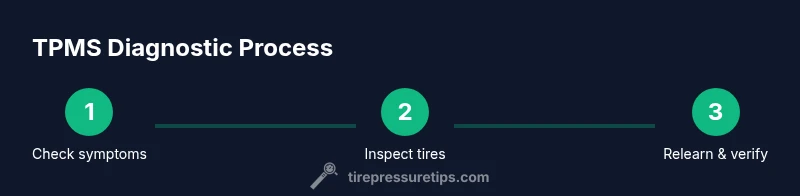
A structured diagnostic approach helps isolate TPMS faults quickly. Start with visual inspection of tires and valve stems, move to pressure verification, check the TPMS warning light behavior, and decide whether to recalibrate or replace a sensor. Document readings from each tire, perform a relearn if the vehicle requires it, and verify results by road testing. This flow minimizes unnecessary replacements and saves time.
Checking and adjusting tire pressures correctly
Always measure cold tires and use the vehicle’s door jamb sticker as the reference for recommended pressures. Inflate all tires to the specified range, then recheck to confirm even readings across all corners. If a tire shows a reading far from the others, inspect for punctures or slow leaks. After adjusting, drive for a few miles to allow the TPMS to refresh, and monitor the dashboard for any persistent alerts. This keeps your Honda Fit safe and efficient.
Recalibrating and resetting the TPMS after service
Reset procedures vary by model year and trim. In many cases, you’ll use a TPMS relearn tool or scan tool and follow on-screen prompts. Ensure the car is on level ground with the ignition off, then perform the relearn sequence exactly as described in the owner’s manual. After relearning, drive at a moderate speed for 10-15 minutes to let sensors register new data. If the light reappears, you may have a faulty sensor that needs replacement.
Replacing a faulty TPMS sensor
Direct TPMS sensors are mounted inside each wheel and can fail due to battery depletion, corrosion, or physical damage. When replacement is necessary, select sensors compatible with your Honda Fit model and ensure proper torque during wheel reassembly. After installation, complete the relearn procedure and verify readings to confirm success. If you’re unsure, a qualified technician can handle sensor pairing and inspection.
Safety, maintenance, and professional help
TPMS work involves handling pressurized tires and electrical components; always work on a cold tire, use a proper gauge, and wear eye protection if needed. Regular maintenance—checking pressures, cleaning sensor housings, and renewing seals—extends sensor life. If you encounter persistent warnings or suspect sensor damage, don’t delay professional help. The Tire Pressure Tips team recommends following the manual and seeking service if you’re not comfortable with the steps.
Tools & Materials
- tire pressure gauge(Digital or dial gauge; ensure accuracy.)
- portable air compressor(Access to reliable air source; keep the gauge handy.)
- owner’s manual / service manual(Model-specific steps and torque specs.)
- TPMS relearn tool or code scanner(Needed for relearn; may be integrated in a scan tool.)
- replacement TPMS sensors (if needed)(Only if sensor failure is confirmed.)
- valve stems and sensor seal kits(Spare seals prevent leaks during replacement.)
- rag and cleaning solution(Keep wheels clean and dry to prevent corrosion.)
Steps
Estimated time: 60-120 minutes
- 1
Prepare the vehicle and tools
Park on level ground, set the parking brake, and gather all required tools. Verify you have the Honda Fit owner’s manual and a TPMS relearn tool if your model requires it. This ensures you won’t stop mid-session for missing items.
Tip: Double-check tire pressures in all four corners before starting. - 2
Check tires when cold
Measure each tire’s cold pressure with a reliable gauge and compare to the door jamb specification. Note any large discrepancies that could indicate leaks or sensor issues. Always start with cold tires for accurate readings.
Tip: If a tire was driven recently, allow it to cool for at least 3 hours. - 3
Inspect tires and sensors
Look for obvious damage to tires, valve stems, and wheel housings. Check sensor housings for corrosion, and ensure valve stems are not bent or leaking. Physical damage is a common TPMS culprit.
Tip: Gently clean around sensors to prevent grime from causing readings errors. - 4
Read TPMS data with a scanner
Connect a TPMS scanner or relearn tool and read the sensor IDs and pressures. This helps identify if a specific sensor is failing or misreporting. In some cases, a calibration is all that’s needed.
Tip: Record sensor IDs for future reference. - 5
Decide on replacement or reuse
If readings are inconsistent or a sensor shows low battery, plan for replacement. Ensure you buy OEM-compatible sensors for reliable performance. Reuse is possible only if readings are stable and within spec.
Tip: Always replace seals when swapping sensors. - 6
Relearn the TPMS
With the car off, follow the relearn procedure using the scanner or the recommended sequence in the manual. Confirm the system accepts the new sensor data and the dashboard light behaves as expected.
Tip: Some models require a drive cycle to finalize the relearn. - 7
Verify and road test
Inflate tires to the recommended pressure, then take a short drive to allow the TPMS to update. Check that all four tires report consistent readings and the warning light stays off.
Tip: If the light returns, re-check for leaks or sensor faults.
Frequently Asked Questions
What is TPMS and how does it work in a Honda Fit?
TPMS stands for Tire Pressure Monitoring System. It uses sensors to monitor air pressure and alerts you when it drops below recommended levels.
TPMS uses wheel sensors to monitor tire pressure and notifies you when the pressure is too low.
Why won’t TPMS reset after tire service?
After tire service, the system may require a relearn or calibration via a scan tool or the procedure in the owner’s manual.
Your car may need a TPMS relearn after service.
How long do TPMS sensors last in a Honda Fit?
Direct TPMS sensors typically last several years, with battery life and environmental exposure being key factors.
Direct TPMS sensors often last several years, but battery life matters.
Can I replace a TPMS sensor myself at home?
Yes, with the right tools and relearn procedure; some steps require a relearn tool or scanner.
You can replace TPMS sensors yourself, but you may need a relearn tool.
What should I do if the TPMS warning light stays on after inflating to spec?
If it persists, you may have a faulty sensor or an incomplete relearn; consult a professional.
If the light stays on after inflating, you likely need a sensor service.
Watch Video
What to Remember
- Check cold tires against the door sticker before adjusting.
- Identify whether your Fit uses direct or indirect TPMS.
- Use the relearn procedure after any sensor work.
- Choose compatible sensors and replace seals.
- Verify results with a road test and monitor for warnings.