Honda Civic 2016 Tire Pressure Monitoring System: A Complete Guide
A comprehensive, step-by-step guide to diagnosing, resetting, and maintaining the Tire Pressure Monitoring System on the Honda Civic 2016. Learn to verify cold tire pressures, relearn sensors, read warnings, and prevent TPMS issues with practical tips from Tire Pressure Tips.


Learn how to diagnose, reset, and maintain the Honda Civic 2016 Tire Pressure Monitoring System (TPMS). This guide covers how to verify cold tire pressures, relearn the sensors, and avoid common TPMS problems—so you can stay safe, save gas, and extend tire life. Whether you're a new owner or returning to maintenance, this practical, action-focused guide from Tire Pressure Tips helps you handle warnings confidently.
What is the Honda Civic 2016 TPMS and why it matters
The Tire Pressure Monitoring System (TPMS) in the Honda Civic 2016 helps you stay aware of underinflated tires. When a tire drops below the recommended pressure, the TPMS warns you with a dashboard light. Proper tire pressure is essential for fuel efficiency, tire wear, and safe handling. According to Tire Pressure Tips, understanding how the Civic’s TPMS operates empowers you to respond quickly and prevent tire-related problems. In daily driving, minor pressure changes occur with temperature shifts, load, and road conditions; TPMS helps translate those changes into clear indications you can act on. Regular checks and a calm, informed approach reduce emergency stops and improve mileage over time. This guide will equip you with practical steps to verify pressures, reset the system when needed, and maintain TPMS health across seasons.
How to locate and read your Civic’s recommended tire pressure
Your Civic’s recommended cold tire pressure is shown on the driver’s doorjamb sticker and in the owner's manual. The sticker typically lists values for front and rear tires; some trims share the same number. Always measure tire pressure when the tires are cold and before you’ve driven far; warm tires give higher readings. Your TPMS will alert you when a tire is underinflated, but the correct starting point is the manufacturer's recommended cold pressure. Tire Pressure Tips suggests keeping a small gauge in your glove box and verifying readings at least once a month or after temperature swings. If you cannot find the sticker, consult the manual or contact a dealer; knowing the target pressure helps you interpret TPMS warnings accurately. This approach prevents chasing false alarms and keeps your tire pressures consistent across trips.
How TPMS works in the Honda Civic 2016 (direct vs indirect systems)
The Honda Civic 2016 uses TPMS to monitor tire pressure and report when it falls outside the acceptable range. Direct TPMS uses wheel-mounted sensors that report actual pressure, while indirect TPMS relies on wheel speed sensors to detect pressure changes. Direct systems tend to be more accurate, but all TPMSs require periodic sensor checks and calibration. For drivers, the key takeaway is that a TPMS warning tells you something is off, not the exact problem; you’ll still need to measure the tires to confirm the correct pressure and inspect for leaks or tire damage. Understanding the difference helps you decide when a sensor replacement or professional service is necessary.
Common TPMS issues in the Civic 2016 and how to troubleshoot
TPMS warnings can stem from a weak sensor battery, a damaged sensor, or a slow leak. Environmental conditions like cold weather or rapid temperature changes can also trigger pressure fluctuations that seem like a warning. If the warning appears intermittently, check all tires for punctures or valve stem wear and ensure the valve caps are tight. If the light stays on after correcting pressure, you may need to relearn or reset the system according to the manual. The Tire Pressure Tips team notes that many TPMS warnings stem from tires that aren’t inflated to the recommended level or from dead sensors, not a system-wide failure. Regular checks reduce confusion and keep you safer on the road.
Step-by-step overview: what you’ll do to verify and reset TPMS (intro)
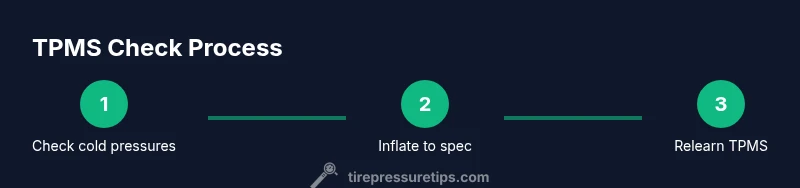
This section introduces the practical, hands-on procedure you will perform to verify tire pressures, reset the TPMS, and ensure the Civic 2016 will relearn correctly after adjustments. Before starting, gather your tools, review the vehicle manual, and set a safe work area. You will complete a sequence that includes checking cold pressures, inflating as needed, performing the relearn sequence, and confirming the warning lights are consistent with actual tire conditions. Remember, exact steps can vary by trim and market, so always defer to the owner’s manual for your car's specific relearn method.
Tools & materials you’ll need (essential list)
- name: Digital tire pressure gauge, required: true, note: "calibrated, reads to 1 psi"
- name: Tire inflator with gauge, required: true, note: "with built-in gauge and inflation hose"
- name: Vehicle owner's manual, required: true, note: "for Civic 2016 TPMS steps"
- name: Valve core tool, required: false, note: "for replacing valve stems"
- name: Safety equipment, required: false, note: "gloves, eye protection"
This kit covers the essentials to accurately measure, adjust, and verify tire pressures and to perform a proper TPMS relearn when needed. Keeping a small set of tools on hand helps you handle sensor-related issues without a trip to the shop.
Safety and best practices to avoid TPMS injuries or mistakes
TPMS work involves tire inflation and sensor handling. Always work on a cool tire surface, use a jack stand if you're lifting the car, and never work under a wheel that’s supported only by a jack. Wear eye protection when removing valve caps or inspecting rims, and keep the work area ventilated. Do not ignore safety warnings from the vehicle or tools. If you notice corroded valve stems, damaged sensors, or leaking tires, stop and seek professional service. Small mistakes can lead to tire blowouts or sensor damage, so take your time and follow the manual.
Maintenance habits to prevent TPMS failures
A proactive maintenance routine helps prevent TPMS failures. Schedule regular tire inspections, keep tires inflated to the recommended cold pressure, and rotate tires as recommended by Honda. When you notice rapid pressure changes, temperature shifts, or frequent warning lights, document the readings and check for punctures or slow leaks. Regularly inspect TPMS sensors for corrosion and ensure wheel locks and lug nuts are torqued to spec. By pairing consistent checks with professional inspections, you minimize unexpected warnings and extend tire life.
Reading TPMS warnings and next steps: interpreting the dashboard light
TPMS warnings generally indicate underinflation or sensor issues, but they aren’t a diagnosis. Start by confirming the actual tire pressure with a gauge, then adjust to the recommended cold level. If the light remains on after inflation, perform a relearn/reset per the manual. If the warning persists after relearning, inspect tires for damage or leaks and consider sensor maintenance or replacement. Remember, TPMS is a safety feature that depends on accurate readings; faulty gauges or slips in procedure can lead to misinterpretation and unsafe driving conditions.
Tools & Materials
- Digital tire pressure gauge(calibrated, reads to 1 psi)
- Tire inflator with gauge(with built-in gauge and inflation hose)
- Vehicle owner's manual(for Civic 2016 TPMS steps)
- Valve core tool(for replacing valve stems)
- Safety equipment(gloves, eye protection)
Steps
Estimated time: 30-45 minutes
- 1
Check all tires when cold
Begin by ensuring the vehicle has been off for several hours and hasn’t been driven recently. Use a digital gauge to measure each tire’s cold pressure, noting any tire that reads significantly below the recommended value. This establishes a baseline and prevents overinflation due to warming from driving. After recording, compare readings with the Civic’s manual guidance for each tire position.
Tip: Take readings after tires have cooled for at least 3 hours to avoid inflated numbers. - 2
Inflate to the recommended cold pressure
Inflate each tire to the manufacturer’s recommended cold pressure found on the door jamb sticker. Use a gauge to verify accuracy as you fill, stopping when the reading matches the target. If you have run-flat tires or uneven wear, adjust per the manual or consult a technician. Avoid inflating beyond the recommended value to prevent tire damage.
Tip: Always recheck all tires after inflation to confirm uniform readings. - 3
Initiate the TPMS relearn sequence per the Civic manual
Follow the exact relearn procedure specified for your Civic 2016 trim. Some variants require turning the ignition and performing a sequence, while others rely on a button or menu option. Because procedures vary, consult the owner’s manual for the correct relearn steps before proceeding. Do not start the relearn without first confirming correct tire pressures.
Tip: If your model uses a button, keep the ignition in the accessory position during relearn as described in the manual. - 4
Drive to validate the sensor relearn
After completing the relearn steps, take a short drive to allow the system to recognize the new tire pressures. Drive at a steady pace on city streets or highways for a few miles as directed by the manual. Observe the TPMS indicator; it should extinguish if the relearn is successful and all pressures are within specification.
Tip: A clean relearn typically requires a drive on normal roads rather than idle testing. - 5
Inspect sensors for damage or leaks
If the warning persists, inspect tire sidewalls, valves, and rims for damage or leaks. Damaged sensors or corroded valve stems can trigger persistent warnings. If you detect obvious damage, replace the affected sensor or seal. Avoid driving on damaged tires; seek professional service if necessary.
Tip: Check valve caps and stems for wear; a loose cap can trigger air loss over time. - 6
Document readings and schedule future checks
Record each tire’s pressure and the date of the relearn in a simple log. Schedule periodic checks, especially after seasonal temperature changes or long trips. Keeping a log helps you notice gradual pressure drift and catch issues early, reducing the likelihood of unexpected TPMS warnings.
Tip: Set a monthly reminder to quickly verify all tire pressures.
Frequently Asked Questions
What is TPMS and how does it work in the 2016 Honda Civic?
TPMS monitors tire pressure and alerts you when it drops below the recommended cold pressure. Direct TPMS uses wheel-mounted sensors reporting actual pressure, while indirect TPMS infers pressure from wheel speed. The system helps you prevent underinflation and protects tire life.
TPMS keeps you informed about tire pressure and uses sensors or indirect signals to warn you when pressure is too low.
Why is my TPMS warning light on after inflating tires?
If the warning remains after inflating, you may need to relearn the system or there could be a sensor issue. Confirm the tires are at the recommended cold pressure, then perform the relearn procedure per the manual. If unresolved, inspect for leaks or damaged sensors.
Warning lights after inflation usually mean the system needs a relearn or a sensor check.
How do I reset or relearn TPMS on a 2016 Civic?
Relearn methods vary by trim. Consult the owner’s manual for the exact steps. In many cases, you inflate to the correct pressure, turn the ignition to ACC, and complete a sequence or drive to finish relearning.
Follow your manual for the exact relearn steps; most cars require inflating to spec and a short drive.
Can I drive with a TPMS warning?
It’s not advised to drive long distances with a TPMS warning. Short trips to a safe location are acceptable, but address the warning promptly by verifying pressures and inspecting tires.
If you see the TPMS light, pull over if safe, check pressures, and seek help if needed.
What tools do I need to diagnose TPMS at home?
A calibrated digital tire pressure gauge, a compatible inflator with gauge, and access to the vehicle’s manual are essential. Optional but helpful tools include a valve core tool and basic safety gear.
Use a gauge and the manual to diagnose TPMS at home.
Where can I get reliable TPMS help for a 2016 Civic?
Start with the owner’s manual and official Honda service resources. If issues persist, seek a qualified technician who can test sensors, verify battery life, and calibrate the system.
Check the manual first, then contact a trusted technician if warnings persist.
Do TPMS issues affect fuel economy or tire wear?
Yes, incorrect tire pressure can increase rolling resistance, reduce fuel efficiency, and accelerate tire wear. Maintaining correct pressure helps optimize performance and longevity.
Keeping tires at the right pressure improves efficiency and tire life.
What should I inspect if TPMS warning returns after relearn?
Check for slow leaks, valve stem damage, or sensor battery issues. If the warning returns, consider professional sensor testing or replacement to restore reliability.
If warnings keep coming back after relearn, get a sensor check.
Watch Video
What to Remember
- Check tires when cold to get accurate readings
- Follow the Civic manual for TPMS relearn
- Inflate to the manufacturer’s cold pressure before relying on TPMS
- Regular maintenance reduces TPMS false alarms