Doran TPMS: Check, Relearn, and Maintain Your Tire Pressure System
Learn how to check, relearn, and maintain Doran TPMS sensors with a clear, step-by-step approach. This guide covers tools, safety tips, troubleshooting, and best practices for reliable tire pressure monitoring.


Follow a step-by-step guide to check, relearn, and maintain Doran TPMS sensors. Gather a tire pressure gauge, a Doran TPMS relearn tool (or compatible device), and your vehicle’s manual for the exact relearn procedure. Start by confirming sensor health, then perform a relearn, and finally verify that all tires read correctly.
Understanding Doran TPMS: What It Is and How It Works
Doran TPMS is a tire-pressure monitoring system that uses sensors located in each wheel to measure air pressure and, in many cases, temperature. The data is transmitted to the vehicle’s TPMS control module, which then alerts you via the dashboard when pressures depart from the recommended range. For drivers using tires that interact with Doran TPMS sensors, understanding how the system communicates, how sensors are learned, and when a relearn is necessary can prevent misreads and unnecessary warnings. According to Tire Pressure Tips, maintaining correct tire pressure improves fuel efficiency, handling, and tire life, while reducing the risk of blowouts. Regular checks are a small but powerful habit for safety and performance.
A Doran TPMS installation may involve sensor batteries and compatibility with wheel cores or sealants. If your vehicle is older, the exact relearn procedure can differ from newer models. The key is to know when a relearn is required—after tire changes, sensor replacements, or wheel swap—and to have a compatible relearn tool on hand. This section explains how the system works and why the process matters for everyday driving.
Tools and Materials You’ll Need for Doran TPMS Work
Having the right tools makes the process smoother and safer. Start with a quality digital tire pressure gauge to establish a baseline. You’ll also need a Doran TPMS relearn tool or a universal TPMS relearn device compatible with your sensors. Your vehicle’s owner manual provides the exact relearn procedure for your model. Optional items include a soap solution for leak checks, a torque wrench for wheel lug nuts, and a battery-powered flashlight for dark work areas. Keeping a spare sensor or vendor-approved replacement kit may save time if a sensor is damaged. Remember to operate in a well-lit, flat area and on cold tires for the most accurate readings.
Preparing for a Doran TPMS Relearn: Baseline Readings and Safety
Before you begin, ensure the car is on a flat surface and the parking brake is engaged. Record the baseline tire pressures for all four tires when the tires are cold. Inspect each sensor and valve stem for corrosion, cracks, or damage. If a tire was recently changed or rotated, make a note of the service history, as this helps determine whether a relearn is needed. Using a digital gauge set to your vehicle's recommended PSI, compare each tire to its specification. If any tire is significantly underinflated, address it before attempting a TPMS relearn. These steps reduce the chances of an inaccurate relearn and spurious warning lights.
Step-By-Step Overview for Doran TPMS Relearn: Core Actions
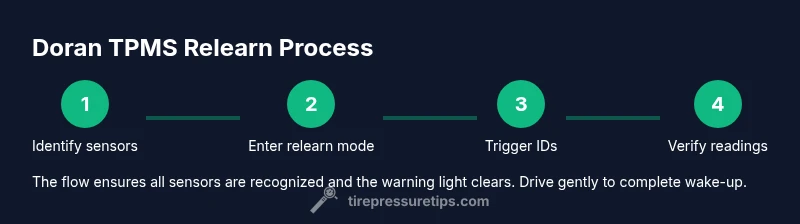
Doran TPMS relearn typically involves three core actions: 1) Initiating the relearn mode via the vehicle or the relearn tool, 2) Triggering each sensor to transmit its unique ID, and 3) Verifying that the system recognizes all sensors and clears warning lights. Always refer to your vehicle’s manual for the correct sequence, as some models support factory resets while others use stand-alone tools. After starting relearn, you may need to drive for a short period to help the system stabilize. This section outlines the general flow and why timing matters for sensor wake-up.
Safety First: Handling TPMS Sensors and Tires
TPMS work involves high-pressure air and exposed wheel hardware. Wear eye protection and gloves when handling tires, and ensure the vehicle is fully secured with the parking brake engaged. Do not hammer or force sensors during removal; use proper tire levers and be mindful of wheel weights and sensors. If a sensor shows signs of damage (cracks in the housing, corroded terminals, or a leaking seal), replace it rather than attempting a quick fix. Safety steps protect you and extend the life of your TPMS components.
Troubleshooting Common Doran TPMS Issues: Light On, Not Relearning
If the TPMS indicator remains on after a relearn attempt, verify the sensor IDs were correctly read by the relearn tool and confirm the battery in the sensor is charged. A misread can occur from dirty sensor contacts or a loose wheel lug. Re-check torque specs and re-run the relearn process. If warnings persist, consult a tire technician or use your vehicle’s service documentation to determine whether a sensor needs replacement. The goal is to ensure reliable, accurate readings from every wheel.
Temperature Effects on TPMS Readings: What Drivers Should Know
Ambient and road temperatures influence tire pressure, which can trigger TPMS alerts if readings drift beyond the recommended range. In colder months, pressures drop; in heat, they rise. This is why you should check tires when they are cold and soon after driving, to avoid chasing false alarms. The Doran TPMS system, like others, benefits from regular checks that account for weather-related pressure changes.
Maintenance Schedule for Doran TPMS: When to Inspect and Relearn
Create a simple maintenance schedule that includes quarterly checks and after every tire service (rotation, replacement, or patch). Document readings and sensor conditions so you can compare over time. If you notice frequent TPMS warnings, it may indicate a sensor with a weak battery or a damaged valve stem—these parts should be addressed promptly to maintain system reliability.
Tools & Materials
- Digital tire pressure gauge(Calibrated, reads up to at least 100 psi; include a bleed feature for precise adjustments)
- Doran TPMS relearn tool or compatible TPMS tool(Ensure it supports Doran sensors and your vehicle's year/make/model)
- Vehicle owner’s manual / service manual(Contains the exact relearn procedure and sensor IDs)
- Soap solution (optional)(Useful for checking leaks around valve stems after disassembly)
- Torque wrench(For ensuring wheel lug nuts are properly torqued after service)
- Safety gear (gloves, eye protection)(Protects hands and eyes during tire work)
- Replacement TPMS sensors (optional)(Keep spare sensors on hand if a sensor is damaged)
Steps
Estimated time: 60-90 minutes
- 1
Gather tools and confirm compatibility
Collect all needed tools and verify the relearn tool supports Doran TPMS sensors for your vehicle. Check the vehicle manual to identify the exact relearn method. Perform a quick sensor inspection before touching any tire to prevent misreads.
Tip: Double-check tool compatibility with your Doran TPMS model before starting. - 2
Locate and inspect TPMS sensors
Identify the sensor locations in each wheel and inspect for obvious damage or corrosion at the valve stems. If a tire was recently replaced, verify you have the sensor IDs and that the wheel is clean and free of debris.
Tip: Clean the valve stems gently with a soft brush to ensure good sensor contact. - 3
Record baseline tire pressures
Before any relearn attempt, measure all four tires when cold and document the readings. Compare these numbers to the vehicle’s recommended pressures printed on the door placard or in the manual. This creates a useful reference if you need to recheck later.
Tip: Take pictures of the gauges reading for your records. - 4
Put sensors into relearn mode
Use the Doran TPMS relearn tool or the vehicle’s own relearn procedure to enter relearn mode. Follow the exact steps in the manual or tool prompts. This step primes the system to recognize each wheel’s sensor ID.
Tip: If your vehicle requires a specific sequence, do not improvise; deviation can fail the relearn. - 5
Trigger each sensor and read IDs
Present the tool to each wheel to trigger and capture the sensor IDs. Ensure the tool confirms a successful read for all four sensors before proceeding. If a sensor ID fails to read, recheck the wheel and retry.
Tip: Slightly rotate the wheel and allow the tool to gain a stable signal. - 6
Complete relearn and verify
Exit relearn mode and drive the vehicle as required by the manual or tool to allow wake-up signals to finalize. Re-check pressures and confirm the dashboard TPMS light is off or indicating four valid sensors.
Tip: Drive 10–15 minutes at typical highway speeds to complete stabilization. - 7
Document results and plan next checks
Note sensor IDs, baseline pressures, and any notes about sensor health. Schedule future checks and keep a record of your maintenance to simplify next tire service.
Tip: Set a reminder for seasonal checks and after tire changes.
Frequently Asked Questions
What is Doran TPMS and how does it work?
Doran TPMS uses wheel-mounted sensors to monitor tire pressure (and sometimes temperature) and communicates with the vehicle’s TPMS module to alert you if pressures fall outside the recommended range.
Doran TPMS uses sensors in each tire to monitor pressure and temperature and reports back to your car to warn you if something’s off.
Do I need to relearn TPMS after changing tires?
Yes. After tire changes or sensor replacements, most vehicles require a relearn to re-sync the sensors with the TPMS system.
Yes, after changing tires you usually need to relearn the sensors so the system recognizes them again.
Can I relearn TPMS without a special tool?
Some vehicles support built-in relearn procedures, but many setups require a dedicated TPMS relearn tool. Check your manual for specifics.
Some cars can relearn using the built-in steps, but many systems need a dedicated relearn tool.
What if the TPMS light stays on after relearn?
Recheck sensor IDs, verify tire pressures, and inspect for damaged sensors or leaks. If the light persists, consult a tire technician.
If the light stays on, recheck the IDs and pressures, and inspect sensors. If it continues, seek professional help.
Is Doran TPMS compatible with my vehicle?
Compatibility depends on sensor type and vehicle model. Always consult the manual and confirm sensor IDs before purchase.
Check your manual and sensor IDs to confirm compatibility with your vehicle.
How often should TPMS be checked?
Check TPMS and tire pressures seasonally and after any tire service. Regular checks help prevent warnings and improper inflation.
Check TPMS and tire pressures regularly, especially after tire work or seasonal changes.
Watch Video
What to Remember
- Check baseline PSI before attempting TPMS work.
- Use a Doran TPMS relearn tool or compatible device for accuracy.
- Drive after relearn to complete sensor wake-up.
- Schedule regular checks to prevent false warnings and ensure safety.