Chevy Tire Pressure Sensor Troubleshooting: A Practical Guide
Practical, urgent guide to diagnose and fix Chevy tire pressure sensor (TPMS) alerts, including battery health, relearn steps, and calibration for safe driving in 2026.


Common Chevy TPMS issues usually start with a simple check: tire pressures, sensor battery, and proper sensor seating. Quick fixes include resetting the TPMS, reinitializing with a scan tool, and recalibrating after airing tires. If the light stays on, inspect for a faulty sensor or a slow leak and escalate to replacement or professional service.
Understanding Chevy Tire Pressure Sensor (TPMS) Basics
According to Tire Pressure Tips, the chevy tire pressure sensor is part of the Vehicle Safety System that alerts you when a wheel’s air pressure falls outside the recommended range. TPMS sensors are generally mounted on the valve stem or inside the wheel, powered by a small battery. When a sensor detects pressure changes, it communicates with the car’s central computer, triggering the dashboard warning light if the value falls outside the preset window. For Chevy owners, understanding how TPMS works helps you diagnose issues more quickly and safely. Regular tire pressure checks remain essential, even when the TPMS is functioning correctly, because sensors can lag or miss tiny leaks that only a manual gauge will reveal. In 2026, the Tire Pressure Tips team emphasizes that preventive checks save time and money and reduce the risk of sudden tire failure on the road.
Common Symptoms You Might Notice
The most obvious symptom is the TPMS warning light staying on after you’ve inflated tires to the recommended pressure. Other signs include a spurious reading that changes with road conditions, a sensor that chimes or blinks intermittently, or a noticeable mismatch between the gauge reading and the dashboard display. In Chevy models, a leaking valve stem can trigger a false alert, while a dead sensor battery will typically cause a permanent warning. You may also notice the light goes off briefly after maintenance but returns shortly after driving. While these symptoms are common, they don’t confirm which sensor is at fault; a systematic check is required to avoid unnecessary replacements.
Quick Checks You Can Do Before Reaching for Tools
Begin with the simplest checks:
- Use a reliable digital tire pressure gauge to verify each tire is within the vehicle’s recommended PSI.
- Inspect valve stems for cracks or obvious damage.
- Ensure wheels were not mixed up during service and that relearn procedures, if needed, were performed on the correct tire position.
- Look for signs of slow leaks, nails, or punctures in the tread that could cause underinflation. If you still see the warning after these checks, the issue may lie with the sensor itself or the relearn process. Remember to perform checks in a safe area away from traffic and on a cold tire for the most accurate readings.
Diagnostic Pathway: Symptom to Diagnosis
A structured diagnostic approach helps minimize unnecessary repairs. Start by confirming tire pressures, then verify that the TPMS light behavior matches typical fault patterns. If readings are inconsistent, it could indicate a weak sensor battery, a damaged sensor, or a failed relearn. Use an OBD-II scanner or a dedicated TPMS tool to retrieve fault codes and sensor IDs. Cross-check sensor IDs with wheel positions to rule out misassignment. In Chevy vehicles, certain model years require a precise relearn sequence after tire service or battery replacement. If codes point to a specific sensor, plan replacement or battery service accordingly.
Step-by-Step Fixes for Chevy TPMS Issues
This section outlines the core fixes you’re likely to need for a chevy tire pressure sensor-related problem. Always start with the easy checks and escalate to professional service when needed.
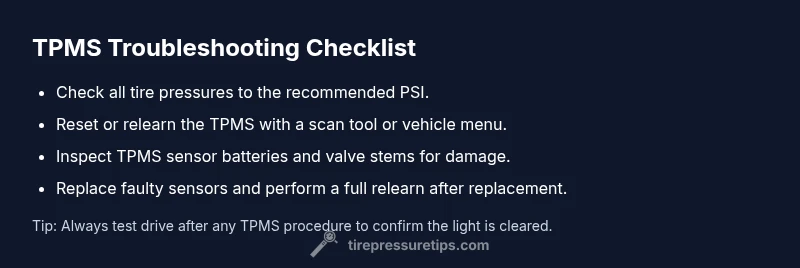
- Step 1: Inflate all tires to the manufacturer’s recommended PSI and recheck. If the warning persists, proceed to step 2.
- Step 2: Reset or relearn the TPMS using the vehicle’s menu or a TPMS tool. Follow the specific steps for your Chevy model year to avoid mislearning.
- Step 3: Inspect the sensor battery life and check for corrosion at the valve stem; replace a weak battery or damaged sensor.
- Step 4: If codes indicate a particular wheel, inspect the valve stem, wiring, and sensor mounting; replace the faulty sensor if needed.
- Step 5: After any replacement, perform a complete relearn/recalibration and test drive to confirm the warning clears.
- Step 6: If the light remains, seek professional diagnosis with a tire and TPMS calibration specialist; persistent faults can indicate system-wide issues.
Safety Considerations and Prevention Tips
Working on tires carries risk. Never drive with visibly underinflated tires, and avoid overinflating beyond the maximum allowed. Always wear eye protection and ensure the vehicle is on a stable surface with the parking brake engaged. If you must lift the car, use proper jack stands and never rely on a jack alone. Regular preventive maintenance includes periodic TPMS checks and sensor battery inspection; this reduces surprises and extends wheel life.
Maintenance and Longevity: Preventing Future TPMS Faults
Routine maintenance reduces TPMS problems. Schedule semi-annual checks of tire pressures, especially before long trips or seasonal changes. When replacing tires, ensure the TPMS relearn is performed correctly; save time and money by avoiding unnecessary sensor replacements. Keep a log of sensor service dates and battery replacement intervals. The Tire Pressure Tips team emphasizes that proactive maintenance is the best defense against unexpected TPMS faults.
Steps
Estimated time: 30-60 minutes
- 1
Verify tire pressures
Measure each tire with a digital gauge and inflate to the recommended PSI shown on the door jamb sticker or owner’s manual. Recheck after 5-10 minutes of driving.
Tip: Do this when tires are cold for accuracy. - 2
Check for obvious damage
Inspect valve stems for cracks, corrosion, or leakage. If a stem is damaged, replace it before proceeding.
Tip: A damaged stem can mimic sensor faults. - 3
Attempt TPMS relearn
Use the vehicle’s TPMS relearn option or a compatible scan tool to relearn sensor IDs to wheel positions.
Tip: Follow model-year specific steps in the manual. - 4
Test sensor battery & integrity
If a battery test is available, check for voltage; replace a weak battery or entire sensor if needed.
Tip: Battery life varies; sensors often last several years. - 5
Inspect sensor mounting
Ensure sensors are securely mounted and not loose, which can cause inaccurate readings.
Tip: Tighten not over-tighten to avoid damage. - 6
Replace faulty sensor if required
If codes point to a specific wheel or the light stays on after relearn, replace the sensor and perform a fresh relearn.
Tip: Consider OEM vs aftermarket sensors based on your budget.
Diagnosis: Dashboard TPMS warning light on Chevy
Possible Causes
- highLow tire pressure in one or more tires
- mediumWeak or dead TPMS sensor battery
- lowSensor not learned/relearned after tire service or rotation
Fixes
- easyCheck and inflate all tires to the recommended PSI, then recheck readings
- mediumReset or relearn the TPMS using a scan tool or vehicle menu
- mediumInspect sensor batteries and replace a faulty sensor if necessary
Frequently Asked Questions
Why is my Chevy TPMS light on even after inflating tires?
The light can stay on if the TPMS sensor is faulty or not relearned after service. Recheck tire pressures, perform a relearn with the correct procedure, and inspect for a damaged sensor or valve stem.
The TPMS light can stay on if a sensor is bad or hasn’t been relearned after service. Recheck pressures, relearn the sensors, and inspect for damage.
Can I relearn TPMS without a professional tool?
Some Chevy models support onboard relearn through the vehicle’s menus. If your model requires a tool, use a compatible TPMS scanner to perform a proper relearn.
Some models let you relearn from the car menu, others need a TPMS scanner. Check your manual.
How long do TPMS sensors usually last?
Sensor life varies; most teams expect several years of service. Battery wear is a common cause of failure, especially on older vehicles.
TPMS sensors typically last several years, but batteries wear out over time.
Is a slow leak the same as a TPMS fault?
A slow leak can trigger a TPMS warning if the pressure drops enough, but it’s not a hardware fault. Use a gauge to verify and repair the leak.
A slow leak can trigger the TPMS alert but isn’t a sensor fault. Check and repair leaks first.
Should I replace all TPMS sensors at once?
Not necessarily. Replace only faulty sensors as diagnosed, but in some cases where several are weak, a multi-sensor set may be more cost-effective.
Only replace sensors that fail diagnosis, unless several are weak.
Does temperature affect TPMS readings on a Chevy?
Yes, ambient and road temperatures affect tire pressure readings. Recheck pressures after temperature changes and before making decisions about sensor replacement.
Temperature changes affect tire pressure readings; recheck after weather changes.
Watch Video
What to Remember
- Check tire pressures first, then TPMS status.
- Relearn the sensor after any tire service or battery work.
- Replace a faulty sensor when codes point to a specific wheel.
- Keep tires within recommended PSI to prevent TPMS nuisance alerts.
- If in doubt, seek professional TPMS calibration.