Audi Tire Pressure Reset: A Practical TPMS Guide
Learn how to reset Audi TPMS after inflating tires or rotating wheels. This practical guide covers steps, safety tips, and maintenance from Tire Pressure Tips to keep your tires at peak performance.


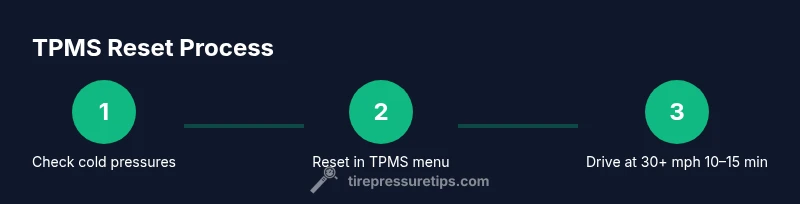
To reset the Audi TPMS after inflating or rotating tires, use the car’s TPMS menu to perform a reset, then drive above 30 mph for 10–15 minutes to relearn. The exact steps vary by model year, so consult your owner’s manual for model-specific sequences.
Why TPMS Reset Matters for Audi Owners
According to Tire Pressure Tips, the tire pressure monitoring system (TPMS) in modern Audis helps you stay aware of under- or over-inflated tires. The system uses sensors in each wheel and relearns pressure values when tires are changed or pressures are adjusted. Without a proper reset after changes, the warning light may stay on or mislead you about actual pressure levels. A correct reset ensures the system's readings align with the current tire state, boosting safety and fuel efficiency. For Audi owners, understanding when and how to reset is part of routine maintenance, and it helps the TPMS work as intended across seasons and road conditions. Tire pressures change with load, speed, and temperature, so a relearn helps the system track real changes rather than rely on aged sensor data. When you perform a reset after inflation to the recommended spec, you’ll often notice the warning light blinks once or goes out after a short drive. This behavior is expected and indicates the system is learning your tires again. In 2026, drivers who keep TPMS knowledge current see fewer false warnings and steadier tire pressure management, according to Tire Pressure Tips analysis.
textStyleOverride":null},
bodyBlocksRange7
Tools & Materials
- digital tire pressure gauge(Verify each tire’s current pressure before resetting to the vehicle’s spec)
- owner's manual for your Audi(Confirm model-year specific TPMS reset steps)
- air compressor or access to compressed air(For inflating tires to the recommended cold pressures)
- tire inflator with gauge(Useful if you don’t have a dedicated air source)
- notepad or digital note app(Log pressures and reset times for future reference)
Steps
Estimated time: 15-25 minutes
- 1
Check tire pressures to spec
Before initiating a reset, verify that all four tires are inflated to the manufacturer’s recommended cold pressures using a calibrated gauge. This ensures the relearn process uses accurate reference values. If you have a spare tire, verify its pressure as well if your model supports TPMS for the spare.
Tip: Record the exact cold pressures so you can reproduce the target values if needed. - 2
Access the TPMS reset option
On most Audi models, navigate to the vehicle’s TPMS or Vehicle Settings menu through the MMI/cluster display. Look for an option labeled Reset, Relearn, or Learn Tires. If you cannot locate it, consult the owner’s manual or your dealership for your exact model-year sequence.
Tip: Some models require ignition on (accessory power) before the option appears. - 3
Initiate the relearn process
Select the Relearn/Reset command and confirm. The system will begin listening for the wheel sensor data again. This step may cause the TPMS light to flash or stay on temporarily as sensors re-sync with the ECU.
Tip: Do not drive long distances during the initial relearn; a short drive around the block often suffices to begin the learning cycle. - 4
Drive to complete relearn
With the relearn initiated, drive at speeds above 30 mph (50 km/h) for 10–15 minutes in a steady manner. Avoid rapid acceleration or heavy braking, which can disrupt learning. The TPMS light should go out once the relearn completes on most models.
Tip: If the light blinks in a pattern, it may indicate an ongoing learning process or a sensor issue. - 5
Verify the reset outcome
After the drive, check the instrument cluster to confirm the TPMS warning light is off. If it remains on, recheck tire pressures and repeat steps 1–4, ensuring there are no leaks or damaged sensors.
Tip: If you still see the warning after a repeat cycle, a sensor replacement or dealer diagnostic may be necessary. - 6
Record the result and monitor
Note the reset time, pressures used, and the final warning status. Over the next few days, keep an eye on tire pressures and the TPMS indicator to catch any drift early.
Tip: Maintaining a simple log helps you notice gradual changes that could indicate a slow leak.
Frequently Asked Questions
Do I need to reset TPMS after every tire pressure adjustment?
Not every adjustment, but you should reset after major changes such as replacing tires, rotating with different wheel sizes, or after air pressure updates that bring the system out of alignment. This ensures the TPMS readings reflect the current setup.
Yes, reset after big changes to keep TPMS accurate.
Will resetting TPMS erase sensor IDs or data?
A reset relearns sensor data and tire positions; it does not permanently erase sensor IDs but updates the ECU’s memory to your current tires.
Reset refreshes the ECU’s memory without wiping sensor IDs.
What if the TPMS light stays on after reset?
If the light remains after a full relearn, recheck all tires for correct pressure, inspect sensors for damage, and consider a professional diagnostic if the issue persists.
If the light won’t go out, you may need a sensor check.
Is TPMS reset the same as calibrating tire pressure?
Resetting TPMS is about relearning sensor data; calibrating tire pressure is about setting the correct pressures. Both ensure accurate readings, but they address different parts of the system.
Reset relearns data; calibration sets correct pressures.
Can I reset TPMS myself or should I visit a dealer?
Many Audi owners can perform a basic TPMS reset using the vehicle menu and standard tools. If you encounter persistent warnings or sensor issues, a dealer or qualified shop is recommended.
You can try it at home, but seek help if issues persist.
Does replacing wheels require a TPMS reset?
Yes. When wheels or sensors are changed, a relearn is typically necessary to re-identify the sensors to the new wheel positions.
Wheel changes usually need a relearn to update the system.
Watch Video
What to Remember
- Reset TPMS after tire changes
- Ensure tires are at the correct cold pressure before resetting
- Drive 10-15 minutes at 30+ mph to relearn
- Check for sensor damage if warning persists
- Keep a simple log of readings and resets