Resetting TPMS: A Practical How-To Guide
Learn how to reset TPMS safely after inflating, rotating, or replacing tires. Step-by-step methods, tools, and common questions from Tire Pressure Tips.


Resetting tpms is the process of clearing a tire-pressure monitoring system fault so the system can relearn current tire pressures after you inflate, rotate, replace, or service tires. The exact steps depend on your vehicle: many cars use a TPMS button, while others require a drive cycle or a scan tool. Always consult the owner's manual for model-specific, safe procedures.
What resetting tpms does and when you need it
Resetting tpms is the process of clearing a fault code and forcing the system to relearn the new tire pressures after you inflate, rotate, replace, or service tires. This matters because inaccurate readings can trigger avoidable lights, lead to mistaken pressure readings, or affect fuel efficiency and tire wear. According to Tire Pressure Tips, a successful reset ensures the sensor data matches the actual air pressure in each tire and helps you maintain safety. Before attempting a reset, confirm that all tires are within the recommended range, because an incorrect starting point will hinder relearning. TPMS data is learned by the vehicle's control module when it detects stable pressures over a short drive or via a learning sequence. Some cars store sensor IDs, while others rely on a generic relearn. The method you use is largely dictated by make and model. If you recently replaced a tire or sensor, the new sensor must pass a calibration step to register correctly. If the light remains after a reset attempt, you may have a faulty sensor, a weak battery in the sensor, or a damaged valve stem. In that case, professional service is advised.
How TPMS learns pressure
Tire Pressure Monitoring Systems detect the actual air pressure in each tire using sensors inside the wheel and communicate wirelessly with the vehicle's computer. When you inflate or adjust tire pressures, the system must relearn the new baseline so it can warn you accurately again. Most modern vehicles use a learning process that happens automatically during normal driving and through a manual relearn sequence. Sensors have unique IDs; some vehicles remember those IDs, while others relearn them with a system check. The relearn can be quick or may require a controlled drive cycle. Strong battery life in the sensors is essential because a weak battery can prevent successful relearn. If you swapped tires, ensure the replacement tires are within the authorized pressure range for your vehicle before starting the relearn.
When to reset: typical triggers
You should reset TPMS after any event that changes the tire's actual pressure readings or sensor status. Common triggers include inflating tires to correct pressures, replacing a tire or sensor, rotating wheels, repairing a puncture, or after a long cold-weather period when pressures have dropped. Some vehicles automatically relearn after a drive, while others require a manual reset. If a pressure sensor was replaced, or if the wheel sensor battery died, a reset is almost always necessary to avoid false warnings.
Button-press reset method (common for many vehicles)
Many cars provide a dedicated TPMS reset button or a sequence of actions (ignition on, press and hold a button, etc.). The button is often located under the steering wheel, in the glove box, or near the pedals. To use it, set all tires to the recommended pressure, turn the ignition to
and hold the reset button until the indicator flashes or goes solid. The exact behavior (blink pattern, duration) varies by model, so refer to the owner’s manual for the correct sequence. If the light blinks twice and then stays on, you may need to perform the drive cycle or alternative relearn method.
Drive-cycle relearn method
Some vehicles require a drive cycle to relearn TPMS data. This typically includes driving at a steady speed above 30-40 mph (50-65 km/h) for several minutes, then driving at a slower pace with varied speeds. The goal is to provide the ECU with a range of tire pressures while the sensors communicate in real time. Do not overinflate or underinflate during the cycle; use the target pressures from the door placard. If your car doesn’t trigger a relearn after a normal drive, consult the manual for any model-specific tweaks.
Reset with an OBD/scan tool
A diagnostic tool can perform a TPMS relearn when the vehicle’s internal system requires a calibration sequence. Connect the tool according to its manual, select the TPMS relearn option, and follow the prompts. This method is common on newer or European models where the ECU requires explicit confirmation. Ensure your tool supports your vehicle’s year and trim; some vehicles need a manufacturer-certified tool for proper relearn.
Troubleshooting common issues
If the TPMS light remains after attempting a reset, recheck tire pressures first. A small variance can prevent relearn. Confirm that sensors are not damaged, batteries are healthy, and valve stems are undamaged. If you replaced a sensor and the light persists, it may indicate a faulty sensor, a mismatched ID, or a wheel rim issue. In some cases, moisture intrusion or corrosion can interfere with sensor signals, requiring professional inspection.
Maintenance tips to minimize resets
Regularly check tire pressures as part of weekly or monthly maintenance, especially before long trips. Use a reliable gauge and calibrate to the vehicle’s recommended values. Keep sensors free from corrosion and ensure valve stems seal properly. If you frequently service tires, consider purchasing a dedicated TPMS diagnostic tool to streamline relearns. By maintaining proper pressures and sensor health, you reduce the need for repetitive resets and protect tire wear.
How to verify a successful reset
After a reset, monitor the TPMS indicator for a short period to confirm that the system has learned the new pressures. A successful reset should extinguish the warning light within a few minutes of driving or after completing the drive cycle. Recheck all four tires with a pressure gauge to ensure consistency with the manufacturer’s specifications. If any tire remains out of spec, adjust and reattempt the relearn.
Authority references
References for TPMS procedures and tire pressure guidelines:
- https://www.nhtsa.gov/road-safety/tires
- https://www.nhtsa.gov/vehicle-safety/tpms
- https://www.consumerreports.org/cars-t-trucks/tire-pressure-monitoring-systems-tpms/
Note: Always follow your vehicle’s manual for model-specific steps and safety guidance. These sources reinforce best practices described in this guide.
Tools & Materials
- Vehicle owner's manual(Model-specific TPMS reset procedure)
- Tire pressure gauge(Verify current pressures to spec)
- Air compressor or air pump(Adjust tire pressures to spec if needed)
- OBD-II scan tool with TPMS support(Use if your vehicle requires a tool-based relearn)
- TPMS reset tool (OEM when applicable)(Some makes require brand-specific tools)
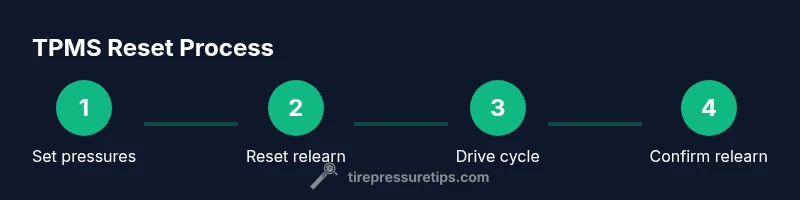
Steps
Estimated time: 20-40 minutes
- 1
Set tires to recommended pressure
Use a reliable gauge to verify each tire’s pressure and adjust to the vehicle’s specification on the door placard or owner’s manual. This ensures a proper baseline for relearning.
Tip: Record the exact pressures for future reference. - 2
Locate the TPMS reset option
Find the TPMS reset button or the relearn menu in your vehicle’s settings. If your car uses a drive cycle, prepare for a short, steady drive instead of relying on a button.
Tip: If you can’t find a button, check the owner’s manual for model-specific steps. - 3
Initiate the relearn
Press and hold the reset button until the TPMS light blinks or a confirmation message appears on the dash. For drive-cycle relearns, begin the mandated driving sequence.
Tip: Do not drive recklessly during the relearn; steady acceleration is best. - 4
Drive to complete the relearn
Drive at speeds recommended by your manual to complete the relearn. This often means 10-20 minutes of mixed speeds.
Tip: Avoid aggressive braking or rapid lane changes during the cycle. - 5
Confirm relearn with a tool if needed
If your vehicle requires a tool-based relearn, connect the OBD-II device and follow prompts to finalize the process.
Tip: Ensure your tool supports your exact vehicle model and year. - 6
Verify the warning light status
Turn off the ignition, restart the car, and check if the TPMS warning light remains. If cleared, the relearn was successful.
Tip: If the light stays on, recheck tire pressures and sensor health.
Frequently Asked Questions
What is resetting TPMS?
Resetting TPMS clears old sensor data and prompts the system to relearn current tire pressures after changes. It helps restore accurate warnings and readings.
Resetting TPMS clears old sensor data so the system relearns current tire pressures after changes.
Do I always need a diagnostic tool?
Not always. Many vehicles use a button or drive cycle, but some models require an OBD-II tool to perform the relearn.
Tools aren’t always required; many cars use a button or drive cycle, but some may need a diagnostic tool.
How long does a relearn take?
A button-based relearn can be completed in a few minutes, while drive cycles may take 10-20 minutes of driving.
Most relearns take a few minutes with a button, or about 10-20 minutes if a drive cycle is needed.
What if the TPMS light stays on after reset?
Recheck tire pressures and sensor installation. If the light persists, a sensor fault or calibration issue may exist and professional inspection could be necessary.
If the light stays on, recheck pressures and sensors. You may need professional help for a faulty sensor.
Can I reset TPMS after rotating tires?
Yes. Rotate tires to spec, then perform the relearn method specified for your vehicle. Many cars require a drive cycle after rotation.
You can reset TPMS after rotating tires; follow the vehicle’s relearn method, often a drive cycle.
Does resetting TPMS reset tire pressures?
No. Resetting clears fault data and allows relearning, but it does not adjust actual tire pressures. You must inflate to the correct values first.
Resetting doesn’t change tire pressures; you must adjust pressures to spec first, then relearn.
What to Remember
- Set tires to spec before relearn
- Choose the correct relearn method for your vehicle
- Use a tool if required by the model
- Verify success by warning light behavior
- Maintain tires to minimize resets