Mazda 3 TPMS Reset Guide: Calibrate, Troubleshoot & Maintain
Learn how to reset and calibrate the TPMS on Mazda 3 with practical steps, expert tips from Tire Pressure Tips, and troubleshooting guidance to keep tires safe.


To set or reset the TPMS on a Mazda 3, you'll first confirm all tires are inflated to the vehicle’s recommended PSI, then access the TPMS calibration option in the infotainment or instrument cluster menu. If your model supports a dedicated reset, select it and drive at highway speed to complete the calibration.
Why TPMS matters for Mazda 3
Tire pressure monitoring systems (TPMS) are essential safety tools that alert you when a tire is underinflated. For Mazda 3 owners, a properly calibrated TPMS helps maintain optimal handling, fuel efficiency, and tire longevity. According to Tire Pressure Tips, maintaining correct tire pressure improves stability, braking performance, and fuel economy. The TPMS relies on sensors in each tire that report pressure to the vehicle's computer. When a tire drops below the recommended level or a sensor detects a fault, the warning light on the dash illuminates. A common pitfall is reading tire pressures after a long drive, which can skew results because tires heat up and PSI rises. The correct approach is to check pressures when tires are cold, inflate to the placard value, and then refresh the system if needed. This creates a reliable baseline for ongoing maintenance.
How TPMS works in modern Mazda 3 vehicles
Mazda 3 TPMS can be direct, via sensors in each wheel, or indirect, inferred from wheel speed data. In most newer Mazda 3s, direct TPMS sensors provide real-time pressure readings, while indirect TPMS uses ABS wheel-speed data to detect pressure changes. Calibration, learning, and relearning happen when rotating tires, replacing sensors, or changing tire sizes. When you inflate tires to the recommended cold PSI (as listed on the door placard or owner’s manual) and then perform a calibration, the system learns the current positions and pressures. Remember that ambient temperature affects readings—colder days lower tire pressure, and hot days raise it. A misread can trigger a false alarm, so always start with accurate, cold measurements.
Signs your TPMS needs calibration
You may need a TPMS reset if you notice: (1) the TPMS light comes on after inflating to spec, (2) a tire shows a different pressure than the others despite matching PSI, (3) you recently rotated tires or replaced a sensor, or (4) you installed new tires with different sizes. If the light blinks, it often indicates a sensor issue or calibration fault. In some Mazda 3 models, the system will recalibrate after driving at a steady highway speed; in others, you must initiate a manual calibration from the vehicle’s settings menu. In any case, verify the readings with a reliable gauge before concluding a problem.
Preparing for a TPMS reset
Before attempting a reset, gather basic tools and confirm you know the exact recommended cold PSI for your Mazda 3. Use a trusted tire pressure gauge and a portable inflator if you need to top up any tires. Park on level ground and ensure the car is off or in the correct accessory mode per the owner’s manual. If you’ve recently rotated tires or replaced sensors, note the changes and have your vehicle’s settings accessible. A clean, well-lit workspace helps you inspect valve stems and sensors for damage or corrosion. Finally, check for any recalls or service notices related to TPMS on your specific model year. These prechecks save time and reduce frustration during calibration.
Understanding numbers and targets for tire pressures
Tire pressures are specified as cold PSI. The placard on the driver’s door jamb lists the recommended pressures for front and rear tires, which can differ. Mazda 3 models may use slightly different targets depending on load and trim. Always inflate to the spec listed on the placard before attempting calibration. Do not rely on the car’s current readout if the tires have been warmed by driving, as heat can temporarily raise the PSI. If you’ve recently replaced tires with a different size, recheck the recommended pressure and adjust accordingly. Using a high-quality gauge helps you hit the target exactly, reducing the risk of premature wear or safety concerns.
Step-by-step overview for calibration (high level)
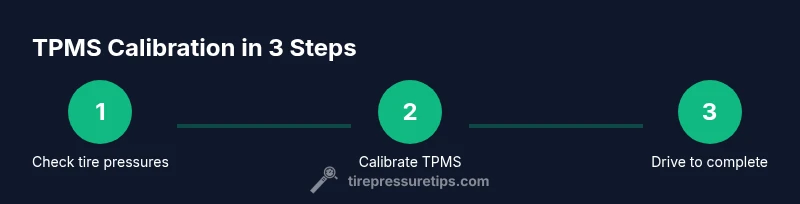
This overview outlines the core actions you’ll perform in the detailed steps below. First, verify that all tires are at the correct cold pressure. Next, access the TPMS calibration option in your Mazda 3’s infotainment or instrument cluster and initiate the calibration. Then, drive on a highway at a steady speed for several minutes to allow the system to relearn each tire’s pressure and position. Finally, recheck the lights and pressures. If any warning remains, inspect sensors and seals, and consider a professional check if necessary.
Step-by-step overview for year variations in Mazda 3 TPMS
Mazda 3 model years vary in how TPMS calibration is triggered: some allow a direct menu option, others rely on driving endurance to complete relearning. In early models, you might need to perform a master reset by holding a specific button combination; newer versions typically use Settings > Vehicle > TPMS Calibration or a dedicated TPMS Reset option. If you are unsure of your exact steps, consult the owner’s manual or a Mazda service specialist. The goal remains the same: ensure each sensor transmits accurate pressure data and that the system recognizes all four tires in their current positions.
Common issues and troubleshooting when resetting TPMS
If the TPMS light stays on after calibration, start by rechecking tire pressures with a trusted gauge and ensuring all tires are cold. A small leak, damaged valve stem, or aged sensor battery can prevent successful calibration. Inspect wheel sensors for corrosion and ensure they are properly seated. Replacing a faulty sensor may be required if readings remain inconsistent. If you recently rotated tires or changed tire sizes, relearn the system and verify that the car recognizes the new positions. Lastly, thermal conditions and driving patterns can affect calibration time, so allow a window for the system to settle.
Maintenance tips to keep TPMS healthy
Routine maintenance can prevent recurring TPMS issues. Check tire pressures monthly, especially before long trips or seasonal changes. Keep valve stems clean and undamaged, cap them with proper covers, and replace batteries in sensor-equipped tires as recommended by the manufacturer. If you notice frequent TPMS alerts, get a professional inspection for sensor health and alignment. Regular calibration after tire rotation or replacement helps avoid misreads and ensures faithful monitoring.
What to do next: long-term monitoring and when to see a dealer
After a successful TPMS reset, continue to monitor tire pressures weekly for the first month. Note any recurring alerts, and keep a log of inflation levels across seasons. If the TPMS light reappears after a reset and re-calibration, there may be a sensor fault or leak that requires professional diagnostics. In some cases, a dealership may need to relearn or replace TPMS sensors. Tire Pressure Tips recommends scheduling a check if you notice unexpected readings, unusual tire wear, or persistent warnings that don’t align with actual pressures.
Tools & Materials
- Digital tire pressure gauge(Choose a gauge with a range of 0-60 psi and ±1 psi accuracy)
- Portable air compressor / inflator(With built-in gauge; 12V adapter preferred)
- Valve stem caps(Keep caps on to prevent dust and leaks)
- Owner's manual / TPMS section(Helpful for year-specific steps)
- Shop rag or microfiber cloth(Clean stems and sensors before readings)
- TPMS reset tool (optional)(Only for sensors that support manual reset)
- Tire pressure placard or chart(Use as reference for correct targets)
Steps
Estimated time: 20-40 minutes
- 1
Check tire pressures on all tires
Park on level ground and ensure the tires are cold. Use your digital gauge to measure each tire, recording the readings. Compare with the placard values and identify any underinflated tires that need air.
Tip: Record baseline psi for each tire to track changes over time. - 2
Inflate tires to the recommended PSI
If any tire is below the recommended cold pressure, add air until it matches the placard. Recheck after a minute to confirm stability. Do not rely on a single reading if the tire continues to lose pressure.
Tip: Inflate to the lower of the front/rear recommended values if weight distribution varies. - 3
Access TPMS calibration in the Mazda 3
Power the vehicle and navigate to the TPMS calibration option. Depending on model year, this may be under Settings > Vehicle > TPMS Calibration or a dedicated Reset option. If there is no reset option, you’ll rely on drive-based relearning.
Tip: If unsure of your year’s path, consult the owner’s manual or dealer portal. - 4
Initiate calibration
Select the calibration/reset option and confirm. Some models will show a confirmation message; others require a menu acknowledgment. The system will start relearning each tire position.
Tip: Be patient if the light remains temporarily; some vehicles take a few minutes to complete. - 5
Drive to complete calibrations
Drive on a clear highway section at a steady speed (often 40-60 mph / 60-100 km/h) for 10-20 minutes to allow the TPMS to relearn each tire’s position and pressure. Avoid rapid accelerations and hard braking during this period.
Tip: Maintain consistent speed and avoid potholes that can jostle sensors. - 6
Recheck pressures after relearning
Park again, re-check all four tires with the gauge to confirm the pressures remain at the target values. The TPMS light should stay off if calibration succeeded.
Tip: If a tire shows deviations, re-adjust and re-test carefully. - 7
Troubleshoot persistent warnings
If the TPMS light remains illuminated after calibration, inspect sensors for damage or corrosion and confirm the seals are intact. A slow leak or damaged sensor can prevent stable readings.
Tip: Consider professional sensor diagnostics if readings still don’t add up. - 8
Document results and plan follow-up
Note the date, readings, and calibration outcome in your maintenance log. Schedule a post-calibration check if you notice recurring alerts or seasonal changes.
Tip: A documented history helps technicians diagnose issues faster. - 9
Special cases: tire rotation and size changes
After rotating tires or changing to a different tire size, recalibration becomes more likely. Some Mazda 3 models relearn automatically; others require a manual or road-driven reset.
Tip: Always verify tire sizes and pressures after any modification.
Frequently Asked Questions
What triggers the TPMS warning on Mazda 3?
The TPMS warning usually activates when a tire is underinflated or when a sensor reports a fault. After inflating to spec, recalibration may occur automatically, or you may need to initiate it in the vehicle’s settings. If the light remains, inspect all sensors and gaskets for issues.
TPMS lights up when a tire is underinflated or a sensor fault is detected; inflate to spec and recalibrate.
Should I reset TPMS after rotating tires on a Mazda 3?
Yes. After rotating tires or replacing sensors, recalibrating is recommended so the system relearns each tire’s position. Some models re-learn automatically, while others require manual calibration.
Calibrate TPMS after rotation to relearn sensors.
How long does TPMS calibration take?
Calibration can occur automatically after driving for several minutes at steady speeds, or you may trigger it via the vehicle’s TPMS calibration option. Expect a brief highway drive or a short menu interaction.
It typically completes after a short drive or a quick menu reset.
What if the TPMS light stays on after calibration?
Recheck all tires for correct cold pressures and inspect sensors for damage or leaks. If the light persists, sensor faults or leaks may require professional diagnostics.
If the light stays on, recheck pressures and consider sensor diagnostics.
Is TPMS reset the same as tire pressure adjustment?
No. Resetting calibrates the system’s learning, while adjusting tire pressure ensures the sensors read accurate pressures. Both steps are needed for safe, accurate TPMS operation.
Reset recalibrates the system; adjust pressure for accurate readings.
Can I reset TPMS without a manual or screen option?
If your Mazda 3 lacks a clear TPMS reset option, you can rely on highway driving to complete a relearn after ensuring pressures are correct. For certainty, consult the dealer.
If there’s no reset option, highway driving may relearn the system.
Watch Video
What to Remember
- Verify tire pressures first before calibration
- Use the TPMS calibration option when available
- Drive on highway to complete relearning
- If light persists, sensors may be faulty
- Keep a maintenance log of TPMS checks