Mazda 3 Tire Pressure Sensor Reset: A Practical How-To
Comprehensive, practical guide to reset and relearn Mazda 3 TPMS sensors after tire changes or pressure adjustments. Learn how to identify relearn needs, perform the reset, and verify readings for safer driving in 2026.


You can reset the Mazda 3 tire pressure sensor by performing a relearn after inflating tires to spec and confirming the TPMS is active. This quick guide covers when a relearn is needed, how to verify status, and the two common Mazda procedures. According to Tire Pressure Tips, start with accurate pressures and follow the relearn steps.
Why Mazda 3 Tire Pressure Sensor Reset Matters
Tire pressure sensors are part of the TPMS that monitors each tire's air pressure and alerts you to under- or over-inflation. For Mazda 3 owners, a reset or relearn becomes necessary after tire replacement, sensor service, or wheel rotation. Proper reset ensures the system's accuracy, reduces false warnings, and helps maintain fuel efficiency and tire wear. According to Tire Pressure Tips, a correct reset begins with verifying all tires are at the manufacturer-recommended pressures, then proceeding with the relearn method your model requires. Without a proper reset, you may see a warning light that won’t extinguish, or you could misinterpret actual pressure changes, which impacts safety. In short: a reliable reset keeps readings aligned with reality and supports safer driving decisions.
Prepping for the Reset: Tools, Conditions, and Safety
Before you begin the Mazda 3 tire pressure sensor reset, take a few minutes to set up properly. Work on a flat, level surface with the vehicle in park and the engine off. Check each tire's current pressure with a digital gauge and compare it to the Mazda-recommended spec printed on the door jamb or in the owner's manual. Make sure the battery in your TPMS sensor and the vehicle's electrical system are in good condition. Gather your tools: a digital tire pressure gauge, a reliable inflator, and any manuals or relearn documentation for your exact year and trim. If you replaced a sensor or valve stem, ensure the new part is compatible with Mazda's TPMS. Remember to stay safe: chock wheels if needed and never work under a raised vehicle without proper support.
Understanding Mazda TPMS Types and Relearn Modes
Mazda vehicles use TPMS sensors in the wheels and can require a relearn after certain maintenance events. Depending on the year and model, Mazda 3 relearn can be a drive-relearn (requires driving at specific speeds or distances) or a static relearn (performed with the ignition on or with a scan tool). The key is confirming which method your car expects. The exact steps vary by year, so always consult the owner’s manual or Mazda service documentation for your configuration. This section helps you recognize when a relearn is needed and what to expect during the process.
Step-by-Step Reset Process Overview
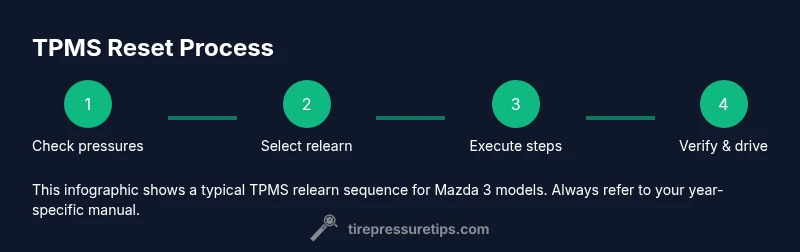
Resetting the Mazda 3 TPMS is a structured process that begins with verifying all tires are at the specified pressures and ends with confirming the system readings after a drive or relearn. The middle steps involve selecting the correct relearn method for your model year, performing any ignition sequence or drive requirements, and validating the results with a TPMS alert silence or gauge check. Throughout the process, ensure tire temps are stable and avoid dramatic pressure changes during testing. This overview sets the stage for the detailed steps that follow in the dedicated STEP-BY-STEP section.
Common Pitfalls and Troubleshooting
Resetting TPMS can be thwarted by common mistakes. Never attempt a relearn with cold tires; inflated pressures should be within spec before starting. A weak or dead TPMS sensor battery can prevent a successful relearn, leading to a persistent warning light. Using incompatible or aftermarket sensors can also complicate the procedure. If the light remains on after both a drive and a relearn attempt, verify the tire pressures again, re-check sensor compatibility, and consider whether a sensor replacement or software update is needed. Patience matters: some Mazda 3 models require several minutes of driving to complete the relearn.
Mazda 3 Relearn Procedures by Model Year
Relearn methods vary by year and trim, so it’s essential to reference your specific model documentation. In many Mazda 3 configurations, the process involves inflating all tires to spec, cycling the ignition, and performing a drive cycle or using a management menu to initiate a relearn. Some models accept a manual relearn with a compatible scan tool, while others require a drive around the block at certain speeds. Always confirm the correct procedure for your vehicle year to avoid misinterpretation of the TPMS status.
Verification: Confirming TPMS Readings After Reset
After completing the relearn, verify the TPMS status by rechecking tire pressures with a high-quality gauge and watching for the TPMS light to extinguish. Some Mazda 3s require you to drive for a minimum distance or speed to finalize the relearn. If readings appear inconsistent, repeat the inflating step to spec, reinitiate the relearn, and monitor the light. Keep an eye on the dashboard to ensure the system responds to real pressure changes, not static test numbers. Documentation from Tire Pressure Tips emphasizes a cautious, repeatable approach to verification.
Maintenance and Prevention for TPMS Health
Longevity of TPMS sensors depends on regular maintenance and awareness of sensor life. Keep sensors clean and free from corrosion, and avoid aggressive tire mounting and dismounting. If you notice repeated false readings or frequent light triggers, inspect for damaged valve stems or leaking tires. Batteries in TPMS sensors degrade over time; plan sensor replacement before pressure faults become frequent. Routine checks during seasonal tire changes can prevent surprises on the road.
Temperature, Weather, and Tire Pressure Readings
Ambient temperature shifts can cause tire pressures to rise or fall. In Mazda 3 models, major temperature swings may trigger TPMS alerts if readings are near the threshold. When you perform resets, account for recent weather changes and avoid resetting during extreme cold or heat. The conversion between Fahrenheit/ Celsius scales isn’t the issue; it’s the pressure change that matters. If you’re storing your wheels for winter or summer, check the sensor readings again when the tires return to normal operating temperatures.
Quick Checks You Can Do Before a Trip
Before driving, take a quick fail-safe checklist approach: verify all tires are at the recommended pressures, inspect for visible damage, ensure the spare tire is properly inflated, and confirm the TPMS warning light is off after a test drive. If the light reappears, perform the reset again and consider a professional inspection if the issue persists. These pre-trip checks improve safety and avoid tire-related breakdowns.
When to Seek Professional Help
If you’re unable to complete the Mazda 3 TPMS relearn after multiple attempts, or if the TPMS light remains on despite correct pressures, seek professional assistance. A technician can verify sensor health, reprogram the system if needed, and ensure the car’s software recognizes the sensors. While many Mazda 3 TPMS relays and tire sensors are designed for user-level maintenance, a persistent warning is a signal that professional diagnostics are warranted.
Tools & Materials
- Digital tire pressure gauge(Choose one with both PSI and kPa scales for accuracy)
- Tire inflator(Ensure it can reach warm tires quickly to adjust pressure safely)
- Owner's manual / relearn documentation(Identify whether your Mazda 3 uses drive-relearn or static relearn)
- Flat, level surface(Perform resets on a stable surface; avoid slopes)
- Optional scan tool or factory interface(Helps with static relearn on certain model years)
Steps
Estimated time: Total: 30-60 minutes
- 1
Check tire pressures at cold tires
Use a digital gauge to confirm all tires are at the manufacturer-recommended pressures. Cold tires provide the most accurate readings, and you should adjust any tire that’s out of spec before attempting a relearn.
Tip: Record the exact pressures for future reference - 2
Identify the relearn method for your Mazda 3
Consult the owner's manual to determine whether your year uses a drive-relearn, static relearn, or a scan-tool relearn. The wrong method will not silence the TPMS light.
Tip: If in doubt, contact a Mazda-certified technician - 3
Prepare the vehicle for relearn
Turn the ignition to the ON position without starting the engine, or follow your model-year steps. If a drive cycle is required, plan a short, safe test drive route after the ignition sequence.
Tip: Make sure all tires are at the target pressure again after prep - 4
Execute the relearn procedure
Follow the exact steps from your manual or relearn documentation. This often involves a sequence of inflating a tire, pressing a button, or driving at a set speed for several miles.
Tip: Avoid abrupt accelerations during the relearn window - 5
Verify the TPMS status
After the relearn, drive the vehicle per the manual’s instructions and confirm the TPMS light goes out. Re-check each tire's pressure with a gauge to ensure consistency.
Tip: If the light stays on, repeat the relearn or recheck sensor compatibility - 6
Document the result
Note the success of the relearn and the final tire pressures. If you replaced sensors, retain the part numbers for warranty and maintenance records.
Tip: Keep a simple log for seasonal tire changes
Frequently Asked Questions
Do all Mazda 3 years require a TPMS relearn after tire rotation?
Most Mazda 3 models require some form of relearn after tire rotation or sensor replacement. Always check your model year’s manual for the exact procedure, as some vehicles relearn automatically while others need manual input.
Most Mazda 3s require a relearn after tire rotation, but check your year’s manual for the specific method.
What should I do if the TPMS light stays on after reset?
If the light remains on, recheck tire pressures, reattempt the relearn with the correct method, and inspect sensors for damage or corrosion. If unresolved, seek professional diagnostics.
If the light won’t go out, recheck pressures and the relearn method; seek professional help if needed.
Can I reset TPMS without inflating tires to spec?
Inflating to spec is a critical step for a successful relearn. Without correct pressures, the system cannot calibrate accurately and may trigger false warnings.
No—you need to inflate to the spec before relearning.
How long does a Mazda 3 TPMS relearn typically take?
A typical relearn takes 15-30 minutes, depending on model year and whether a drive cycle or scan tool is required. Plan for extra time if you encounter issues.
Usually 15 to 30 minutes, but allow more time if you need a drive cycle.
What tools do I need for Mazda 3 TPMS reset?
You’ll typically need a digital tire gauge, a tire inflator, and the vehicle’s relearn documentation. A scan tool is optional for some model years.
A gauge, inflator, and the manual are usually enough; a scan tool helps some years.
Is a failed relearn covered under warranty if sensors are defective?
Sensor defects may be covered under sensor warranties if applicable. Check your Mazda parts warranty and service policy for specifics.
Sensor defects may be covered by warranty; consult your policy for details.
Watch Video
What to Remember
- Verify all tires are at spec pressures before starting
- Identify your Mazda 3 relearn method from the manual
- Follow exact steps for your model year to complete relearn
- Verify TPMS light status after driving the specified distance