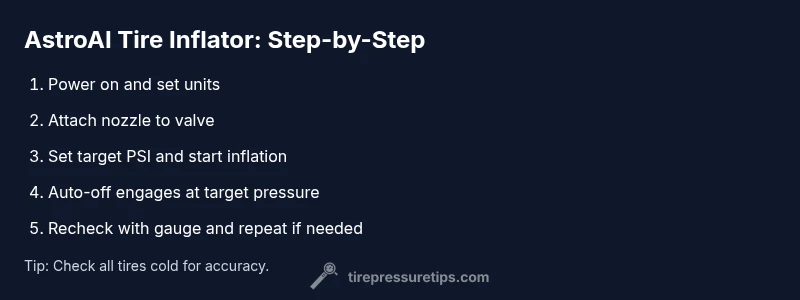
AstroAI Tire Inflator: Step-by-Step Guide to Safe Inflation
Learn how to use the AstroAI tire inflator for accurate PSI checks, safe inflation, and quick maintenance. This comprehensive guide covers setup, operation, safety, troubleshooting, and best practices for drivers and car owners.


According to Tire Pressure Tips, mastering the AstroAI tire inflator helps you quickly check and fill tires to the correct PSI, improving safety, fuel efficiency, and tire life. This guide covers setup, operation, safety checks, and troubleshooting. You’ll learn how to switch units, use the auto-off feature, and verify tire pressures for optimal performance.
Why accurate tire inflation matters for every driver
Maintaining the correct tire pressure is one of the simplest, most effective ways to improve safety, fuel efficiency, tire wear, and handling. An accurate inflator like the AstroAI tire inflator gives you a reliable read and a fast, repeatable inflation process. The Tire Pressure Tips team emphasizes that using a digital inflator with a built-in gauge tends to reduce under- or over-inflation errors common with only visual checks or analog gauges. Regular use a) helps you detect slow leaks early, b) supports consistent tire performance, and c) makes proactive maintenance easier for busy schedules.
In cold weather or after long highway drives, pressures can shift. This guide keeps you aligned with safe targets and practical checks, so you can drive with confidence, knowing your tires are at the right pressure for traction and efficiency.
notes":null},
Tools & Materials
- AstroAI Tire Inflator(Ensure it includes the built-in gauge and auto-off feature.)
- 12V vehicle power outlet(Commonly the cigarette lighter socket in most cars.)
- Replacement nozzle/nozzle adapters(Useful for valve stems on various tires (car, bike, etc.).)
- Tire pressure gauge (backup)(Optional, for cross-checking readings.)
- Owner’s manual or quick-start sheet(Helps with model-specific steps.)
Steps
Estimated time: 15-25 minutes
- 1
Inspect tires and prepare the inflator
Before you start, ensure the vehicle is parked on a flat surface and the engine off. Inspect valve stems for damage and remove any dirt. Connect the AstroAI inflator to the 12V outlet and verify the device powers on. Select the correct unit (psi, kPa, or bar) for your preferred reading.
Tip: Make sure the inflator is fully charged or has a stable power supply before use. - 2
Set the target pressure and units
Determine the recommended cold-inflation pressure for each tire (as specified on your vehicle’s door jamb sticker or owner manual). Use the inflator’s unit switch to set psi or your preferred unit, then input the target PSI. If your model supports auto-off, enable it to prevent over-inflation.
Tip: Always use “cold” target pressures for accuracy. - 3
Attach the nozzle securely to the tire valve
Placing the nozzle on the valve stem, press firmly to create a seal. If air escapes, adjust the angle or reseat the nozzle to prevent leaks. Hold the inflator steady to avoid slipping and ensure readings are stable.
Tip: A clean, tight seal reduces inaccurate readings by air leaks. - 4
Inflate and monitor until auto-off engages
Start inflation and monitor the gauge. The AstroAI inflator will typically shut off when the target pressure is reached. If your model lacks auto-off, pause to check pressure frequently to avoid over-inflation and repeat as needed.
Tip: Don’t rush—watch the gauge closely as you approach the target. - 5
Verify pressure after inflation
Remove the nozzle and re-check the tire pressure with the inflator’s gauge or a separate digital gauge to confirm accuracy. If underinflated, repeat steps 3 and 4 until the reading matches the target. If overinflated, release a small amount of air and re-check.
Tip: Use a consistent check method to ensure reliability. - 6
Repeat for all tires
Move to the remaining tires and repeat the process. Remember cold readings for each tire, since different tires can require slightly different targets depending on load and vehicle."
Tip: Record numbers if you’re maintaining multiple vehicles. - 7
Turn off, disconnect, and store
Power down the inflator, unplug from the 12V outlet, and wipe any dust from the nozzle. Store the device in a clean, dry place to extend its life. Recheck all tires during the first 24–48 hours of driving if you’ve changed pressures significantly.
Tip: Keep the device away from moisture and extreme temperatures. - 8
Inspect for leaks and plan next checks
After inflation, inspect valve stems for signs of leaks or damage. Plan regular checks—ideally monthly or before trips—to ensure pressures stay within recommended ranges.
Tip: Regular checks prevent gradual underinflation that can harm fuel economy and tire wear.
Frequently Asked Questions
Can the AstroAI tire inflator reset TPMS warnings on my vehicle?
No, inflating tires with a digital inflator does not reset TPMS fault codes. After correcting pressures, the TPMS warning should turn off automatically once the system recognizes the proper pressure over time. If it doesn’t, consult your vehicle manual.
Inflate to the correct pressures and wheel sensors should reset automatically; if not, check your manual.
What units does the AstroAI inflator display and can I switch between them?
Most models display psi, kPa, and bar. You can switch units via a dedicated button or menu on the device to match your preferred measurement standard.
The inflator shows psi, kPa, and bar, and you can switch between them easily.
How accurate is the built-in gauge compared to a separate tire gauge?
Built-in gauges are generally accurate for everyday use, but a separate digital gauge can offer higher precision for critical measurements. Always cross-check if exact pressure matters.
The built-in gauge is usually accurate for everyday needs; for precision, cross-check with another gauge.
What should I do if the inflator won’t power on?
Check the 12V outlet, ensure the car is off or in accessory mode as required by your vehicle, and inspect the power cable for damage. If available, try a different outlet or power source.
If it won’t power, check the outlet and cable, then try another outlet if possible.
Is it safe to use the AstroAI inflator on all tires, including bicycles or motorcycles?
Many AstroAI models come with multiple nozzles suitable for different tire types, but always verify compatible fittings and recommended pressures for bikes or motorcycles before use.
Check compatibility and use the correct nozzle for bicycles or motorcycles.
Watch Video
What to Remember
- Inflate tires to cold, manufacturer-recommended PSI.
- Use the inflator’s built-in gauge and auto-off for accuracy and safety.
- Attach nozzle firmly to avoid leaks and misreadings.
- Recheck pressures after inflation for reliability.
- Regular checks save fuel, extend tire life, and improve safety.