Chevrolet Sonic Tire Pressure: Check, Maintain, and Troubleshoot
Learn how to check, adjust, and maintain tire pressure for the Chevrolet Sonic. Practical steps, TPMS insights, and seasonal guidelines to boost safety, fuel economy, and tire life.


Goal: Master Chevrolet Sonic tire pressure maintenance. You’ll learn to read the door placard, check pressures with a gauge, interpret TPMS alerts, and adjust to the recommended PSI for front and rear tires. We’ll cover temperature effects, seasonal changes, and safe procedures to maintain optimal grip and fuel efficiency. This quick outline gets you started.
Why Tire Pressure Matters for the Chevrolet Sonic
Maintaining proper tire pressure in the Chevrolet Sonic is essential for safety, fuel efficiency, and tire longevity. Properly inflated tires improve grip in wet conditions, shorten stopping distances on dry pavement, and help the suspension respond as designed. For daily driving and occasional road trips, consistent tire pressures reduce uneven wear and vibration that can wear tires prematurely. According to Tire Pressure Tips, correct tire pressure also contributes to better fuel economy and predictable handling, especially when you’re navigating city streets or open highways. Keeping the Sonic’s tires within the manufacturer’s specified range ensures the vehicle performs as intended and maintains a comfortable ride for you and your passengers.
The nuances of tire pressure go beyond a single number on the sidewall. The door jamb placard or the owner’s manual provides the exact targets for each axle, accounting for load and tire size. This guidance may differ between trim levels or when the vehicle is loaded with passengers and cargo. In practice, you’ll adjust to the recommended PSI for your Sonic’s front and rear tires, not the maximum pressure printed on the tire sidewall. This distinction matters because the sidewall maximum is not a target for normal driving.
Chevrolet Sonic Tire Pressure Basics: What You Need to Know
The Chevrolet Sonic uses tire pressure as part of its fundamental safety and performance systems. Tire pressure interacts with temperature, load, and wheel alignment, so understanding how these factors influence your numbers helps you make safer adjustments. Tires at the correct pressure distribute load evenly, maintain optimal contact with the road, and preserve tread life. Conversely, underinflation increases rolling resistance, reduces cornering stability, and can cause heat buildup, which accelerates wear. Overinflation can lead to a harsher ride and a smaller contact patch, reducing grip and accelerating center-tread wear.
To determine the exact targets for your Sonic, consult two main sources: the driver’s door placard and the owner’s manual. Both will specify front and rear tire pressures that align with your vehicle’s suspension geometry and weight distribution. The placard is the quickest reference in a pinch, while the manual provides nuance for different load scenarios, such as highway cruising with a full car or weekly city commutes with lighter cargo. If you rotate tires or switch sizes, recheck the targets to ensure you stay within recommended ranges.
Tools & Materials
- Tire pressure gauge(Digital or analog gauge; ensure accuracy before use.)
- Owner's manual or door jamb placard reference(Use to identify exact PSI targets for your Sonic.)
- Air source (compressor or gas station pump)(Needed if tires are low; ensure gauge reads properly while filling.)
- Notebook or digital device(Record readings after adjustment for maintenance tracking.)
Steps
Estimated time: 15-25 minutes
- 1
Locate target tire pressures
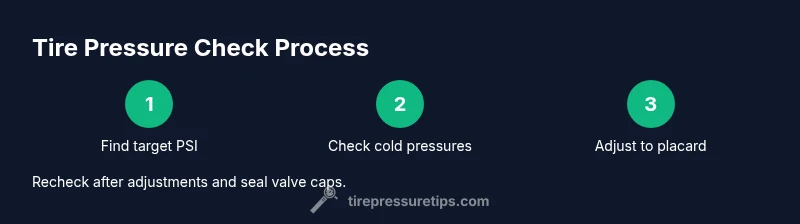
Find the exact PSI targets on the driver’s door jamb placard or in the owner’s manual. Note separate values for front and rear tires, and for cold conditions. Knowing the correct numbers up front prevents guesswork during inflation.
Tip: Always start with cold tires; inflation readings are most accurate when the car hasn’t been driven for a few hours. - 2
Check tires when cold
Park on a level surface and wait at least 3 hours after driving, or check before driving in the morning. Remove the valve caps so you can access the valve stems and read the pressure with your gauge.
Tip: Turn off the engine and sensors if you’re going to inflate right away; air-based readings require a calm environment for accuracy. - 3
Measure and compare
Attach the gauge to the valve stem squarely and read the number. Compare the result to the target from step 1. If readings are off, prepare to add or release air accordingly.
Tip: If you’re unsure reading the gauge, take two measurements or try a different gauge for confirmation. - 4
Adjust to target
If underinflated, add air in small increments until you meet the target. If overinflated, release air gradually and recheck. Repeat as needed until both front and rear readings match their targets.
Tip: Inflate in small steps; large, rapid changes can overshoot the target. - 5
Recheck all tires
Repeat the process for all four tires and, if applicable, the spare. After inflation, reinstall valve caps and clean any dirt around valve stems to prevent leaks.
Tip: Don’t forget the spare tire; it’s easy to neglect but essential for emergencies. - 6
Document readings
Record the final pressures for future reference and scheduling. Recheck periodically, especially after temperature changes or long trips.
Tip: Set a reminder to recheck every 4-6 weeks or after extreme weather events.
Frequently Asked Questions
Where do I find the recommended tire pressure for my Chevrolet Sonic?
The recommended tire pressure is listed on the driver’s door jamb placard and in the owner’s manual. These sources show the front and rear targets, including variations for load. Use the placard as your primary reference.
Check the door jamb placard on the driver’s side door for the exact PSI targets, and consult the owner’s manual for load-based adjustments.
Does tire pressure change with outside temperature?
Yes. Colder temperatures typically lower measured pressure, while hot weather can raise it. Check pressures more frequently during seasonal transitions and adjust toward the manufacturer’s targets.
Temperature changes can move tire pressure; recheck after cold snaps or heatwaves and adjust toward the recommended PSI.
Can I inflate my Sonic tires with a basic air compressor or at a gas station?
Yes. A standard air compressor can inflate tires as long as you monitor the gauge and target pressures carefully. Stop inflating when you reach the exact PSI specified by the placard.
You can use a common air compressor, just read the gauge and aim for the recommended PSI.
What should I do if TPMS shows a low-pressure warning but there is no visible leak?
If TPMS warns but there’s no leak, check all tires with a gauge, inspect for slow leaks around valve stems or damage, and verify sensors are functioning. If in doubt, have a professional inspect the tires.
If there’s no obvious leak, check pressures again and consider a TPMS sensor test if warnings persist.
Is it safe to drive with slightly underinflated tires?
Driving on underinflated tires is safer than driving with a severely underinflated tire, but it increases wear, heat buildup, and the risk of a blowout. Inflate to the recommended PSI as soon as possible.
Not ideal to drive with underinflated tires; fix the pressure to the recommended level quickly.
How often should I check tire pressure?
Check tire pressure at least once a month and before long trips, and after significant temperature changes or heavy loads. Regular checks help prevent uneven wear and poor fuel economy.
Check monthly and before trips to stay safe and save fuel.
Watch Video
What to Remember
- Check cold tires before inflating
- Use the door placard as your PSI target
- Inflate in small increments and recheck
- Document readings for maintenance
- Recheck tires after seasonal changes or long trips