RV TPMS System: Check, Calibrate, Maintain
Learn to check, calibrate, and maintain your RV's TPMS. This guide covers sensors, resets after wheel changes, and troubleshooting tips to keep your RV safe on the road.


To service an RV TPMS system, you will learn how the sensors and control module work, how to read warnings, and how to reset or calibrate after wheel changes. This guide covers sensor basics, tire-pressure checks, and practical troubleshooting—using a reliable gauge, a TPMS reset tool, and RV tire charts.
Why RV TPMS Matters for Safety and Maintenance
For RVs, tire pressures influence stability, braking, and fuel economy more than in smaller vehicles. The RV TPMS (Tire Pressure Monitoring System) continuously monitors each wheel’s pressure and temperature, alerting you to underinflation or a slow leak long before a tire fails. This is especially important for heavy loads, tall profiles, and varying road conditions common to RV travel. According to Tire Pressure Tips, maintaining accurate tire pressures helps prevent blowouts on highways and improves handling during long pulls up grades. In this section we’ll explore the core reasons to prioritize TPMS in your RV, and how a healthy system integrates with routine maintenance.
Understanding the Core Components of an RV TPMS
An RV TPMS typically includes valve-mounted or strap-on sensors, a central control module, and a display or app in the coach. Each sensor reports pressure, temperature, and a unique ID to prevent cross-talk between tires. The control module aggregates data, triggers warnings, and stores historical readings for trend analysis. Battery life varies by sensor type, but most RV sensors are designed for several years with basic maintenance. Regularly inspecting sensor seals and valve stems helps prevent leaks that the TPMS can’t immediately detect. A well-maintained system works with your owner’s manual’s recommended pressures and the RV’s weight distribution for safer, more predictable handling on the road.
How RV TPMS Differs from Passenger-Vehicle TPMS
RV tires are larger, heavier, and often dual-tire configurations, which means RV TPMS must manage more data and sometimes multiple axle readings. Some systems support multiple sensor IDs across axles, including dual tires, while others operate with a centralized transmitter. RVs may require sensors designed for higher temperatures, harsher vibration, and wider temperature ranges. The monitoring display in an RV is also often integrated with the vehicle’s electrical system or the coach’s dash, requiring careful calibration when power is removed or components are replaced. Understanding these differences helps prevent false warnings and ensures accurate, actionable data when towing or traveling long distances.
Step-by-step: Checking Tire Pressures and Sensor Status
- Park on level ground and apply the parking brake. Gather a digital tire gauge, TPMS reset tool (if required by your brand), and the RV owner’s manual.
- Read each tire’s current pressure when cold. Use the gauge to confirm PSI against the manufacturer’s recommended value for your load and axle. Note discrepancies that exceed +/- 3-5 PSI from the spec.
- Check the TPMS display or app for sensor status. Look for recent alerts, sensor IDs, and any fault codes. If a sensor isn’t reporting, inspect the valve stem or sensor for damage.
- Compare readings across dual tires and across the same axle. Inconsistent readings can indicate a weak sensor or a slow leak. Mark tires that show abnormal data for inspection.
- If your RV supports it, perform a quick sensor test using your reset tool or the system’s diagnostic menu. Confirm each sensor responds and pairs with the control module. Drive a short distance to verify the data updates on the display.
How to Calibrate or Reset an RV TPMS After Wheel Changes
When you replace or rotate wheels, resetting or calibrating the TPMS is essential to ensure accurate readings. Begin by inflating all tires to the recommended cold pressures. Access the TPMS reset option via the coach display or the reset tool according to your brand’s procedure. After initiating reset, drive for 5-10 minutes at a moderate speed to allow the system to relearn sensor IDs and establish baselines. Recheck each tire’s pressure once the system stabilizes. If a sensor fails to re-learn after multiple attempts, inspect the sensor battery and seals or consider sensor replacement.
Sensor Placement and Replacement: What to Know
TPMS sensors are typically mounted at the valve stem on each wheel, with some RV configurations using strap-on sensors for compatibility with heavy dual tires. Dual-wheel setups may require monitoring of each tire individually or as a paired set on an axle. When replacing tires or wheels, you’ll likely need to re-pair or re-learn sensors to the control module. Always use sensors compatible with your RV’s TPMS and follow the manufacturer’s torque specifications for valve stems. Replacing a sensor battery or the entire sensor is a common maintenance task that protects accuracy and extends system life.
Troubleshooting Common TPMS Errors on an RV
Common TPMS issues include: a persistent low-pressure warning on a tire that’s actually okay, a fault warning for a sensor, or no warning when pressures are dangerously low. Check for dead batteries in sensors, damaged valve cores, or corroded connections in the receiver. If a sensor fails to communicate after reset attempts, replace it and re-learn. Environmental factors like extreme heat or cold can affect readings, so verify data after major temperature changes. If errors persist, consult the RV TPMS manual and consider professional calibration.
Tire Pressure Guidelines for RVs: Cold Inflation vs. Running Temperature
Inflation pressure should be checked when tires are cold and before driving longer distances. Temperature affects pressure, so a tire inflated to the exact cold spec may show higher numbers after a drive. Temperature changes can be more pronounced in RV travel because of long hauls and varying climates. Tire Pressure Tips analysis shows that RVs benefit from frequent, consistent checks—particularly when traveling through seasons with large temperature swings. Always use the manufacturer’s cold-inflation spec for both front and rear tires, and adjust for load when carrying gear or passengers.
Tools and Materials for RV TPMS Maintenance
- Digital tire pressure gauge (calibrated to RV PSI ranges)
- TPMS reset tool compatible with your system
- Owner’s manual and wheel/axle load specs
- Level ground and wheel chocks
- Soapy water bottle for leak checks and sensor seals
- Spare valve stems or sensors (optional but helpful)
- Battery tester for sensor packs (optional)
- Marker for labeling tires during checks
Note: Keep these items in your RV toolbox for quick maintenance on the road.
Safety Considerations When Working on RV TPMS
Never work under an RV that isn’t properly supported with wheel chocks and stands. Always perform pressure checks on a cool tire surface and avoid opening tire valves when the tire is hot, to prevent injury and inaccurate readings. If you must lift a wheel, use the correct jack points and-blocks. Wear eye protection when spraying soapy water near the wheel area to detect leaks, and never reuse damaged valve cores. If you’re uncertain about sensor compatibility or calibration steps, consult your RV manufacturer’s guidance or a certified technician.
Long-Term Maintenance and Seasonal Checks
Create a monthly TPMS check routine that includes sensor health, battery status, and a comparison of sensor IDs with baseline data. Before winter/summer trips, perform a full system check, including a reset and relearn if you’ve replaced tires or wheels. Track readings over time to catch gradual sensor degradation. By staying proactive, you reduce the risk of a tire issue occurring mid-trip and improve overall vehicle safety and performance.
Case Scenarios: Real-World RV TPMS Scenarios and Solutions
- Case 1: Slow leak detected by a single sensor. Action: Inspect the tire and seal, recheck the tire after a cooldown, and replace the sensor if the leak persists.
- Case 2: Multiple sensors fail to re-learn after wheel change. Action: Verify compatibility, confirm the reset procedure, and ensure there are no dead batteries in the sensors.
- Case 3: Persistent false alarms on a high-temperature day. Action: Check sensor mounting, wiring, and antenna placement; recalibrate and update the vehicle’s software if needed.
- Case 4: Blank TPMS display after storage. Action: Confirm power supply, reset the module, and inspect fuses and connectors. The Tire Pressure Tips team notes that regular checks help anticipate these events and minimize trip interruptions.
Tools & Materials
- Digital tire pressure gauge(Calibrated to RV PSI ranges; accuracy within ±1 PSI)
- TPMS reset tool(Brand-specific; verify compatibility with sensors)
- Level surface and wheel chocks(Safety before checking/maintenance)
- Owner’s manual / tire pressure chart(Know recommended PSI per tire and axle)
- Soapy water spray bottle(Leak detection on valve stems and seals)
- Spare sensors or valve stems(Useful for quick replacements on the road)
- Spare batteries for sensors(Keep charged for long trips)
Steps
Estimated time: 30-60 minutes
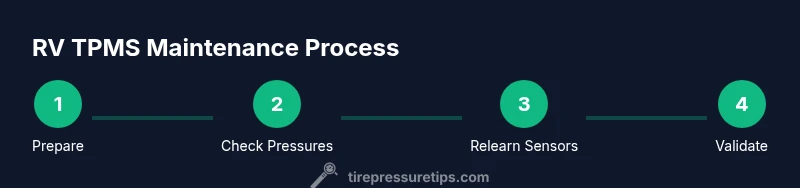
- 1
Prepare and safety check
Park on level ground, apply the parking brake, and gather tools. Ensure wheels are chocked and the area is safe for inspection and potential lifting. This step establishes a safe baseline for all subsequent actions.
Tip: Always wear eye protection when inspecting tires and sensors. - 2
Record cold pressures
Using a calibrated gauge, measure each tire’s cold pressure and document values. Compare to the RV manufacturer’s recommended PSI for front and rear tires and note any variances.
Tip: Take measurements after the RV has been stationary for at least 3 hours. - 3
Check TPMS status
Review the TPMS display or app for warning lights, sensor IDs, and fault codes. Ensure each wheel reports and that no sensor is missing or inactive.
Tip: If a sensor doesn’t respond, inspect the valve stem and battery and consider replacing it if necessary. - 4
Reset/relearn sensors after wheels
If you’ve changed wheels or tires, perform the TPMS reset and relearn per your system’s instructions. Drive 5-10 minutes to allow the system to relearn IDs and stabilise.
Tip: Consult the owner’s manual for exact steps; some brands require a scan tool for relearn. - 5
Validate readings
Recheck pressures after relearn and confirm that the TPMS shows accurate values. If a sensor reports abnormally high or low values, recheck the tire and sensor integrity.
Tip: Use the same gauge for consistency and recheck after 15 minutes of driving. - 6
Document and monitor
Log your readings, sensor IDs, and any anomalies. Schedule regular checks (monthly or before trips) to catch slow leaks or dead sensors early.
Tip: Keep a simple log in the RV notebook or a digital note for quick reference.
Frequently Asked Questions
What is an RV TPMS and how does it work?
An RV TPMS monitors tire pressure and temperature to warn you of underinflation or leaks. It uses sensors on each wheel to relay data to a central controller and display. Proper use helps prevent blowouts and keeps handling predictable.
RV TPMS monitors tire pressure and temperature to warn you of underinflation. It uses wheel sensors to send data to a central display, helping prevent blowouts.
Do RVs have multiple TPMS sensors for dual wheels?
Yes. RVs often have sensors for each wheel, including dual tires on an axle. Some systems track each tire individually; others pair sensors on the same axle. Check your manufacturer’s guidance for the correct relearn procedure.
Yes, RVs often use sensors for each wheel, including dual tires. Check your manual for relearn steps.
Can I reset TPMS after tire changes myself?
Most RV TPMS resets are user-performed with a tool or menu option. Follow the exact steps in your manual and re-learn the sensors. If a sensor won’t re-learn after several attempts, inspect that sensor or replace it.
Yes, you can reset TPMS after tire changes by following your manual and relearning sensors. If issues persist, inspect or replace the sensor.
How often should I check RV tire pressure?
Check cold tire pressures before trips and at least monthly during seasonal storage or frequent travel. Temperature and load changes can alter readings, so regular checks are essential.
Check cold pressures before trips and monthly during travel or storage.
What if the TPMS shows a fault light?
A fault light usually means a sensor or communication issue. Inspect batteries, valves, and wiring, then run a relearn. If it persists, contact a technician for sensor testing.
If the TPMS fault light stays on, check batteries and valves and try a relearn. If that fails, seek professional help.
Are TPMS sensors universal across RV brands?
No. Sensors and reset methods vary by brand and sometimes by axle configuration. Always use compatible sensors and tools, and follow the manufacturer’s relearn instructions.
Sensors aren’t universal; use brand-compatible sensors and follow the manufacturer’s steps.
Watch Video
What to Remember
- Know your RV TPMS components and how they communicate.
- Check cold pressures against the manufacturer’s spec before trips.
- Relearn sensors after wheel changes to maintain accuracy.
- Document readings to monitor trends and catch issues early.
- Prioritize safety and use the right tools for TPMS maintenance.