Reset Tire Pressure Sensor on Lexus RX 350: Step-by-Step Guide
Learn how to reset the tire pressure sensor on a Lexus RX 350 with this comprehensive, step-by-step guide. Covers model-year nuances, tools, safety, and verification to ensure accurate TPMS readings.


Learn how to reset the tire pressure sensor on a Lexus RX 350. This guide covers when a reset is needed, the basic tools required, and safe methods for recalibrating TPMS after tire service or sensor replacement. Whether your wheels were rotated, tires changed, or the TPMS light stays on, this step-by-step approach helps you regain accurate readings and reliable tire pressure monitoring.
Understanding TPMS basics and why a reset might be needed
Tire Pressure Monitoring Systems (TPMS) monitor the air pressure in each tire and alert you if a tire falls below the recommended level. For the Lexus RX 350, understanding TPMS behavior is key to keeping readings accurate and avoiding nuisance warnings. According to Tire Pressure Tips, a TPMS reset is often required after tire rotations, air-pressure adjustments, or sensor replacements. A successful reset aligns the vehicle’s computer with the current sensor data, reducing false alerts and ensuring reliable monitoring. Before starting, verify cold tire pressures using a quality gauge and consult your RX 350 owner’s manual for year-specific steps, since Lexus sometimes adjusts the TPMS menu layout across generations. If you search for "reset tire pressure sensor lexus rx 350", you’ll see model-year nuances that matter for the reset sequence. This is a good moment to inspect valve stems and ensure there are no leaks around your sensors. A proper reset helps you maintain optimal tire pressure and fuel efficiency.
Common scenarios that require a TPMS reset on the Lexus RX 350
Several everyday service activities can trigger the need for a TPMS reset on a Lexus RX 350. If you’ve recently rotated tires, replaced tires, or swapped a sensor, the system may no longer reflect the current tire pressures. A reset is also recommended after a battery disconnect or if the TPMS warning light behaves inconsistently. In any of these scenarios, reprogramming the system ensures the ECU and the sensors are synchronized. The Tire Pressure Tips team notes that careful resets support accurate monitoring and reduce the risk of running with incorrect tire pressure, which could affect handling and tire wear. Always confirm all four tires are within the recommended range before performing a reset to avoid skewed readings. After completing a reset, drive the vehicle to allow the system to relearn the tire positions and sensor IDs. This approach minimizes false alerts and supports safe driving conditions.
Pre-checks before resetting the sensor
Before you initiate a reset, complete a quick checklist to avoid wasted effort. Start by ensuring all four tires are inflated to the manufacturer’s recommended cold pressures, usually found on the door placard or the owner’s manual. Inspect tires for signs of damage, punctures, or slow leaks around the valve stems, which can affect sensor readings. If you recently serviced a wheel, double-check the wheel lug torque and ensure wheels are mounted correctly with proper seating of the TPMS sensor. Keep a clean, dry space for sensor handling and remove any moisture that could affect electronic contacts. If you’re unsure about compatibility or year-specific steps, refer to the RX 350’s manual and the Tire Pressure Tips guidance. A well-prepared start reduces the chance of errors during the reset process and supports long-term TPMS reliability.
Quick reset methods you may find in your Lexus RX 350
Many Lexus models offer a built-in TPMS reset option accessible through the vehicle’s dashboard menu, typically under Settings or Vehicle/TPMS. The quick reset method often involves selecting a Reset or Learn procedure and confirming your choice. Some model years require a brief drive after initiating the reset to allow the system to relearn sensor IDs and pressures. While the exact path can vary by year, the goal remains the same: re-synchronize the ECU with the current sensor data so the TPMS light turns off when all tires are within spec. If your RX 350 does not show a reset command in the menus, you may need a diagnostic tool or a dealer visit for a sensor relearn. This section emphasizes model-year differences and helps you decide whether to rely on onboard procedures or professional support. Remember, the keyword reset tire pressure sensor lexus rx 350 still appears in model nuances; always verify the steps against your vehicle’s year.
Manual reset after tire service or sensor replacement
If a built-in reset isn’t available or you’ve installed new sensors, you may need a manual relearn process. This typically involves ensuring correct sensor alignment, inflating tires to spec, and manipulating the TPMS interface or an external tool to register the new IDs. The goal is for the system to recognize each tire and its corresponding sensor again, clearing the previous fault data. After you complete the relearn, a short drive helps the sensors stabilize. If the light persists, recheck sensor installation, verify valve stems, and confirm that the correct sensor type was used for your RX 350. The Tire Pressure Tips guidance emphasizes patience and verification to avoid repeated resets due to misidentified sensors or improper seating.
Troubleshooting and tips if reset fails
If the TPMS light remains after attempting a reset, several issues could be at fault: a faulty sensor, a depleted battery, or an improper relearn. Start by checking the sensor battery life and ensuring the rotation or service didn’t damage a stem or wiring. Re-seat the sensors if you suspect a loose fit, and verify that each tire’s current pressure matches the target range. If you can access a vehicle diagnostics tool, scan for TPMS fault codes to identify which sensor or wheel is problematic. In some cases, a dealer or qualified tire shop may be needed to perform an advanced relearn or sensor replacement. The goal is to get a reliable readout and avoid repeated warning lights.
Maintenance and best practices to prevent TPMS issues
Preventing TPMS problems is easier than repeatedly resetting. Maintain correct tire pressures, especially during seasonal temperature shifts. Regularly inspect tires and valves for leaks or damage, and replace damaged TPMS sensors as needed. When rotating tires, ensure the process preserves sensor IDs and positions. Document any resets or sensor changes for future visits and keep the RX 350’s software up to date if updates are available. According to Tire Pressure Tips, consistent maintenance improves safety, optimizes fuel efficiency, and reduces nuisance warnings. A proactive approach also lowers the likelihood of needing frequent resets, and helps you stay on top of tire care.
What to do after Reset: verifying pressure and monitoring
After a reset, confirm that all four tires read within the recommended ranges on the dashboard display and with a physical gauge when the tires are cold. The TPMS should acknowledge the changes and the warning light should extinguish if readings are steady. If the light returns, perform a quick recheck of tire pressures and sensor seating, or consult a technician. A final check using a reliable gauge helps ensure accuracy. The Tire Pressure Tips team recommends documenting these checks as part of routine vehicle maintenance to sustain TPMS reliability.
Tools & Materials
- Tire pressure gauge(Digital or analog; ensure accuracy to ±1 psi; test when tires are cold.)
- Owner's manual for Lexus RX 350(Refer to TPMS or Learn/Reset sections; year-specific steps vary.)
- TPMS diagnostic tool or scanner (optional by year)(Some model years support built-in resets; others require a tool.)
- Soapy water and cloth(Optional for checking loose valve stems or leaks around sensors.)
- Wheel chocks and basic safety gear(Prevent movement during inspection and handling of wheels.)
- Clean workspace and lint-free towels(Keep sensors dry and avoid debris during handling.)
Steps
Estimated time: 20-40 minutes
- 1
Prepare the vehicle and confirm tire pressures
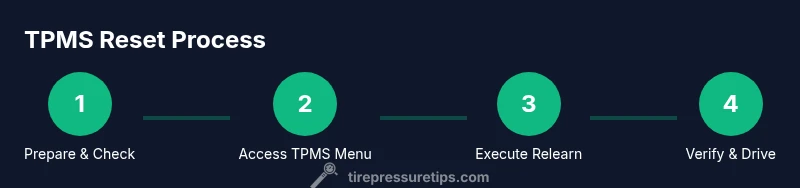
Park on a flat surface and engage the parking brake. Ensure all four tires are cold and inflated to the manufacturer’s recommended pressures. Have the RX 350 owner’s manual handy for model-year specific notes, and gather your TPMS tools before proceeding.
Tip: Always measure cold tire pressures to avoid readings inflated by heat after driving. - 2
Access the TPMS reset option in the RX 350 menu
Turn on the ignition and navigate to the TPMS or Vehicle settings area. Look for a Learn, Reset, or Relearn option. If your year uses a generic vehicle settings path, refer to the manual for the exact submenu.
Tip: If you don’t see a reset option, your model may require a diagnostic tool or dealer procedure. - 3
Initiate the reset and confirm
Select the reset option and confirm you want to begin the relearn. Some models require you to hold a button or confirm via screen prompts. Do not remove sensors during this process and ensure all four tires remain undisturbed.
Tip: Confirm you’re using the correct procedure for your exact model year. - 4
Perform a relearn if the vehicle requires it
If your RX 350 prompts for a relearn, follow the on-screen instructions, which may include leaving the car parked with the ignition on or moving to a specific driving pattern. This helps the system pair each sensor with its wheel.
Tip: Avoid driving aggressively immediately after relearn; gentle driving helps sensors stabilize. - 5
Drive to allow recalibration
After completing the relearn, drive the vehicle for a short period to allow the TPMS to relearn sensor IDs and align with current pressures. In some cases, a reset will be completed during this drive.
Tip: Keep to normal speeds and avoid sudden maneuvers during relearn. - 6
Verify pressures and readouts
Check all four wheel readings on the dashboard and at the valve with a gauge. Ensure display data matches the actual cold pressures and check for any warning lights that may indicate a follow-up issue.
Tip: If readings don’t align, recheck tire pressures and seating of the sensors. - 7
Troubleshoot a persistent TPMS light
If the light remains after relearn, inspect sensor installation, verify sensor IDs, and consider sensor replacement if a fault is detected. In some cases a dealer diagnostic is required.
Tip: Document any warning codes if you use a diagnostic tool for quick reference later. - 8
Document results
Record the reset outcome, the date, and the current cold pressure readings for future reference. Note any sensor changes or service performed so future visits don’t trigger unnecessary resets.
Tip: Keeping a simple log helps you maintain TPMS reliability over time.
Frequently Asked Questions
Do I need to reset TPMS after rotating tires on a Lexus RX 350?
Yes, rotating tires can alter sensor positions and readings. A TPMS reset ensures the system relearns the sensors' positions and IDs, helping prevent false warnings. Always verify all four pressures after the reset.
Yes. Rotating tires can affect the TPMS readings, so perform a reset and recheck all four pressures afterward.
Can I reset TPMS if the warning light is blinking?
A blinking TPMS light usually indicates a fault or sensor issue. Stop driving if necessary, check for obvious sensor damage, and use the appropriate reset method after addressing any faults. If unresolved, seek professional help.
A blinking light often means a fault; check sensors and perform reset only after addressing faults.
What happens if I replace a TPMS sensor and don’t reset?
Replacing a sensor without a relearn may cause the system to misread tire pressures or fail to register the new sensor. Always complete the relearn process to ensure accurate readings.
If you replace a sensor, you must relearn it so the system recognizes the new device.
Is dealership service required for TPMS reset on the RX 350?
Not always. Many model years support built-in resets, but some scenarios require a diagnostic tool or dealer service, especially if the system cannot relearn sensor IDs.
Often not required, but some cases may need a diagnostic tool or dealer service.
How long does the TPMS reset process typically take?
The reset itself is usually quick, but you should include a short drive afterward for relearning. Total time can vary, depending on model year and whether a tool is needed.
Typically quick, plus a short drive to relearn sensors.
What if the TPMS light comes back after a reset?
If the light returns, recheck tire pressures, inspect for leaks, and ensure sensors are properly seated. If issues persist, consult a professional to diagnose sensor faults or wiring problems.
If the light returns, recheck readings and seek professional help if needed.
Watch Video
What to Remember
- Verify four cold tire pressures before resetting
- Use the RX 350’s built-in TPMS reset if available
- Check readings after reset to confirm accuracy
- If the light persists, seek professional diagnostics
- Maintain TPMS health with regular tire maintenance