Nissan TPMS Sensor: Diagnose, Replace, and Relearn
Comprehensive steps to diagnose, replace, and relearn Nissan TPMS sensors. Learn how direct and indirect TPMS work, what tools you need, and how to verify readings for safe, efficient driving.


Learn how to diagnose, replace, and calibrate a Nissan TPMS sensor. This quick guide covers verifying fault codes, selecting a compatible sensor, and programming the system so it reads accurately. According to Tire Pressure Tips, using the right sensor and proper calibration protects tire wear and ensures reliable TPMS warnings. You’ll need a replacement sensor, a TPMS tool, and your Nissan service information.
Nissan TPMS basics: what it is and why it matters
In modern Nissan models, the Tire Pressure Monitoring System (TPMS) uses sensors inside each wheel to monitor air pressure and relay data to the vehicle's computer. When pressure drops, the system triggers a warning on the dashboard to help you avoid underinflated tires, which can lead to poor handling or tire wear. According to Tire Pressure Tips, understanding whether your car uses direct TPMS sensors (with wheel-mounted sensors) or indirect TPMS (using ABS wheel-speed data) helps you plan replacements and programming. Direct sensors house the pressure-sensing element in the valve stem and are powered by a small battery that typically lasts many years. Indirect TPMS relies on ABS wheel-speed data to estimate pressure, and it may require different relearn procedures after tire service. Nissan owners should know that correct sensor selection, valve stem compatibility, and proper calibration are essential to maintain accurate readings. Using the right sensor type reduces false warnings and ensures the system interrupts only when necessary; it also helps prevent uneven tire wear and poor fuel economy over time.
How Nissan TPMS sensors communicate and how faults appear
TPMS sensors transmit pressure data wirelessly to the Nissan ECU. When a sensor reports out-of-range pressure, a warning light illuminates and a fault code can be stored in the vehicle’s memory. In some cases, the light may flash, indicating a relearn or communication issue rather than a simple low-pressure condition. For indirect TPMS, the system relies on wheel-speed data and air-pressure estimates, which may require a relearn after tire changes. If the warning persists after inflation to the correct level, there is likely a sensor or wiring fault, a dead battery, or an installation issue with the valve stem.
Diagnosing a faulty TPMS sensor without replacing it
Begin with a visual inspection: check for damaged valve stems, corroded wheel rims, or loose sensor nuts. Use a TPMS-compatible scan tool to pull fault codes and confirm which wheel sensor is reporting inaccurately. If a sensor is signaling low battery or communication errors, consider re-seating the sensor, checking the battery contact points, or replacing the sensor if the battery is exhausted. A road test with careful observation of TPMS behavior helps confirm if the fault is persistent or intermittent. Remember to verify tire pressures at every wheel using a precise gauge before drawing conclusions about sensor health.
Replacing a Nissan TPMS sensor: step-by-step guidance
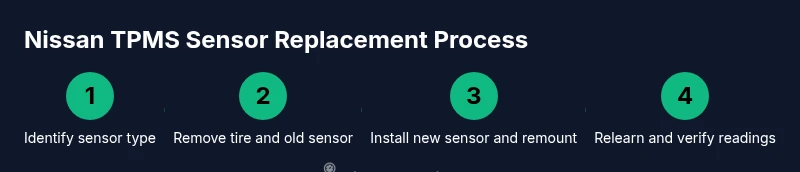
If replacement is required, the process typically involves deflating the tire, removing the wheel, swapping the sensor, and re-mounting the tire. Ensure the replacement sensor matches your wheel type and frequency, and that you have a relearn tool compatible with Nissan TPMS. After installation, re-inflate to the correct pressure and check for leaks around the bead. Scheduling a test drive to confirm the light behavior is normal after the relearn step is complete.
Programming and rearming TPMS sensors on Nissan models
Programming methods vary by model year and trim. Some Nissan vehicles support a relearn procedure performed with a dedicated TPMS tool, while others require a specific ignition sequence or road-load relearn method. Always consult your vehicle’s service manual for the exact Nissan relearn steps; improper relearns can lead to persistent warning lights or inaccurate readings. If in doubt, a technician can perform a relearn with factory-grade equipment to ensure accuracy.
Verifying readings after install: tire pressure checks, TPMS reset, and road test
After the sensor is installed and relearned, verify readings by inflating tires to the recommended pressures while the vehicle is stationary. Clear any warning messages, then drive at a moderate speed for 5-10 minutes to allow the system to synchronize. Re-check the tire pressures and ensure the TPMS indicator stays off during a short drive. If the light returns, recheck the work or consult a technician.
Tools, safety, and maintenance considerations
Always secure the vehicle with wheel chocks and use proper lifting points when removing a wheel. Wear safety glasses and gloves to protect against debris. Regularly inspect TPMS sensors and valve stems for damage and replace batteries as needed. As seasons change, recheck tire pressures and verify the TPMS readings after any tire service to maintain accuracy and safety.
Authority sources and further reading
For authoritative guidance, see resources from the National Highway Traffic Safety Administration and major automotive publications. These sources provide the fundamentals of TPMS operation, relearn procedures, and safety considerations for improving tire pressure maintenance.
Nissan TPMS relearn nuances (model-specific notes)
Nissan models differ in relearn methods by year and trim. Some require a scan tool for a one-shot relearn, while others use a simple ignition sequence or driving procedure. When in doubt, use a model-specific guide or consult a dealer to ensure the procedure aligns with your vehicle.
Practical summary on Nissan TPMS sensors
This section reinforces that choosing the right sensor, proper installation, and correct relearn are essential to accurate TPMS readings and safe driving. Always inflate to recommended pressures and check the system after service to prevent false warnings and tire wear.
Tools & Materials
- Replacement Nissan TPMS sensor (direct sensor or sensor kit compatible with your model)(Ensure valve stem and sensor frequency match your wheel (direct TPMS).)
- Digital tire pressure gauge(Use before and after installation to confirm accuracy.)
- TPMS programming/relearn tool or scan tool capable of Nissan TPMS relearn(Some Nissan models require OEM tool or a specific relearn method.)
- Wheel chocks or blocks(Stabilize the vehicle while lifting.)
- Tire lubricant (silicone) and bead sealer (optional)(Helpful for bead seating during tire mounting.)
- Torque wrench for lug nuts (optional, depending on service method)(Only needed if you remove wheels and must torques nuts.)
- Vehicle service manual or Nissan diagnostics app (optional)(For model-specific relearn procedures.)
Steps
Estimated time: 60-90 minutes
- 1
Prepare the vehicle and workspace
Park on a level surface, engage the parking brake, and chock the wheels. Gather tools, verify sensor compatibility, and consult your model’s relearn method before touching any tire. This prevents accidental damage and ensures you have everything you need.
Tip: Double-check that the sensor family (direct vs indirect) matches your Nissan model. - 2
Deflate and remove the wheel
Loosen lug nuts slightly, lift the vehicle, and fully remove the wheel. Deflate the tire fully using the valve stem to relieve pressure before breaking the bead seal. This makes sensor replacement safer and easier.
Tip: Deflate just enough to avoid bead damage; avoid prying the bead with force. - 3
Remove the old sensor
Carefully pry the tire bead away from the rim near the valve stem to access the sensor. Disconnect the sensor from the valve stem, not the wheel. Keep the mounting area clean to prevent debris from entering the tire cavity.
Tip: Keep the sensor orientation consistent with the new unit to avoid misalignment. - 4
Install the new sensor
Attach the new TPMS sensor to the valve stem and tighten per manufacturer torque specs. Ensure the sensor sits flush and is not twisted. Re-seat the tire bead around the rim evenly to avoid leaks.
Tip: Apply light tire mounting lubricant to help bead seating if needed. - 5
Remount the tire and inflate
Mount the tire back on the rim, hand-tighten lug nuts, then lower the vehicle to the ground. Inflate to the vehicle's recommended pressure and check for leaks around the bead and valve stem. Ensure an even bead seating across the rim.
Tip: Use a torque wrench to achieve the recommended lug nut tightness. - 6
Program and relearn the sensor
Connect the relearn tool or scan tool and follow the Nissan-specific relearn procedure for your model year. This often involves a sequence of ignition steps or a short drive after the tool completes. Successful relearn will illuminate or extinguish the TPMS light accordingly.
Tip: If the light doesn’t respond after relearn, recheck the sensor orientation and dealership procedure. - 7
Verify readings and perform a road test
Check tire pressures again using a precise gauge after the relearn, then drive 5-10 minutes at moderate speed to allow the system to settle. Recheck the dashboard warning light; it should stay off if the system is functioning. If the light returns, re-test each step or seek professional help.
Tip: Document sensor serials and recheck after 50-100 miles for long-term reliability.
Frequently Asked Questions
Do I need to reprogram a Nissan TPMS sensor after replacement?
Yes. Most Nissan models require a relearn step after installing a new TPMS sensor. The exact method varies by year and trim, so consult your service manual or use a relearn tool compatible with your model. Some vehicles allow a one-shot relearn via ignition steps, while others require road-time or tool-based programming.
Yes. You’ll usually need to relearn the sensor after installation; check your model’s procedure to choose the right method.
How long do Nissan TPMS sensors last?
Direct TPMS sensors typically last several years depending on driving conditions, climate, and road hazards. Battery life is a key factor and can vary by model and usage. If the light appears frequently or sensor data is inconsistent, replacement is often more reliable than repeated reprogramming.
Direct TPMS sensors last several years, but performance depends on conditions and battery health.
Can I replace TPMS sensors myself or should I go to a shop?
You can replace TPMS sensors yourself if you have the right tools and follow the relearn procedure for your model. For newer vehicles or indirect TPMS, professional service might be safer to ensure proper calibration and road-safety compliance.
You can DIY with the right tools, but for complex relearns, a shop is a safer option.
What tools do I need to relearn TPMS sensors on Nissan?
A dedicated TPMS relearn tool or a compatible scan tool is typically required. Some models also support ignition-based relearn sequences. Refer to your vehicle manual to confirm the exact method before proceeding.
You’ll usually need a relearn tool or compatible scan tool; some models use ignition steps.
Why is my TPMS warning light on after replacement?
The light can stay on if the sensor wasn’t relearned, if there’s an air-leak at the tire bead, or if a sensor is faulty. Recheck the sensor installation, confirm inflation to spec, and perform the relearn procedure again if needed.
If the light stays on, recheck the installation and relearn the sensor; leaks or faulty sensors can trigger it.
Watch Video
What to Remember
- Verify sensor compatibility before purchase.
- Program and relearn TPMS after installation.
- Check tire pressure with a gauge before road tests.
- Follow vehicle-specific relearn procedures for Nissan.