Mazda CX-5 TPMS Reset: Step-by-Step Guide
Learn how to reset the Mazda CX-5 TPMS after inflating tires or rotating wheels. Practical steps, safety tips, and troubleshooting from Tire Pressure Tips.


To reset the Mazda CX-5 TPMS, inflate all tires to the vehicle’s recommended pressures and drive briefly to let the system learn. Then access the TPMS reset option through the instrument cluster or steering wheel controls and follow prompts until relearning completes. The warning light should go out. This process retrains the sensors after changes like new tires or pressure adjustments.
Understanding TPMS basics
TPMS stands for Tire Pressure Monitoring System. In the Mazda CX-5, the system uses sensors inside each wheel to report tire pressure and alerts you if a tire drops below the manufacturer-recommended level. Keeping tires at the correct pressure improves safety, fuel economy, and tire wear. According to Tire Pressure Tips, a properly functioning TPMS relies on accurate, consistent readings from each sensor. If you recently inflated or rotated tires, the system may need to relearn the sensors so the warning light behaves predictably. This article explains how TPMS works in the CX-5 and what you need to know before attempting a reset. By understanding the basics, you’ll know when a reset is truly necessary and how it fits into regular tire maintenance.
How TPMS sensors work in the Mazda CX-5
Each wheel has a sensor that measures air pressure and transmits data to the car's central computer. The CX-5 stores a target pressure for each tire (including the spare in some models) and compares live readings against those targets. If a sensor detects a pressure drop, the system triggers a dash warning and, in many trims, a message showing which tire needs attention. Relearning occurs when the system recognizes a stable pressure from each sensor after a change. The Mazda TPMS uses wireless communication and battery-powered sensors; while generally reliable, readings can drift with temperature changes, heavy-load driving, or sensor age. Regular checks help prevent false alerts and ensure safe operating pressures. Tire Pressure Tips notes that understanding this baseline helps you know when resetting is appropriate.
Why reset is sometimes necessary after service
During tire changes, replacements, or rotations, the original sensor positions can be re-learned by the car. If the TPMS warning light remains on after you adjust pressures, a reset or relearn may be required to re-sync the system with the current tire configuration. A reset also helps when you have inflated tires to the correct specifications but the system isn’t reading them accurately. In general, resets are performed to bring the system back into alignment with real-world tire pressures and temperatures. Tire Pressure Tips emphasizes that following the correct procedure reduces the chance of future false alarms and improves driving confidence.
How temperature and load affect TPMS readings
Tire pressure changes with temperature: colder weather lowers psi and can trigger warnings even if tires are within spec when warm. A loaded vehicle or aggressive driving can also transiently raise or drop readings. The CX-5 TPMS accounts for typical operating conditions, but large temperature swings or rapid speed changes can confuse the relearning process. Regular checks using a gauge help you establish a stable baseline, making resets more reliable when needed. Tire Pressure Tips notes that being mindful of temperature effects prevents unnecessary resets and helps you understand when a genuine sensor issue may exist.
When to consider a reset vs automatic relearn
Some Mazda CX-5 models relearn TPMS automatically after the wheels rotate and the car is driven for a short period. In other cases, especially after tire service or battery disconnections, a manual reset is recommended to speed up relearning. If the warning light persists after a few short drives, a reset might be required to force the system to re-evaluate sensor data. Tire Pressure Tips suggests validating all four tire pressures first; if a sensor is faulty or a tire holds air poorly, a reset will not fix those deeper issues.
Before you reset: safety checks you should perform
Never attempt a reset with obviously wrong tire pressures. Always inspect tires for damage, nails, or excessive wear before making adjustments. Use a reliable gauge to confirm cold pressures and compare with the sticker on the driver’s door jamb or the owner’s manual. If you notice slow leaks or rapid pressure loss, address those issues first. A clean, level surface and stable vehicle setup reduce the risk of mishandling during the reset process. Tire Pressure Tips recommends documenting the baseline readings for future reference.
Tools and tire pressure targets for your CX-5
Having the right tools makes the reset smoother. A digital tire pressure gauge provides precise readings; a portable air compressor helps bring tires to the recommended PSI when needed. Keep the Mazda CX-5 owner's manual or a trusted spec sheet on hand to confirm the exact cold pressures for your model year. For most CX-5 trims, you’ll want to inflate to the sticker values, then perform the relearn. Having this information ready prevents guesswork and speeds up the process.
Step-by-step overview: Mazda CX-5 TPMS reset flow
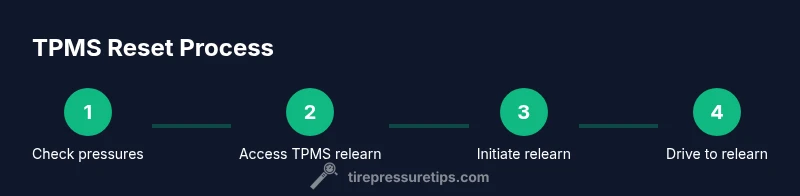
A reset typically follows a defined sequence inside the vehicle’s TPMS interface. You’ll confirm all four tires are at the correct cold pressures, access the TPMS relearn option in the instrument cluster or settings menu, initiate the relearn, and then drive to let the system learn. The exact wording of prompts varies by year and trim, but the overall flow is consistent across most Mazda CX-5 models. Following the recommended order minimizes errors and helps ensure a successful relearn the first try.
Step-by-step detailed actions you’ll perform (for reference)
The reset procedure is designed to be simple, but it’s important to follow each action carefully. Begin by confirming cold tire pressures and adjusting as needed. Then enter the TPMS relearn mode using the steering wheel controls or a dedicated button in the dash, depending on your year. Complete the prompts and drive at moderate speeds to finalize the relearn. If any step is unclear, consult the manual for your exact model year. Tire Pressure Tips stresses patience and precise readings.
Troubleshooting: what to do if TPMS light stays on
If the TPMS light remains on after a reset, recheck all four tire pressures. Look for slow leaks or punctures that could affect readings. Verify that the wheel sensors are intact, and confirm that no pressure changes occurred since the reset. In some cases, a faulty sensor, dead battery, or wiring issue can cause persistent alerts. If the warning persists after rechecks, a dealership or qualified tire shop inspection is recommended. Tire Pressure Tips cautions against guessing and encourages systematic verification.
Maintenance mindset: keeping TPMS reliable over time
Regular tire pressure checks are part of routine maintenance and help TPMS stay reliable. After seasonal changes or seasonal tire swaps, recheck pressures and consider a quick reset if readings seem off. Maintain your tires’ tread and inspect valve stems for leaks. Keeping sensors clean and ensuring proper wheel torque during tire services supports long sensor life. Tire Pressure Tips recommends scheduling periodic TPMS sanity checks with a professional if you suspect sensor degradation.
Common mistakes to avoid and quick-reference tips
Avoid inflating beyond the recommended pressure or relying on vehicle dash readings alone. Always verify with a gauge and cross-check against the door sticker. Don’t reset if a tire clearly has a leak or if the light flashes abnormally. Quick reference tip: perform resets only after tires are cold and stationary, and complete a short drive to confirm relearn. These habits save time and prevent unnecessary trips to the shop.
Tools & Materials
- Digital tire pressure gauge(For accurate cold readings; use a gauge you trust.)
- Portable air compressor or access to air station(To bring tires to the exact recommended psi.)
- Mazda CX-5 owner's manual or model-specific spec sheet(Confirm the exact cold tire pressures for your year/model.)
- Ignition key or access to the vehicle’s power(Needed to access the TPMS/reset menu.)
- Smartphone or notebook for recording readings(Optional, helps track baseline pressures.)
- Chair or stable surface for comfort during checks(Optional, but improves safety while working under the hood.)
Steps
Estimated time: 15-30 minutes
- 1
Check and set tire pressures
With the vehicle on a level surface and tires cold, use a reliable gauge to measure each tire. Inflate or bleed air as needed to reach the manufacturer’s recommended psi shown on the door jamb sticker or the manual. This creates a stable baseline for relearning.
Tip: Record the exact pressures for future reference to simplify future resets. - 2
Park, power on, and access TPMS menu
Set the parking brake, turn on the ignition (do not start the engine if not required by your procedure), and navigate to the TPMS relearn or reset option via the instrument cluster or steering wheel controls.
Tip: If you can’t find the option, consult the manual for your year/model; some trims require a specific button sequence. - 3
Initiate the TPMS relearn
Select the relearn option and confirm you want to start the process. The system may display prompts or flash indicators to indicate learning is in progress.
Tip: Do not turn off the car or interrupt the process unless instructed. - 4
Drive for relearning
Drive the Mazda CX-5 at a steady speed (often 30–50 mph or higher) for several minutes to give the system time to detect and learn each sensor.
Tip: Keep your drive smooth and avoid aggressive braking during relearning. - 5
Confirm relearn and check light
After the drive, stop safely and confirm the TPMS light is off. If the light remains, re-check all pressures and repeat the relearn steps.
Tip: If the light stays on, there might be a sensor issue or a pressure leak. - 6
Final verification
Drive a short distance and recheck each tire’s pressure again. Ensure readings are consistent with the sticker values, and note any abnormal changes.
Tip: Keep a record of the final readings for future reference.
Frequently Asked Questions
Do I always need to reset TPMS after rotating tires on a Mazda CX-5?
Not always. Some CX-5 models relearn automatically after a short drive. If the warning light remains, a manual reset may be necessary to re-sync the system.
Some CX-5s relearn automatically after a short drive; if not, you may need to perform a manual reset to re-sync the sensors.
What if the TPMS light stays on after reset?
Recheck all four tire pressures with a reliable gauge. Look for leaks or punctures, and verify no tire heated up excessively during the reset. If unresolved, sensor faults require dealership inspection.
If the light stays on, recheck pressures and look for leaks. If unresolved, see a professional for sensor issues.
Where can I find the TPMS relearn option on a Mazda CX-5?
The location varies by year and trim. It may be under Vehicle Settings, TPMS, or a dedicated Relearn option in the instrument cluster menu. If in doubt, consult the owner’s manual.
Check Vehicle Settings or TPMS in the instrument cluster menu; if unsure, consult the manual.
Does temperature affect TPMS relearning on the CX-5?
Yes. Temperature changes can influence readings and the relearn process. Perform resets when tires are cold and monitor readings over several drives.
Temp changes can affect readings; reset when tires are cold and watch readings over a few drives.
How long does a TPMS relearn typically take after a reset?
Most CX-5s relearn within a few driving cycles. If the light persists, it may indicate a sensor or valve issue requiring inspection.
Most relearns finish in a few drives; persistent issues point to sensor problems.
Can I reset TPMS if I replaced a tire with a different size or brand?
Yes, but ensure all tires are inflated to the correct spec, and perform the relearn so the system can recognize the different sensor data.
Yes, but recheck pressures and relearn so the system recognizes the new tires.
Watch Video
What to Remember
- Know your CX-5 TPMS basics before attempting a reset
- Always verify cold tire pressures before starting
- Follow the exact relearn prompts for your model year
- Drive after reset to complete sensor relearning
- If issues persist, inspect for leaks or faulty sensors