Ford Tire Pressure Sensor Fault Reset Button Location: Step-by-Step Guide
Learn where to find the reset button for Ford TPMS, how to reset fault warnings, and best practices for maintaining proper tire pressure across Ford models.


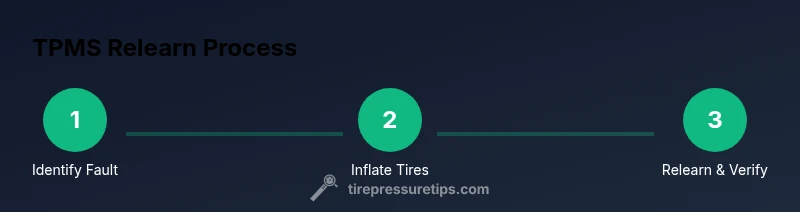
By following this guide, you will locate the ford tire pressure sensor fault reset button location, inflate tires to the recommended pressures, and complete a reset if supported by your model. If no reset button exists, you'll use a drive cycle or a diagnostic tool to relearn sensors. This process helps clear the fault light after proper inflation.
What TPMS is and why a reset matters
The tire pressure monitoring system (TPMS) in modern Ford vehicles continuously monitors air pressure in every tire and alerts you when a tire is underinflated or overinflated. A reset is not a magic fix for a flat or a damaged sensor; instead, it realigns the vehicle's sensor data with the actual tire pressures after inflation, rotation, or repair. The Ford TPMS relies on wheel sensors and a central controller, so when you encounter a fault, a reset may be required to re-learn tire positions and sensor IDs. This article focuses on practical steps you can take to address a TPMS fault and confirm the system reads accurately.
Note: Always start by verifying tire pressures with a reliable gauge and inflate to the door placard specification before attempting any reset.
Ford tire pressure sensor fault: common triggers and symptoms
TPMS faults are commonly triggered by sensor battery degradation, a slow tire leak, or sensor ID mismatch after wheel rotation. In Ford vehicles, the warning light may indicate a fault even if one tire is only slightly underinflated. Symptoms include a persistent TPMS warning light, readings that don’t match observed pressures, or messages from the vehicle’s computer about sensor fault. If you rotate tires or replace sensors, the system may require re-learn or reset. Remember: a reset does not fix a leak or replace a failing sensor—repair the tire or sensor as needed first.
Tire pressure readings can differ depending on ambient temperature and driving conditions, so rechecking after inflation is essential.
Where to look for the reset button on Ford models
Location varies by model year and trim level. In many Ford vehicles, you’ll find a dedicated TPMS reset button inside the cabin, often near the steering column, under the dashboard, or in the glove box. Some models hide the reset function behind a menu in the instrument cluster, while others rely on a drive cycle (no physical button). If you own a newer Ford with a touchscreen, open Settings and navigate to TPMS or Vehicle settings to access a relearn option. Your owner’s manual is the best source for exact location.
If you do not see a reset button, do not assume the system can’t relearn—many Ford models handle relearn through a drive cycle or require a factory scan tool.
How to prepare for a successful reset
Before attempting a TPMS reset, gather your tools and ensure every tire is inflated to the recommended pressure. Park on a flat, level surface, apply the parking brake, and turn the ignition to ON (without starting the engine) if your model requires it. Have a tire pressure gauge and a source of stable air ready. Check the spare tire if your model includes a spare TPMS sensor ring, and verify that the wheel lug nuts are properly torqued. A clean, well-lit workspace reduces missteps during the relearn process.
Path A: Reset using a TPMS reset button (where available)
If your Ford has a dedicated TPMS reset button, the typical workflow is to inflate all tires to the correct pressures, then press and hold the button for several seconds until the dash light blinks or the indicator chirps. After releasing, drive the car for a few minutes to complete relearn. If the dash indicator repeats, re-check pressures and, if needed, consult the manual for the exact button press sequence. Remember: the reset button location and procedure can differ by model, so the owner’s manual is essential.
Tip: Some vehicles require you to turn the ignition to ON and hold the button while the car is stationary before driving.
Path B: Reset without a dedicated button (drive cycle or scan tool)
Many Ford models without a physical reset button rely on a drive cycle or a scan tool for TPMS relearn. Inflate tires to spec, then drive the vehicle for 10–20 minutes at speeds above 25 mph, allowing the system to relearn automatically. If your model uses a scan tool, connect the tool, select TPMS relearn or relearn by driving, and follow the prompts. For some trims, the process must be completed with the ignition at ON but with the engine off, then driving to confirm after the message disappears.
Note: Not all Ford models respond to a drive cycle in the same way; refer to the manual or dealer for model-specific steps.
After reset: verification and driving tips
Once the relearn is complete, verify that all tires report pressures close to the placard values and that the TPMS warning light stays off. Drive for 10–15 minutes to ensure sensors register new data and to stabilize readings. If the light returns, inspect tires for slow leaks, check valve stems, and verify sensor IDs after a tire rotation. In some cases, a faulty sensor or battery requires replacement rather than reset.
Common mistakes and safety reminders
Avoid inflating tires beyond the recommended limit or deflating any tire to test the system. Always use the correct tire pressures listed on the door placard. Working around a vehicle with wheels off the ground or with hot tires can be dangerous; wear gloves and use proper jack stands if you must remove wheels for sensor inspection. A reset should occur only after tire pressures are verified and any immediate tire issues addressed.
When to seek professional help
If the TPMS warning persists after attempting reset and verification, diagnose the possibility of a faulty sensor, damaged wiring, or ECU fault. A dealership or qualified tire shop can perform a precise relearn with factory tools and inspect sensors for battery life and signal strength. Regular maintenance helps prevent recurring faults.
Tools & Materials
- Tire pressure gauge(Digital preferred for accuracy; use the same gauge for consistent readings.)
- Air compressor or access to inflation station(Have a reliable source to bring all tires to the door placard pressure.)
- Owner's manual (Ford model)(Check for model/year-specific TPMS reset instructions.)
- TPMS scan tool or OBD-II scanner with TPMS capability(Needed if no physical reset button or if light stays on after relearn.)
- Flashlight(For better visibility under dash or inside glove box.)
- Safety equipment (cones, chocks)(Use wheel chocks and a safety cone when working near traffic.)
Steps
Estimated time: 20-40 minutes
- 1
Verify tire pressures and warning light
Check all tires with a gauge and compare to the door placard. Note any tire that is low or high before starting the reset. This establishes the baseline and helps identify possible leaks.
Tip: Use the same gauge for consistency and re-check after inflation. - 2
Find model-specific reset method
Refer to the owner's manual or Ford service portal to locate either a dedicated TPMS reset button or the relearn option in the vehicle's settings. Location varies by model and trim.
Tip: If you can't locate a button, plan for a drive cycle or scan tool relearn. - 3
Inflate tires to the recommended pressure
Inflate each tire to the pressure listed on the door placard or in the manual. Uneven or underinflated tires can trigger TPMS faults and impair handling.
Tip: Allow a few minutes for the tire surface to settle after inflation. - 4
Perform the relearn using the available method
If a reset button exists, press and hold as instructed until the dash indicator blinks or confirms relearn. If using a drive cycle or scanner, follow those prompts to complete relearn.
Tip: Record the sequence you performed in case you need to repeat. - 5
Drive to complete the relearn
Drive 10–20 minutes at moderate speeds to allow sensors to register new data. Avoid aggressive driving during the relearn window.
Tip: If the light remains, double-check tire pressures and consider a sensor check. - 6
Verify the light is off and readings are stable
After relearn, monitor TPMS readings and confirm the warning light stays off. Recheck pressures after a short drive to ensure stability.
Tip: Keep records of readings for future reference.
Frequently Asked Questions
Do all Ford models have a TPMS reset button?
No. Some Ford models use a dedicated button, while others relearn via a drive cycle or a factory scan tool. Check the manual for your exact model/year.
Most Ford models either have a reset button or rely on a drive cycle or scan tool for TPMS relearn.
Why does the TPMS light stay on after I inflate tires to spec?
If the light remains, check for slow leaks, damaged sensors, or sensor IDs that didn’t relearn. Recheck pressures and attempt a relearn again.
The light can stay on if a sensor didn’t relearn or if there’s a leak that needs repair.
Can I reset TPMS without a scan tool?
Yes, many Ford models support a drive cycle relearn without a tool. If your model lacks a button, follow the drive cycle steps in the manual.
You may be able to relearn using a drive cycle if there’s no button.
How can I tell if a TPMS sensor is faulty vs just needing a relearn?
Observation of persistent light after a proper relearn, a physical sensor failure, or frequent pressure loss indicates a faulty sensor or battery.
If the light comes back after relearn, the sensor may be bad.
How long does TPMS relearn take after a reset?
Most relearns complete within 10–20 minutes of driving, but some models may require longer cycles or tool-based relearns.
Expect 10 to 20 minutes of driving for relearn in many models.
Is it safe to drive with a faulty TPMS?
Driving with underinflated tires can be dangerous. Get tire pressures correct and repair any damaged sensors as soon as possible.
Driving with a fault can be risky; fix the system promptly.
Watch Video
What to Remember
- Know your model's TPMS reset method
- Verify tire pressures before any relearn
- Use a scan tool if no reset button exists
- Drive to complete the relearn and verify lights off