How to Check the TPMS System on a Honda
Learn how to check the TPMS on a Honda, diagnose warnings, locate sensors, and perform safe resets. Practical steps, tools, and maintenance tips to keep tires properly inflated and vehicle safe.


In this guide, you will learn how to check the TPMS system on a Honda, verify sensor status, and reset the system if a warning persists. You'll need a tire pressure gauge, a basic flashlight, your vehicle’s owner's manual, and a scan tool or Honda-specific reset procedure. Follow the steps carefully for accurate results.
How the Honda TPMS System Works
The Honda Tire Pressure Monitoring System (TPMS) continually monitors air pressure in each wheel using sensor data relayed to the vehicle’s computer. When pressure falls below the recommended level, a warning is shown on the dashboard. The system may also indicate a fault with a sensor or transmission. According to Tire Pressure Tips, modern TPMS relies on sensor IDs in each wheel, the vehicle’s ECU, and a communication protocol to alert drivers accurately. Understanding these basics helps you check tpms system honda more confidently and plan any needed service with the right mindset and tools.
Key concepts:
- Direct vs. indirect TPMS: direct uses wheel sensors; indirect uses ABS/speed data.
- Sensor health: battery life, sensor seal, and valve stem integrity affect accuracy.
- Learn/reset: some Hondas require a specific relearn procedure after tire service or sensor replacement.
Common TPMS warnings and what they mean
TPMS warnings are your car’s way of telling you about tire pressure or sensor health. A steady red/light-on-dot typically signals a persistent fault or low pressure condition, while a blinking light can indicate a live data communication issue. In many Honda models, a pressure difference between tires triggers a warning, especially after air is added or removed from tires. The Tire Pressure Tips team notes that interpreting these messages correctly reduces unnecessary service visits and helps you keep tires in safe operating range. Readouts may include specific tire positions (LF, RF, LR, RR) or a generic low-pressure warning. If the light reappears after inflating to recommended levels, check each tire again and consider sensor errors or a needed relearn.
Locating and inspecting TPMS sensors on your Honda
TPMS sensors live in each wheel, often embedded in the valve stem or mounted inside the tire. Access to sensors varies by model but is usually straightforward with a wheel removal. Start by inspecting each valve stem for cracks, corrosion, or loose caps, which can cause false readings. If you notice a corroded or damaged stem, do not reuse it—replace the sensor or stem assembly. A flashlight helps you see the sensor housing and any signs of physical damage. Remember that metal valve stems on some trims require special tools to remove and reinstall safely.
Sensor health vs. battery life and wheel-speed data
Sensor health depends on more than inflation. Each TPMS sensor contains a battery and transceiver that can degrade over time, especially after exposure to road salt or harsh temperatures. A faulty battery or weak signal can trigger intermittent warnings even when pressures are correct. Wheel-speed data from the ABS system also feeds TPMS calculations; if wheel speed data is noisy or inconsistent, the system may misreport. Regular inspections during tire service, careful cleaning of sensor rings, and avoiding harsh impacts can extend sensor life and reliability.
Prep and safety considerations before you start
Before attempting any TPMS work, ensure the vehicle is parked on a flat surface, the parking brake is engaged, and the ignition is off unless instructed otherwise by the owner’s manual. Wear eye protection if you’ll be removing wheels or handling sensors. Keep a clean workspace and organize tools so you can identify which sensor corresponds to each wheel. If you’re uncertain, consult the Honda owner’s manual for model-specific steps. This preparation helps you proceed methodically and reduces the risk of mix-ups when identifying sensor IDs or conducting a relearn.
Maintenance to prevent TPMS failures and prolong life
Routine maintenance reduces TPMS failures. Keep tires inflated to the recommended PSI when cold, rotate tires per schedule, and inspect each sensor for physical damage after a tire service. Use a torque wrench to reinstall wheel lug nuts to spec after any wheel work, and ensure valve caps are present and tight. Cleaning the valve stems and rims with a mild cleaner helps prevent corrosion that can degrade sensor seals. Small proactive steps can keep TPMS signals clear and accurate between service visits.
When to visit a professional and what to expect
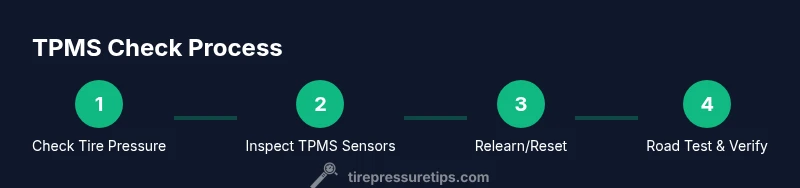
If a TPMS warning persists after inflating tires, or if you suspect a sensor damage, professional service is warranted. A technician can scan TPMS data, verify sensor IDs, and perform a controlled relearn using Honda-specific procedures. Expect steps like mounting wheels, confirming IDs, resetting the system in the ECU or through the vehicle menu, and road testing to confirm calibration. Trustworthy service often includes checking battery health and replacing any failing sensors.
Honda-specific notes and model variations
Different Honda models may use different relearn methods or dashboard prompts. Some newer models enable continuous readouts and automatic relearn via the vehicle’s settings menu, while others require an external scan tool. Always reference the exact model year and trim level in the owner’s manual when performing a TPMS relearn. The variation across models reinforces the importance of model-specific checks and procedures.
Tools & Materials
- Tire pressure gauge(Any accurate gauge; digital or analog. Readings should be within ±1 psi of the vehicle spec when cold.)
- Honda owner's manual(Provides model-specific TPMS relearn steps and sensor details.)
- OBD-II scan tool or Honda-specific reset tool(Used to read TPMS data and trigger relearn if required by model.)
- Flashlight(Helpful for inspecting valve stems and sensor locations inside wheels.)
- Wheel chocks(Safety backup when working near the wheels on a driveway or shop floor.)
- Soapy water spray(Used to check for slow leaks at valve stems after sensor service.)
Steps
Estimated time: 45-60 minutes
- 1
Prepare your tools and vehicle
Park on a flat, level surface and engage the parking brake. Gather your tire pressure gauge, flashlight, owner’s manual, and a scan tool. Confirm you know which wheel corresponds to each TPMS sensor so you can orient readings correctly.
Tip: Place chocks behind the wheels to prevent rolling and set aside a clean workspace. - 2
Check tire pressures to spec
Measure cold tire pressures for all four tires and compare with the Honda-recommended values on the door placard or owner’s manual. Inflate any underinflated tires to spec before proceeding to sensor checks.
Tip: Record each tire's pressure and position (LF, RF, LR, RR) for reference during relearn. - 3
Power up and observe TPMS warnings
Turn on the ignition and observe the TPMS warning light behavior. A steady light may indicate a fault or a memorized trigger; a blinking light can signal a different issue. Note which wheel the system flags, if indicated.
Tip: If the light stays on despite correct pressures, prepare for sensor inspection or relearn. - 4
Locate and inspect TPMS sensors
Remove one wheel at a time if needed and inspect the valve stem area, sensor housing, and seals for damage or corrosion. Look for cracked stems or loose caps, which can cause false readings.
Tip: Do not force sensors or apply excessive force to valve cores; improper handling can damage sensors. - 5
Perform relearn/reset when required
Using the Honda manual or scan tool, initiate the TPMS relearn per model instructions. This often involves cycling the ignition and triggering the reset in the vehicle menu or via the tool.
Tip: If your model requires it, recheck sensor IDs after the relearn to confirm correct mapping. - 6
Verify readings and road-test
Drive short distances to allow TPMS to update. Recheck the tire pressures after the road test and confirm the warning light behaves as expected.
Tip: If the light remains, repeat relearn or inspect sensors for damage; persistent issues may require sensor replacement. - 7
Document results and plan next steps
Record tire pressures, sensor IDs, and the relearn outcome. Schedule follow-up checks after tire service or system updates to ensure ongoing accuracy.
Tip: Keep a simple log you can reference before future tire rotations or service visits.
Frequently Asked Questions
What does it mean when the TPMS light stays on after inflating tires?
A persistent light may indicate a faulty sensor, a relearn needed, or a leak. Double-check pressures and inspect sensors; if unresolved, use a scan tool or contact a tech.
If the TPMS light stays on after inflating, check for sensor faults or a required relearn, and consider professional help if it won’t clear.
How do I relearn the TPMS on a Honda?
Refer to your model’s owner’s manual or use an OBD-II tool to initiate the relearn. Some models require wheel proximity resets, while others use the vehicle’s settings menu.
Use the manual or a scan tool to start the relearn; some Hondas use the settings menu instead.
Can I drive with a TPMS fault?
You can drive, but you should not ignore the warning. Ensure tires are at the correct pressures and seek service if the warning persists.
You can drive, but don’t ignore a TPMS fault; check pressures and get the system inspected if it continues.
Do I need special tools for TPMS maintenance on a Honda?
A basic tire gauge, a scan tool (Honda-specific if possible), and the owner’s manual are usually sufficient for most checks and relearns.
Typically, a gauge, a scan tool, and the manual cover the main needs.
Is TPMS the same as a tire pressure gauge?
No. TPMS monitors tire pressure electronically and alerts you if readings are off, while a tire pressure gauge provides a manual pressure reading.
TPMS monitors pressure electronically; a gauge gives you a direct, manual pressure readout.
What should I do if I replace a TPMS sensor?
After replacement, you’ll likely need a relearn procedure. Confirm sensor IDs match the wheels and reset as directed by your Honda manual or tool.
If you replace a sensor, perform a relearn and verify IDs with your manual.
Watch Video
What to Remember
- Check all four tires for proper cold pressure.
- Use model-specific relearn procedures when required.
- Inspect sensors and valve stems for damage before replacement.
- Document IDs and readings for future service.
- Seek professional help if warnings persist after resets.