Ford Tire Pressure Monitoring System Reset: Step-by-Step Guide
Learn how to perform a Ford TPMS reset after tire service or sensor changes with a practical, step-by-step approach. Includes preparation, model variations, verification, and troubleshooting tips from Tire Pressure Tips.


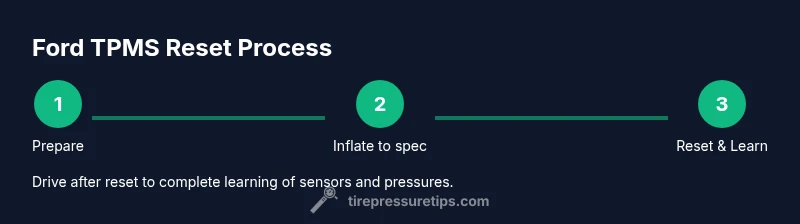
To perform a ford tire pressure monitoring system reset, inflate all tires to the recommended pressures and use the TPMS reset option in your Ford’s instrument cluster or button sequence. This quick guide explains when a reset is needed, the general approach, and how to verify the light behavior after resetting.
Why Resetting the Ford TPMS Matters
The tire pressure monitoring system (TPMS) in Ford vehicles helps you detect underinflated tires, which affects safety, fuel efficiency, and tire wear. When you rotate tires, replace sensors, or install new valve stems, the system may require a reset to recalibrate sensor IDs and current pressures. According to Tire Pressure Tips, a proper reset ensures the warning light behaves predictably and your tire information remains accurate. This ford tire pressure monitoring system reset process isn't a one-size-fits-all operation; model year and trim can influence the exact steps. Always consult your owner's manual for model-specific guidance and never drive with visibly underinflated tires. A reset is typically triggered after tires have been serviced or when sensor positions change.
When to Reset TPMS on a Ford
Resetting the TPMS is commonly needed after tire service: rotating tires, repairing a flat, replacing a TPMS sensor, or changing wheels or sensor batteries. If you notice a TPMS warning even after tires are inflated to spec, or if new sensors were installed, a reset helps the system relearn the current configuration. The general rule is to reset only after all tires are at or near the recommended pressures, and to verify that the readings align with the placard on the door jamb. When in doubt, refer to the owner's manual and consider a quick visit to a dealership or trusted tire shop for a diagnostic check.
Understanding Ford TPMS Systems and Sensors
Ford uses two main TPMS approaches: direct TPMS, which uses sensors inside each tire, and indirect TPMS, which infers pressure from wheel speed sensors. Most modern Ford models rely on direct TPMS, where each sensor broadcasts a pressure reading and a unique ID. Resetting the system teaches the vehicle which sensors are active and what pressures to expect. The goal is to have the system show accurate tire pressure data and illuminate the warning only when a tire is truly underinflated. If your vehicle has aftermarket sensors, compatibility with Ford's reset procedure may vary, so confirm sensor specifications in the manual.
Preparing for the Reset: Tools, Tire Pressure, and Safety
Before starting a ford tire pressure monitoring system reset, gather essential tools and confirm you are in a safe environment. You will want a reliable tire pressure gauge, access to a source of air for topping off tires, and your vehicle's owner’s manual for model-specific steps. Check each tire's cold pressure against the recommended specification on the driver door jamb. If any tire is below spec, inflate to the recommended level before proceeding. Safety first: park on a level surface, set the parking brake, and ensure the engine is off when interacting with the vehicle's controls.
Model Variations: TPMS Reset by Year and Trim
Ford's reset sequence can vary by model year and trim level. Some vehicles offer a dedicated TPMS reset option in the instrument cluster's settings menu, while others rely on a physical reset button located near the steering column or under the dashboard. On some models, the reset is automatic after driving for a certain distance and speed, while on others you must perform a manual sequence. Because of these differences, always refer to the owner's manual for your exact model and consider contacting a Ford dealer if you cannot locate the reset option.
Verifying the Reset: What to Expect
After performing the reset sequence, the TPMS light on the dash should behave as a normal warning light: it should turn off after the tires have returned to proper pressures and the system has learned the sensor IDs. You may notice a brief learning period as the vehicle relearns the optimal values. If the light remains on after driving, double-check tire pressures and sensor status. A persistent warning can indicate a faulty sensor, a damaged valve stem, or an incompatible sensor that would require professional inspection.
Common Pitfalls and Troubleshooting
Common issues include inflating tires to the wrong pressures, attempting a reset before tires are at spec, and using an incorrect reset sequence for your Ford model. If the reset fails, verify there are no slow leaks, check for damaged sensors, and confirm Sensor IDs match what the vehicle expects. For after-market sensors, some vehicles require additional steps or a dealer-level diagnostic tool. When in doubt, seek professional assistance to avoid misalignment or misinterpretation of warning lights.
Tools & Materials
- Tire pressure gauge(A reliable gauge to verify each tire's pressure when cold)
- Air compressor or inflator(For topping tires to the recommended pressures)
- Owner's manual(Model-specific TPMS reset instructions and sequence)
- Vehicle keys and access to instrument cluster(Needed to navigate to the TPMS reset option in some models)
Steps
Estimated time: 15-30 minutes
- 1
Prepare the vehicle
Park on a level surface with the parking brake engaged. Ensure the engine is off and the area around the wheels is clear. Gather your tools and locate your model's TPMS reset method from the owner’s manual. Knowing where to find the reset control saves time.
Tip: Make sure ignition is off before touching TPMS controls to avoid accidental wheel sensor triggers. - 2
Inflate tires to the recommended pressures
Check the door jamb placard for cold tire pressure specs and use a reliable gauge to verify each tire. Inflate or deflate as needed so every tire is at or near the recommended value. Do not exceed the maximum pressure printed on the tire sidewall.
Tip: If one tire cannot reach spec, address the leak first or consult a professional before resetting. - 3
Access TPMS reset control
Open the relevant Ford TPMS reset interface in the instrument cluster menu or locate the physical reset button, depending on model year. Follow the on-screen prompts or the button sequence to begin the learning mode.
Tip: If you cannot find the reset option, check the manual for your exact trim; some models require a specific submenu path. - 4
Execute the reset sequence
Confirm the reset action and wait for any confirmation signal from the dash or chime. Some vehicles require you to hold a button or complete a multi-step menu flow. Do not move the vehicle if the system requires learning while stationary.
Tip: Stay patient; some Ford models take a few moments to register the learning event. - 5
Verify reset and drive to confirm
Take a short, normal drive and observe the TPMS light. If it extinguishes within a reasonable driving period, the reset has likely succeeded. If the light remains, recheck tire pressures and sensor status, or seek professional diagnostic help.
Tip: A successful reset should not reoccur immediately after a short test drive if pressures are stable.
Frequently Asked Questions
What is the purpose of a Ford TPMS reset?
A TPMS reset retrains the system to recognize current sensor IDs and tire pressures after service or sensor changes, ensuring warnings are accurate and the display reflects actual conditions.
A TPMS reset retrains the system after tire service so readings match current pressures.
Can I reset TPMS after rotating tires on a Ford?
Yes, but inflate tires to spec first and follow your model's reset steps. Some Ford models auto-learn after a drive, while others require a manual sequence.
Yes, but make sure the tires are at spec and follow the model's steps; some cars auto-learn after driving.
Why won’t the TPMS light reset after the procedure?
Possible causes include underinflated tires, damaged sensors, or an incorrect reset sequence for your model. Recheck tire pressures and sensor status, and consult the manual or dealer if needed.
Common causes are underinflation, damaged sensors, or wrong reset steps; recheck and consult if needed.
Does resetting TPMS recalibrate automatically after driving?
In many Ford models, a drive helps the system relearn after a reset, but some require additional steps. Always verify by monitoring the dash indicator after a short test drive.
Driving helps most models relearn after a reset, but check the dash indicator afterward.
Is it safe to drive with a TPMS warning on?
A TPMS warning usually indicates at least one tire is underinflated or there's a sensor issue. It’s best to address the warning promptly and inflate to spec, then reset or diagnose as needed.
If the warning is on, address it promptly and inflate to spec; reset or diagnose if needed.
Watch Video
What to Remember
- Check tire pressures before resetting.
- Follow model-specific Ford TPMS steps.
- Drive after reset to confirm learning.
- Recheck pressures after driving.
- Contact a dealer if the light stays on.