RAM 1500 TPMS Reset Guide: Step-by-Step Sensor Relearn
Learn how to reset the RAM 1500 tire pressure monitoring system (TPMS) after tire changes or sensor service. This guide covers relearn methods, required tools, timing, and verification to keep TPMS indicators accurate and tires properly inflated.


This guide shows you how to reset the RAM 1500 TPMS, identify the correct relearn method for your exact model year, and verify proper inflation with a gauge. You’ll learn where to locate the TPMS sensor, what tools are needed, and the safe sequence to complete the relearn without triggering warning lights.
Understanding the RAM 1500 Tire Pressure Sensor and Reset Basics
Your RAM 1500 relies on a tire pressure monitoring system (TPMS) to alert you when a tire is underinflated. After you replace a sensor, rotate tires, or adjust pressures, the ram 1500 tire pressure sensor reset may be required to learn the new sensor data and the correct PSI targets. According to Tire Pressure Tips, a successful reset hinges on accurate inflation, a clear target PSI from the door placard, and following the manufacturer’s relearn steps. While the exact sequence can vary by model year, most RAM 1500 trucks use a relearn process that becomes active once the tires are inflated to spec and the vehicle is driven for a short period. This block sets the foundation for safe maintenance and reliable TPMS readings.
Tools & Materials
- Calibrated tire pressure gauge (digital preferred)(Read 0-60 psi with 0.5 psi precision for each tire.)
- RAM 1500 owner's manual (model year-specific relearn steps)(Check for your exact model year procedure.)
- TPMS relearn tool or scan tool (optional)(Some RAM models support relearn via tool.)
- Tire inflation source (air compressor)(Access to air supply to bring tires to target PSI.)
- Wheel chocks and safe parking space(Prevent vehicle movement during the procedure.)
- Soap water spray (optional)(Check for leaks around valve stems after service.)
Steps
Estimated time: 25-40 minutes
- 1
Park and prepare the vehicle
Park on a level surface with the engine off and the parking brake engaged. Place wheel chocks to secure the vehicle and ensure you have clear space to access the tires and the instrument cluster. Gather your tools so you aren’t scrambling mid-process.
Tip: Take a quick photo of the tire placard and sensor locations for quick reference. - 2
Inflate tires to target PSI per placard
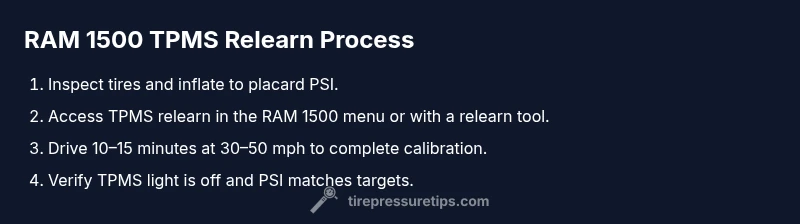
Consult the door placard on the driver’s door frame to confirm the recommended PSI for front and rear tires. Use your calibrated gauge to bring each tire to that exact target before attempting relearn, as incorrect pressures can cause failed relearn attempts.
Tip: Document the target PSI values for future reference. - 3
Initiate the relearn sequence
Access the RAM 1500 TPMS relearn option via the vehicle’s settings menu or, if applicable, using a relearn tool. Follow the model-year specific prompts to place the system in relearn mode. Avoid turning the vehicle on and off repeatedly during the relearn process.
Tip: If your model supports a dashboard sequence, keep the ignition on in accessory mode during the process. - 4
Drive to complete the relearn
With tires inflated to spec, drive at a steady speed (typically 30–50 mph) for 10–15 minutes to let the system calibrate and learn each sensor. This step helps the TPMS reconcile sensor IDs with tire pressures.
Tip: Avoid abrupt accelerations or heavy braking during relearn. - 5
Verify sensor learn and reset success
Turn off and restart the vehicle if required and check that the TPMS warning light goes out. Cross-check each tire’s PSI with your gauge to confirm it matches the placard values.
Tip: If the light remains on, proceed to a second relearn attempt or consult the owner manual. - 6
Troubleshooting and next steps
If the TPMS light persists after a second relearn, inspect for sensor damage, valve leaks, or battery failure. Some issues may require a professional TPMS reset sequence or sensor replacement.
Tip: Document any error codes shown by a scan tool for quick diagnosis.
Frequently Asked Questions
What is TPMS reset, and why would I need it on a RAM 1500?
TPMS reset re-trains the system to recognize current sensor data and tire pressures after changes. It’s needed after replacing a TPMS sensor, adding new tires, or adjusting pressures to ensure accurate warnings.
TPMS reset retrains the system so your RAM knows the current sensor data and tire pressures after changes.
Do I always need a relearn after inflating to the correct PSI?
A relearn is often required after sensor work or tire changes. If the tires were already at the correct pressures before, you may still need a relearn to synchronize sensors with the ECU.
You usually need a relearn whenever sensors are touched or tires change, to sync the data.
Can I drive normally after starting the relearn process?
A light drive at moderate speed is typically recommended to complete the relearn. Avoid aggressive driving while the system calibrates.
Yes, a gentle drive helps the system finish learning the sensors.
What if the TPMS light stays on after the relearn?
If the light remains, re-check tire pressures, inspect sensors for damage or leaks, and consider a second relearn or a scan tool diagnosis.
If the light doesn’t go out, double-check pressures and sensor health, then try relearn again or use a scanner to diagnose.
Is a TPMS relearn the same for all RAM model years?
Relearn procedures can vary by model year and trim. Always consult the RAM owner’s manual for your specific year and use the correct relearn method.
Relearn steps can differ by year, so check your manual for your RAM’s exact procedure.
Do I need any special tools beyond a pressure gauge?
A basic tire gauge is usually enough for checking pressures; some RAM models may require a scan tool or TPMS relearn tool for certain steps.
Usually a gauge is enough, but some models need a relearn tool.
Watch Video
What to Remember
- Lock in a level surface and safety gear before starting.
- Inflate tires to door placard PSI values for relearn accuracy.
- Follow RAM relearn steps and drive to complete calibration.
- Verify lights off and PSI readings match target values.
- If issues persist, seek professional TPMS assistance.