Dodge Challenger Tire Pressure Sensor Guide
Learn to inspect, diagnose, and calibrate the Dodge Challenger tire pressure sensor (TPMS) with practical steps, safe practices, and maintenance tips from Tire Pressure Tips.


Learn how to locate, inspect, and calibrate the Dodge Challenger tire pressure sensor (TPMS) to ensure accurate readings and safe driving. This guide covers checking pressures, resetting the system after tire service, and common troubleshooting, using practical steps. Whether you rotate tires, replace sensors, or simply want peace of mind, this quick answer points you to practical checks.
What the TPMS Does for Your Dodge Challenger
According to Tire Pressure Tips, the Dodge Challenger tire pressure sensor (TPMS) is a safety feature that alerts you when one or more tires are underinflated or when a sensor loses its connection. The system relies on direct sensors in each wheel or an indirect method that infers pressure from wheel speed data. In a Challenger, you may encounter either type, depending on the trim and manufacturing year. The TPMS helps prevent underinflation, which can reduce fuel efficiency, handling, and tire life. Regular checks, informed by warning lights on the dash, keep you ahead of trouble. For best results, treat the TPMS as a control loop: monitor, compare to target pressures, and relearn after tire work. The Tire Pressure Tips Team emphasizes consistency in your routine to minimize false alarms and maximize accuracy.
In this section you will learn the core purpose of the Dodge Challenger tire pressure sensor (TPMS), how it protects you on the road, and why maintenance matters. The TPMS is not just a warning light; it’s a continuous feedback system that works best when you maintain correct tire pressures and ensure sensors stay connected. Practically, your Challenger’s TPMS aids in steering response, braking performance, and tire wear distribution, so neglecting it can subtly degrade safety over time. Keep your approach visual: check the dash, verify with a gauge, and relearn after service. Defensive driving starts with accurate sensor data and steady maintenance.
Signs Your TPMS Needs Attention
A functioning TPMS will alert you promptly when pressures deviate from manufacturer recommendations. In the Dodge Challenger, you may see a warning light, hear a chime, or notice a message in the instrument cluster. Other signs include sporadic or inconsistent readings, a tire that remains flagged despite proper inflation, or frequent false alarms after a tire swap. The key is to verify any warning with a physical pressure check and a TPMS scan using a dedicated tool. If readings are inconsistent across tires, or if a sensor refuses to relearn after work, you likely have a sensor or sensor-communication issue. The Tire Pressure Tips Analysis (2026) highlights that many TPMS faults stem from sensor battery drain, damaged valve stems, or corroded wheel-hub contacts. Addressing these issues promptly reduces further risk.
Dark, wet mornings or extreme temperatures can influence TPMS readings, so note environmental factors when diagnosing. Even with modern systems, a reliable, repeatable check is the best defense: cold tires, verify pressure, then compare to the door placard. If a warning persists after reinflating to the recommended range, plan a sensor check with a professional. Remember: early intervention saves money and protects tread life.
Tools & Materials
- Digital tire pressure gauge(Calibrated and read in psi; large display helps accuracy)
- TPMS diagnostic tool or relearn transmitter(OEM or aftermarket tool compatible with Dodge TPMS relearn procedures)
- Owner’s manual/door placard(Locate recommended tire pressures and relearn sequences for your Challenger trim)
- Socket wrench and wheel wrench(Helpful for wheel removal when needed during sensor inspection)
- Safety gear(Gloves, safety glasses; work on a flat surface with parking brake engaged)
Steps
Estimated time: 25-40 minutes
- 1
Park safely and prepare the workspace
Park on a flat, level surface and engage the parking brake. Gather all tools and confirm you have room to work around all four wheels. This is the foundation for accurate readings and safe sensor inspection.
Tip: Use wheel chocks if you’re on a slope; never work under a lifted vehicle without proper supports. - 2
Identify TPMS indicators and suspect tires
Turn the ignition to run and observe the TPMS warning light. If the message pinpoints a tire, note its position and inspect visually for obvious issues like a tire bead leak, visible puncture, or damaged valve stem.
Tip: If a tire looks unusual (bulged sidewall, excessive wear), put that tire as the first priority for pressure check. - 3
Check all tire pressures with a calibrated gauge
With the tires cold, measure each tire’s pressure using a calibrated digital gauge. Compare readings to the Challenger’s door placard. Correct any underinflation promptly and recheck to ensure even pressure across all tires.
Tip: Record the readings for future reference and to monitor changes over time. - 4
Read TPMS sensor data with a diagnostic tool
Connect your TPMS scan tool and read sensor IDs, battery status, and transmission health. Note any sensor that reports low battery or fails to respond; this often points to a faulty sensor or wiring issue.
Tip: If a sensor doesn’t respond, it may require relearn or replacement. - 5
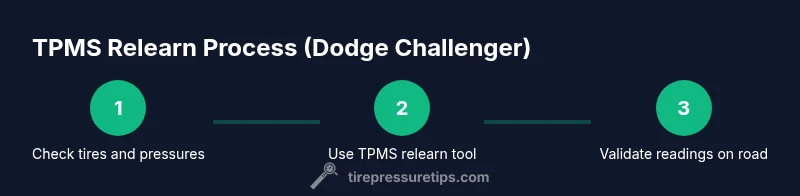
Perform TPMS relearn after any tire work
If you rotated tires, repaired a puncture, or replaced a sensor, follow the Challenger relearn procedure to re-sync the system with new sensor data. This step is essential to restore accurate readings.
Tip: Refer to the owner’s manual for the exact relearn sequence or use a compatible tool. - 6
Replace or repair faulty TPMS sensor
Inspect damaged valve stems or corroded wheel-hub contacts; if a sensor is failing, replace only the affected unit with a compatible sensor. Recheck pressures and relearn afterward.
Tip: Avoid continuing to drive with a known failing sensor; it can mask real underinflation cases. - 7
Validate readings and complete relearn
Drive the vehicle for several miles to allow the TPMS to relearn; recheck all four tires with a gauge and verify the dashboard no longer shows warnings. Confirm stability across all sensors.
Tip: A short test drive helps the system update and reduces false warnings.
Frequently Asked Questions
What is TPMS and why does it matter on a Dodge Challenger?
TPMS stands for tire pressure monitoring system. It alerts you when a tire is underinflated or a sensor is malfunctioning, helping you maintain safe handling, better fuel economy, and longer tire life. For the Challenger, accurate TPMS data is essential due to performance handling characteristics.
TPMS is the tire pressure monitor and sensor system that warns you about underinflation or sensor issues, which is important for safe handling and optimal performance.
How do I reset TPMS after rotating tires on a Challenger?
Most Challenger models allow a relearn procedure through the driver settings menu or a TPMS tool. After rotation, follow the official relearn steps in the owner's manual or use a compatible diagnostic tool to re-sync the sensor data.
After rotating tires, re-sync the TPMS using the vehicle menu or a TPMS tool.
Can I drive with a bad TPMS sensor?
If a TPMS warning persists, avoid driving long distances while underinflated and schedule a vehicle check. A faulty TPMS can mask real underinflation, increasing risk of tire damage or blowouts.
If the TPMS is faulty, limit driving and get it checked soon.
What are common causes of TPMS faults in a Challenger?
Common causes include dead battery in the sensor, damaged valve stems, corrosion at wheel-hub contacts, and improper relearn after service. Regular checks help catch these issues early.
Most TPMS faults come from a weak battery, damaged valve, or poor relearn after work.
How often should TPMS sensors be replaced?
TPMS sensors typically last several years, but battery life varies. Replace sensors when sensor warnings persist or after noticeable damage or corrosion.
Sensors can last years, but replace them if warnings keep coming up or they’re damaged.
Watch Video
What to Remember
- Check tire pressures first with cold tires.
- Use a TPMS tool to read sensor data and status.
- Relearn after tire service or sensor replacement.
- Drive 5–10 miles to complete sensor relearn and verify readings.