Chevy Colorado Tire Pressure Sensor Troubleshooting Guide
Urgent guide to diagnose and fix Chevy Colorado tire pressure sensor (TPMS) warnings, with recalibration steps, relearn procedures, and sensor replacement tips for safer driving.


Common Chevy Colorado tire pressure sensor (TPMS) warnings usually point to a weak battery in a sensor, a damaged valve stem, or a misread from the control module. Start with a visual check of tires and stems, then use a TPMS scan tool to pull fault codes, and follow the manufacturer’s relearn procedure or sensor replacement if needed.
Understanding Chevy Colorado TPMS: What You Need to Know
When the light on your dashboard glows or the message chevy colorado tire pressure sensor appears in your instrument cluster, you likely want fast answers. According to Tire Pressure Tips, TPMS is there to alert you when a wheel's air pressure deviates from the manufacturer’s recommended range. For the Chevy Colorado, TPMS relies on sensors in each wheel and a central control module that tracks readings and triggers the warning when a pressure change exceeds a set threshold. The system is a safety feature, not a nuisance, and understanding how it works helps you respond quickly and safely. In 2026, the best practice is to verify tire pressures using a trusted gauge before chasing sensor faults. If the tire pressures check out, but the TPMS light stays on, a sensor battery or a relearn procedure could be the culprit.
The Tire Pressure Tips team emphasizes that TPMS data is only as good as the sensors and the communication link. A weak battery in any wheel sensor can drift readings and trigger false alerts, while a corroded valve stem can cause slow leaks that confuse the system. For drivers of the Chevy Colorado, treating TPMS alerts seriously means checking both the shown tire pressures and the sensor integrity. This approach minimizes unnecessary tire replacements and helps you stay safe on the road.
Common Causes of TPMS Warnings in Chevy Colorado
The chevy colorado tire pressure sensor system is designed to warn you when a tire is underinflated or when a sensor fails. Velocity or impact can damage a wheel sensor, while natural wear may drain its battery. Common causes include underinflation, a sensor battery nearing end-of-life, corrosion at the valve stem, or a relearn requirement after tire service. In some cases, simply rotating tires without performing a relearn will cause a temporary mismatch, prompting a warning light. The Tire Pressure Tips analysis shows that the majority of TPMS warnings stem from sensor batteries and relearn issues rather than complete sensor failure. Always start with a tire pressure check to rule out underinflation and plan the next steps accordingly. If you suspect a sensor fault, a diagnostic scan will reveal which wheel sensor is problematic.
Tools, Safety, and Quick Checks
Before diving into sensor work, assemble the basics: a calibrated tire pressure gauge, an air pump or compressor, and a TPMS diagnostic tool compatible with GM vehicles. Safety first: park on a flat surface, engage the parking brake, wear gloves, and avoid working on hot tires. For the chevy colorado tire pressure sensor, you’ll want to confirm all four tires (and the spare if your model supports monitoring) are within the recommended range. If the gauge reads normal but the TPMS warning persists, capture the fault codes with a scan tool. These codes point you toward the likely wheel, whether it’s a sensor with battery trouble, a damaged stem, or a relearn need. Because TPMS operates at the wheel level, even a single faulty sensor can trigger the entire system. Regularly checking tire pressures and sensors prevents false alarms and keeps your vehicle safe on the road.
Diagnostic Pathway: From Warning Light to Fix
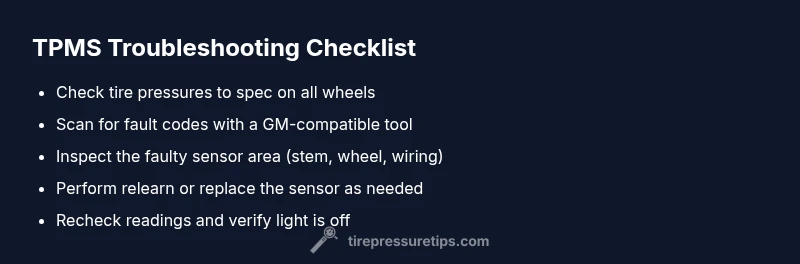
Starting with the simplest checks, you verify inflation first. If all four tires are within spec, use a TPMS diagnostic tool to pull fault codes. The symptom-to-diagnosis flow often looks like this: warning light present → confirm pressures are correct → read codes → identify faulty sensor or relearn requirement → perform fix → recheck. If the codes indicate a specific wheel, inspect that wheel for damage, corrosion, or a damaged valve stem. If the codes show multiple sensors or ambiguous results, you may need a more thorough relearn or sensor replacement. Remember, a failed relearn can leave you with misleading readings, so following the proper relearn sequence for your Chevy Colorado is essential. If the issue persists after these steps, professional service is advised.
Step-by-Step Fixes for the Most Common Cause
- Check tire pressures on all wheels and adjust to the manufacturer’s specification. Do not rely on the dashboard readout alone. 2) Inspect the valve stems for damage, corrosion, or debris; replace any questionable stems. 3) Use a TPMS diagnostic tool to read fault codes and locate the faulty wheel. 4) If a specific sensor is indicated, attempt a relearn procedure per GM guidelines or replace the sensor if the codes persist after relearn. 5) After any sensor replacement, perform a system relearn and verify readings on all four wheels. 6) If the warning remains after these steps, inspect wiring and consult a professional. Each fix has its own difficulty level, from easy inflation checks to hard sensor replacement and programming.
Prevention Tips and When to Seek Help
Prevent TPMS warnings by maintaining correct tire pressures, rotating tires properly, and scheduling periodic TPMS checks. Regularly inspect sensors for damage after impacts or off-road driving, especially in rugged GM trucks like the Chevy Colorado. If you notice frequent warnings after road hazards, avoid driving long distances and seek professional help promptly. A certified technician can reprogram or replace sensors, ensuring the TPMS modules read accurately across all wheels. Remember: neglecting TPMS issues can lead to unsafe tire conditions and reduced fuel efficiency. The Tire Pressure Tips team recommends proactive TPMS maintenance as part of your monthly vehicle checks.
Steps
Estimated time: 60-90 minutes
- 1
Prepare and gather tools
Park on a flat surface, engage the parking brake, and assemble a calibrated tire gauge, portable air compressor, and a compatible TPMS scan/relearn tool. Having a wheel chock and gloves improves safety during the procedure.
Tip: Label wheels by position (FL, FR, RL, RR) to avoid mix-ups during relearn. - 2
Check tire pressures
Measure the pressure of each tire and compare with the vehicle’s recommended value found on the door placard. Inflate underinflated tires to spec before proceeding, as a misread can mask sensor faults.
Tip: Record readings to reference after fixes and multiple tests. - 3
Read TPMS fault codes
Connect the TPMS scan tool to the vehicle data port and pull the fault codes. Note which wheel or system the codes reference to target your inspection.
Tip: If codes point to a wheel, start with that tire's valve stem and sensor first. - 4
Perform relearn or replace sensor
If codes indicate a sensor issue, attempt the relearn procedure per GM guidelines. If relearn fails after several attempts, replace the faulty sensor and reattempt relearn.
Tip: Use OEM-compatible sensors to simplify relearn and ensure compatibility. - 5
Verify and finalize
After successful relearn or replacement, recheck all four tire pressures and confirm the TPMS light stays off. Take a short test drive to ensure the system reads consistently.
Tip: Document the final readings and the relearn confirmation for your records. - 6
Know when to seek help
If the TPMS light returns or persists after a full relearn and inspection, consult a professional to diagnose wiring, module, or sensor issues that may require specialized tools.
Tip: Professional help can prevent repeated warnings and ensure safety.
Diagnosis: TPMS warning light on Chevy Colorado remains on or returns after reset
Possible Causes
- highDead or weak TPMS sensor battery
- mediumSensor damaged by corrosion or impact
- highTire rotated or replaced without relearn
- lowFaulty TPMS control module or receiver
- highUnderinflation not corrected after warning
Fixes
- easyInflate tires to specification and recheck
- easyUse a TPMS diagnostic tool to read fault codes and perform relearn
- mediumReplace faulty sensors or reprogram after replacement
- hardInspect TPMS wiring and ABS/CTM interfaces if codes persist; seek professional help
Frequently Asked Questions
What does a TPMS warning light mean on a Chevy Colorado?
A TPMS warning indicates that at least one tire’s pressure is outside the recommended range or a sensor is malfunctioning. Start by checking inflation, then diagnose specific sensors using a scan tool.
A TPMS warning means a tire is under or overinflated or a sensor is failing. Check inflation first, then diagnose with a scan tool.
Why would the TPMS warn even when tires look fine?
Sensors can misread if the battery is weak, a stem is corroded, or a relearn is required after service. Scanning for fault codes reveals the cause.
Sensors can misread due to battery issues, stem corrosion, or a needed relearn. Use a scan tool to find the cause.
How do I relearn TPMS sensors on a Chevy Colorado?
Relearn steps vary by model year; use a GM-compatible scan tool and follow the official relearn procedure for your truck. If the process fails, sensor replacement may be needed.
Use a GM-compatible scan tool and follow the official relearn steps for your year. If it fails, you may need to replace the sensor.
Where are TPMS sensors located on the Chevy Colorado?
TPMS sensors are mounted inside each wheel at the valve stem. In some vehicles, the spare tire sensor is also monitored. Inspect each wheel for damage if warnings occur.
Sensors sit in each wheel at the valve stem, sometimes including the spare. Inspect each wheel for damage if warnings occur.
Can replacing a TPMS sensor be expensive?
Replacement costs vary by sensor type and labor, but a relearn or sensor replacement is usually less costly than continuing to drive with an incorrect reading. Check with a trusted shop for an estimate.
Costs depend on sensor type and labor; you’ll typically pay more for sensor replacement than a relearn. Ask a shop for an estimate.
Is it safe to drive with a TPMS warning?
If the warning suggests underinflation, reduce speed and avoid sharp maneuvers. Do not drive long distances with low tire pressure; get the tires inflated and diagnose the cause promptly.
Don’t drive long distances with underinflation. Inflate tires to spec and diagnose the cause quickly.
Watch Video
What to Remember
- Check tire pressures first to rule out improper inflation.
- Use a TPMS tool to pull fault codes and perform relearn when needed.
- Replace sensors only after confirming fault codes and unsuccessful relearn.
- Recheck all tires after any TPMS service to confirm accuracy.
- Schedule regular TPMS maintenance to prevent future warnings.