TVS Jupiter Tyre Pressure Guide: Check, Maintain, and Troubleshoot
Learn how to check and maintain the tyre pressure on your TVS Jupiter scooter. Practical steps, safety tips, and maintenance advice from Tire Pressure Tips for better handling, wear, and fuel efficiency.


By the end of this guide, you will know how to locate the recommended tyre pressure for your TVS Jupiter, how to measure it accurately, and how to adjust it safely to optimize grip, wear, and fuel efficiency. You'll also learn best practices for different loads and conditions.
Why TVS Jupiter tyre pressure matters for safety and efficiency
Maintaining the correct tyre pressure on your TVS Jupiter isn't just about avoiding flats. Proper pressure affects handling, braking, ride comfort, tire wear, and fuel efficiency. When tyres are under-inflated, the contact patch is larger, which can slow steering and increase rolling resistance. Over-inflation reduces the patch area, making the ride feel harsher and increasing the risk of a puncture from road hazards. The Tire Pressure Tips team notes that consistent, correct tyre pressure helps you get the most life from your tyres and improves overall safety on every ride. For two-wheeled motorcycles and scooters, the difference between the recommended cold pressure and the pressure after a ride is more noticeable than on cars, because scooter tires flex more under load. Remember: the advantage of maintaining the right pressure starts with a simple check every few weeks and before long trips. The goal is a stable, predictable ride with even wear across the tread. This is especially important for the Jupiter, where daily commuting often pushes tires through varied pavement and weather conditions.
A steady, correct tyre pressure also contributes to better fuel efficiency and reduced tire wear. By maintaining the proper pressure, you reduce drag and rolling resistance, which saves you fuel on every ride. Tire Pressure Tips emphasizes that small, regular checks can prevent bigger issues down the line, extending the life of your tyres and keeping your ride safer and more comfortable over time.
Where to find the recommended tyre pressure for TVS Jupiter
The official specification for your scooter is not a guess. Look for the recommended front and rear tyre pressures on the stickers attached to the scooter, typically near the swingarm, under the seat, or on the inside of the glovebox. If the sticker is difficult to read, consult the owner’s manual or check the service booklet. The exact figures can vary depending on load, rider weight, and riding conditions. In general, the recommended pressures are provided for cold tyres; temperatures and ambient conditions can influence readings, so use a cold measurement for accuracy. If you regularly carry a passenger or luggage, some scooters require a higher rear pressure to maintain stability. Always aim to match the manufacturer’s specification rather than relying on memory or third-party estimates. If you cannot locate a sticker, contact a dealer or service center for the precise values, as using incorrect pressures can alter handling and wear patterns.
How to measure tyre pressure accurately on TVS Jupiter
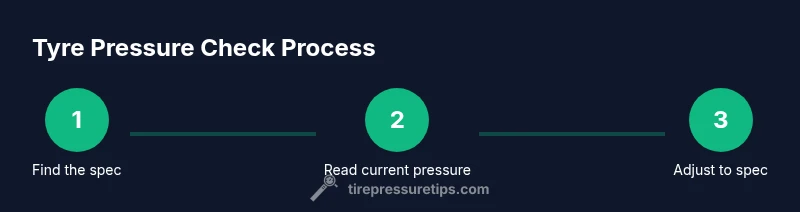
Start with a cold tire—the vehicle should be stationary for a few hours or overnight. Remove the valve cap from the air valve on the wheel. Attach a reliable digital or analogue gauge, ensuring a snug seal. Read the pressure directly on the gauge, then compare with the manufacturer’s recommended value. If the pressure is too low, add air in small increments and re-check after each addition to avoid over-inflation. If it’s too high, release air a little at a time and recheck. Refit the valve cap. For best results, check both tires when the scooter is on a flat surface to ensure even inflation. After adjustments, take a short, slow ride to settle the pressure, then recheck if you’ve added or released air. Regularly calibrate your gauge and keep it clean for accurate readings. This routine supports safe handling and even tread wear on the Jupiter.
Adjusting pressure for different riding scenarios
Your TVS Jupiter may need slightly different pressures for solo commuting, two-up riding, or carrying luggage. If you frequently ride with a passenger or heavy load, you should refer to the manual for the recommended rear pressure. In hot weather or after long rides, pressures can rise; always verify when cold. A common mistake is inflating while the tires are warm, which creates inaccurate readings. Use a gauge you trust, and maintain instrument hygiene to avoid false readings from dirt on the valve stem or gauge nozzle. Ground conditions also matter; smoother roads require less patch contact, whereas rougher roads benefit from slightly higher pressure to reduce tire squirm. The aim is even wear over the tread across the life of the tire while preserving predictable handling. When carrying loads, also consider tyre wear patterns and replace tires at the end of their service life to maintain safety.
Maintenance routine and trouble-shooting tips
Create a simple schedule: check cold tyre pressure at least once a month and before long rides. Always verify after a puncture repair or tire rotation. If you notice frequent punctures, slow leaks, or the tyre feels squirmy, recheck the pressure and inspect the valve stem for damage. Visual wear patterns can also indicate pressure problems; if the tread wears more on one side or edges, adjust accordingly and consider a professional check. Keep a small pressure gauge in your bag and document readings for reference. The aim is consistent pressure that supports safe braking, traction, and steering, extending tyre life and improving fuel economy. For the Jupiter, regular checks can help you anticipate wear, balance loads, and optimize performance across daily commuting and weekend trips.
Tools & Materials
- Tire pressure gauge (digital or analogue)(Ensure it reads in PSI and is calibrated)
- Air pump or portable compressor(Prefer a unit with a built-in gauge)
- Valve cap removal tool (optional)(Useful if caps are tight)
- Owner’s manual or service booklet(Check for the exact front/rear pressure values)
- Clean cloth or wipe(Wipe dirt from valve stem before check)
Steps
Estimated time: Total time: 10-15 minutes
- 1
Find the manufacturer’s pressure spec
Locate the recommended cold tyre pressures for front and rear on the scooter sticker or in the owner’s manual. Note the exact values and the distinction between front and rear pressures. If you regularly ride with a passenger or luggage, plan for any stated adjustments.
Tip: Always record the exact numbers and verify with the latest manual to avoid outdated values. - 2
Gather your tools
Collect a pressure gauge, an air pump, and a clean workspace. Ensure the scooter is on a level surface and cold before beginning. Having everything ready minimizes delays and ensures accurate readings.
Tip: Use the same gauge for a consistent baseline over time. - 3
Remove valve caps and attach the gauge
Carefully remove the valve caps from both wheels. Place the gauge on the valve stem, ensuring a tight seal to prevent air leaks when you read the pressure. Do one wheel at a time for accuracy.
Tip: If the valve stem is dirty, wipe it before attaching the gauge for a clean seal. - 4
Read, compare, and decide
Read the measurement and compare it to the manufacturer’s cold-pressure specification. If it’s low, add air in small increments and recheck; if high, release air gradually and recheck.
Tip: Make incremental adjustments to avoid over-correcting. - 5
Adjust and recheck both tires
Repeat the process for the opposite tire. Confirm both readings match the recommended values and reattach the valve caps. A quick test ride helps settle the air and validate stability.
Tip: Always recheck after adjustments, and watch for any sudden pressure changes after a ride. - 6
Document and store your gauge
Record the last readings so you can track changes over time. Store the gauge in a safe place to prevent damage and keep it accessible for future checks.
Tip: A simple notebook entry makes ongoing maintenance easy.
Frequently Asked Questions
How often should I check TVS Jupiter tyre pressure?
Check at least once a month and before long rides. Recheck after any tire work or changes in load. Regular checks prevent under-inflation and help preserve tyre life.
Check tyre pressure at least monthly and before long rides, and after any tire work.
Can I check tyre pressure when the tyres are hot?
Measuring after riding can give higher readings. Always measure when tyres are cold to get an accurate pressure that matches factory specs.
Prefer cold readings for accuracy; avoid checking right after a ride.
What if I can't find the manual or a sticker?
If the sticker is unreadable, contact a dealer or service center for the exact front and rear pressures. Do not rely on memory or guesswork.
If you can't read the sticker, reach out to a dealer for the correct numbers.
Is TPMS available on TVS Jupiter?
Most scooters, including TVS Jupiter, do not come with TPMS. Use a reliable gauge and manual checks to maintain proper pressure.
Most Jupiter models don’t have TPMS; rely on a good gauge and manual checks.
Where should I place the gauge on two-wheelers?
Place the gauge squarely on the valve stem and seal tightly. Ensure the valve stem is clean and the gauge fits snugly for accurate readings.
Seal the gauge firmly on the valve stem for an accurate read.
What are signs of under-inflation or over-inflation?
Under-inflation often causes soft handling and increased ride roughness; over-inflation leads to a harsher ride and uneven wear. If you notice poor grip or odd wear, recheck pressure.
Soft handling or rough ride may mean pressure needs checking.
Watch Video
What to Remember
- Know the official TVS Jupiter tyre pressures and verify cold readings.
- Check regularly and before long trips to stay safe.
- Use a reliable gauge and adjust carefully to spec.
- Poor inflation harms wear, handling, and fuel efficiency.