Tire Pressure Guide for Can-Am Maverick
Learn how to check, adjust, and maintain tire pressure on a Can-Am Maverick with practical steps, TPMS guidance, and safety tips to improve handling, traction, and tire life.


This guide shows you how to check and adjust tire pressure on a Can-Am Maverick, using the right PSI, TPMS considerations, and safe practices. You’ll learn how to inspect cold tires, locate the recommended range in your manual, and set pressures for different loads and terrains. Follow the steps to protect tires, handling, and traction.
Why tire pressure matters for Can-Am Mavericks
Tire pressure is a core safety and performance factor on a Can-Am Maverick. Properly inflated tires improve traction on rocky trails, reduce heat buildup, and help achieve predictable steering. Underinflated tires flex excessively, increasing rolling resistance and transferring heat to the sidewalls, which can lead to premature wear or a bead failure in rough terrain. Overinflation, on the other hand, reduces the contact patch and diminishes grip on soft surfaces like sand or mud. The Tire Pressure Tips team emphasizes that, for a Maverick, the correct psi depends on tire size, load, terrain, and temperature. Always start with the recommended range in the owner's manual or on the tire sidewall and adjust in small increments. After a ride, re-check pressures because heat from use raises the reading and can mask the true cold pressure. This knowledge helps protect tires, extend tread life, and keep handling predictable in fast, technical sections.
Understanding the right PSI for your Can-Am Maverick
Every Maverick uses different tire sizes; front and rear tires may have different pressures. The right PSI is usually defined by the tire manufacturer and Can-Am's recommendations for your model and load. Start by locating the spec sheet in the owner's manual or on the tire's sidewall. Use a reliable gauge and measure when tires are cold. If you can't read a manual, consult the Tire Pressure Tips database or official Can-Am support for the model year. When you ride with more weight—passengers, gear, or cargo—you may need to add pressure to maintain the proper contact patch. If you drive in soft terrain or heavy mud, you might need lower pressure in some tires to improve flotation; on hard or paved surfaces, higher pressure can reduce squirm and heat. Always adjust both front and rear tires consistently to keep balance.
Temperature, load, and terrain: how pressure shifts
Pressure changes with temperature: cold tires have a different psi than warmed tires after a ride. A 10-degree drop can reduce pressure by a noticeable amount, which is why checking before each trip is wise. The Maverick's weight distribution and cargo affect the load on each tire, so front and rear psi may diverge. Terrain matters too: rocky, sand, or wet trails require different abrasion and grip strategies; you may choose to slightly alter pressure to optimize traction while staying within a safe range. If you operate at high speeds on concrete or asphalt, higher pressures help stability but can reduce comfort. If you frequently switch between work tasks and trail rides, consider keeping two target pressures and adjusting accordingly. The key is to have a documented baseline that you revert to after each session.
How to measure pressure accurately: cold vs hot tires
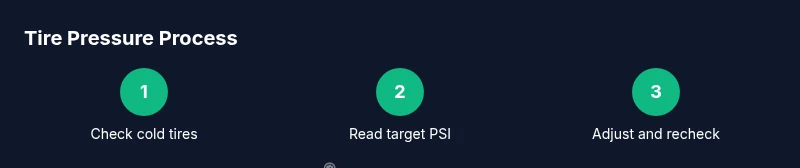
To measure accurately, always read cold tires, ideally after the vehicle has sat for at least three hours. Remove the valve stem cap, attach the gauge, and note the reading for each tire. If a tire is significantly low, add air in small increments (2-3 psi at a time) and recheck. Avoid measuring immediately after a drive—the tires retain heat and will read higher than they actually are when cold. If you don't have an air source, plan ahead and fill at a gas station or on-site air pump before you hit the trail. After you set the recommended pressures, drive a short distance to seat the beads, then recheck both tires. If one tire continues to show low pressure, inspect for leaks, or consult a pro.
Tools and safety gear you should have
Consistency is easier with the right tools. A digital tire gauge provides precise readings, and a portable air compressor or a reliable air pump is essential for topping up. You should have the Maverick's tire size documented and know the manufacturer's recommended PSI both front and rear. Keep a log of your baseline pressures for different loads and seasons. Wear eye protection when working near air lines and ensure the vehicle is parked on a stable surface with the parking brake engaged. If you attempt to adjust tires on the trail, stop in a safe area first. Do not over-pressurize beyond the tire sidewall limit; this can cause bead damage or blowouts.
Baseline measurement routine for daily use
A consistent routine helps avoid guesswork and ensures predictable handling. Begin with cold tires, ensure the Maverick is on level ground, and gather your gauge and air source. Check all four tires against your baseline pressures from the manual. If any tire reads more than 1-2 psi away, top off or release air in small increments and recheck. Record the readings and the conditions (load, temperature, terrain) to build a personal reference bank. This routine makes it faster to diagnose creeping pressure changes and catch slow leaks early.
Adjusting pressure for specific scenarios: trail, road, sand, mud
Trail riding on loose surfaces benefits from slightly lower pressure to increase surface contact and grip, but never go below the tire's minimum rating. For fast highway-like segments, higher pressures can reduce heat buildup and keep steering precise. In soft sand, a modest reduction can improve flotation and prevent bogging down; on rocky or hard-packed surfaces, modestly increased pressures help reduce bead deflection and protect tires. Always stay within the recommended range and adjust both front and rear tires consistently to maintain balanced handling.
TPMS considerations for Maverick
TPMS can help monitor real-time pressure, but it should not replace regular manual checks. Sensor locations vary by model; some Maverick variants have sensors mounted in the valve stems or within wheels. If the TPMS gives a warning, verify with a gauge and compare across all tires to confirm a true issue or a sensor fault. Regularly inspect TPMS batteries and sensors during routine maintenance and replace them as needed to avoid false alerts on the trail.
Common mistakes to avoid
Avoid overreliance on a single reading, especially after riding. Do not inflate beyond the tire's maximum PSI printed on the sidewall, and avoid mixing different pressure targets between front and rear without a model-specific rationale. Never adjust pressures on a hot tire without accounting for heat expansion. Finally, don’t ignore slow leaks; even a small puncture can cause gradual pressure loss that undermines traction and tire integrity.
Logging pressures across seasons and miles
Create a simple log, either on paper or a note in your phone, documenting the baseline PSI for each tire under different loads and temperatures. Track changes caused by seasonal temperature shifts and tire wear. This habit helps you spot trends, such as consistently low pressure in winter or after heavy loads, enabling proactive maintenance before a ride.
Tools & Materials
- Tire pressure gauge (digital preferred)(Choose precision +/- 1 psi; check on cold tires for accurate reading)
- Air compressor or access to gas-station air pump(Ensure the unit has a good flow; many UTV tires require 12-40+ psi depending on size; check manual)
- Can-Am Maverick owner's manual or tire spec sheet(Use the official PSI range per tire size and load)
- Tire sidewall markings and tire size(Helpful for verifying required pressure range)
- Marker and notebook for logging pressures(Record changes for different loads and seasons)
- TPMS reset tool (if available)(Not all units require reset; refer to manual)
Steps
Estimated time: 20-30 minutes
- 1
Gather tools and prep the Maverick
Park on level ground, engage the parking brake, and lay out all tools. Ensure the tires are cool before you begin. This reduces reading errors caused by heat and ensures safety during pressure adjustment.
Tip: Have a clear work area to avoid tripping over hoses and hoses while inflating. - 2
Find the recommended PSI range
Consult the Can-Am manual or tire sidewall markings for the front and rear PSI targets. If you can’t access the manual, use a trusted online resource or contact Can-Am support. Note any differences between front and rear tires.
Tip: Record the target range for your model and tire size in your log. - 3
Check cold tire pressures
Attach the gauge to each valve stem, read the pressure, and compare to the baseline. If a tire reads below target, plan for a small top-up; if above, release air gradually.
Tip: Remove the valve cap to ensure a clean seal and accurate reading. - 4
Inflate or deflate to target
Add or release air in small increments (1–3 psi at a time). Recheck after each adjustment to avoid overshooting the target.
Tip: Seat beads if you’re at the minimum pressure; a short drive helps settle the tire. - 5
Recheck and document
Recheck both front and rear tires after adjustments. Log the final readings and conditions (temperature, load, terrain) for future reference.
Tip: Compare to your baseline under similar conditions for consistency. - 6
Test drive and revisit
Take a short test drive to confirm handling and stability. Recheck pressures after the drive since heat can raise readings.
Tip: If readings drift, inspect for slow leaks or damaged valves.
Frequently Asked Questions
What is the recommended tire pressure for Can-Am Maverick?
Refer to the Can-Am manual or tire sidewall for the exact PSI range, which varies by tire size and load. Always verify with the official specs for your model year and configuration.
Check the owner's manual for the exact psi range; it changes by tire size and load, so verify before adjusting.
Should I rely on TPMS alone to monitor pressure?
TPMS is helpful for alerts, but it’s not a substitute for periodic manual readings with a gauge. Validate any alert with a cold-tire measurement.
TPMS helps you spot issues, but always confirm with a manual tire pressure check.
Can I change tire pressures for different terrains?
Yes. Softer terrain can benefit from slightly lower pressures for better flotation and grip, while firmer terrain may require higher pressures for stability. Stay within the recommended range and adjust front/rear evenly.
Yes, adjust pressure for terrain, but stay within the safe range and keep front and rear balanced.
How often should I check tire pressure on a Maverick?
Check pressures weekly or before any long trip, especially after weather changes or loading changes. Temperature shifts can cause readings to drift.
Check pressure weekly and before trips; temperature changes can affect readings.
What if a tire stays consistently low?
Inspect for leaks, punctures, or valve stem issues. If no leak is found, consult a tire professional or Can-Am support to diagnose a potential internal problem.
If a tire stays low, inspect for leaks or damage and seek professional help if needed.
Should I reset TPMS after adjusting pressure?
Most systems don’t require manual resets after simple pressure changes. Follow your model’s instructions; only reset if you’ve replaced sensors or performed a calibration.
Only reset TPMS if required by sensor replacement or calibration per your manual.
Watch Video
What to Remember
- Check cold tires before every ride.
- Use the manual or tire sidewall for target PSI.
- Adjust front and rear tires consistently.
- Recheck after a short drive to account for heat.