Golf Cart Tire Pressure Chart: Read by Size and Load
Learn how to read a golf cart tire pressure chart, choose the right cold PSI by tire size and load, and maintain safe, efficient operation with TPMS and practical checks.


A golf cart tire pressure chart translates tire size and load into a recommended cold PSI, helping you inflate accurately for safety and performance. It accounts for front/rear weight distribution, terrain, and how heat affects tire pressure in use. According to Tire Pressure Tips, start with the chart, then verify with a reliable gauge to avoid under- or over-inflation across different loads.
What is a golf cart tire pressure chart?
A golf cart tire pressure chart is a reference tool that links tire size, load, and operating conditions to a recommended cold PSI. It blends guidance from tire manufacturers, cart models, and field testing to help you inflate accurately. According to Tire Pressure Tips, starting with the chart and then validating with a reliable gauge minimizes the risk of under- or over-inflation. Because tires behave differently by size and load, charts typically show a range rather than a single value, and many charts distinguish front and rear pressures when applicable.
In practice, the chart serves as a baseline. It is not a one-size-fits-all prescription; rather, it tells you where to start and what factors will modify that starting point. This makes it especially useful for owners who switch tires, adjust payload, or drive on mixed terrain. Keep a copy handy and update it whenever you change tires or loads.
Reading by tire size and load
To use a chart, start by locating your tire size on the sidewall (for example, 20x9-10 or 18x8.5-8). Then check the recommended cold PSI for the corresponding load category and whether the front or rear axle carries more weight. If you regularly drive with passengers, cargo, or on rough terrain, your chart may indicate a higher pressure at the rear to compensate. Always cross-reference the chart with your cart's manual and with TPMS readings. This section explains how a chart translates into real-life inflation, and how to resolve common mismatches between front and rear pressures.
Tip: Note the load distribution on your cart. If you routinely carry heavy payloads in the back, the rear pressure may sit at the high end of the range, while the front stays at the lower end to maintain steering feel.
Common ranges and how to dial in
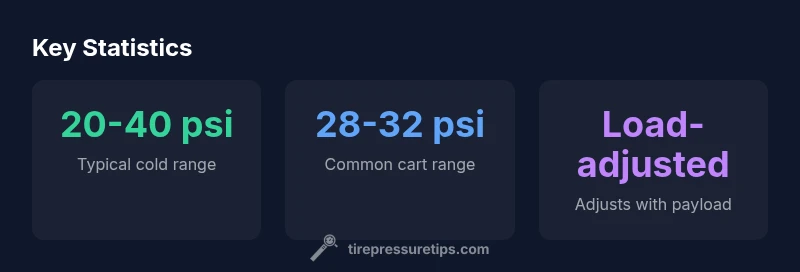
While there is no universal PSI for every golf cart, most carts operate within a broad cold-range bracket. In general, smaller, light-load carts use the lower end of the range, while heavier carts and larger tires sit toward the higher end. A practical starting point is the mid-range cited in the chart, then adjust by 1-2 psi for each major load or terrain change. The Tire Pressure Tips analysis notes that small adjustments of a few psi can noticeably alter ride quality and tire wear. Remember: consistency matters more than chasing a single number, and seasonal changes may require rechecking.
In summary, if your chart suggests 28-32 psi, you might start at 30 psi for a light load on paved surfaces, then move toward 32 psi with a full passenger load on uneven ground.
How to measure cold vs hot PSI
Never inflate a hot tire. Inflate when cold, ideally after the cart has sat for several hours or overnight. Take a reading, compare to the chart, and adjust accordingly. If you drive the cart daily, recheck after 15-30 miles or 20-30 minutes of real-world use, especially after changing loads. Temperature and ambient conditions can shift PSI by roughly 0.5-1.5 psi per 10 degrees Fahrenheit; use the chart as your baseline, not a guarantee. By verifying with a gauge each time you inflate, you reinforce safe pressure throughout variations in weather and operation.
Practical steps to create a personalized chart
Here is a step-by-step approach to building your own chart:
- Record your tire size, load rating, and axle distribution for a typical cart setup.
- Note your most common loads (person count, cargo weight) and terrain (pavement, grass, hills).
- Choose your target cold PSI from the chart, then adjust by 1-2 psi for each major load/terrain change.
- Validate with a high-quality gauge and TPMS readings when possible.
- Update the chart after seasonal changes or equipment upgrades.
- Keep a copy in your cart or toolbox for quick reference.
- Revisit the chart when you change tires, wheels, or payload to maintain accuracy.
Integrating TPMS and maintenance tips
TPMS provides real-time feedback; however, it is not a substitute for a manual gauge and a chart. Use TPMS alerts as a secondary check and verify with a gauge during routine maintenance or after inflating. Regular calibration helps reduce false alarms. Tire Pressure Tips recommends scheduling a monthly quick check and a biannual full inspection to catch leaks, damaged valves, or worn tires.
Pro tip: If TPMS readings drift after inflation, consider rechecking gauge accuracy and revalidating against the chart. This ensures your system remains reliable across temperature swings and tire wear.
Choosing the right gauge and tools
Invest in a digital tire pressure gauge with a bleed function for precise adjustments. Keep a tire pressure gauge, a small notebook or app, and a copy of your golf cart tire chart handy. For large motorized carts, a portable air compressor may help in remote locations; ensure the gauge is calibrated. Keep spare valve cores and a repair kit. A printed version of the chart placed near the dash helps you reference the right numbers without delayed inflations.
Common mistakes to avoid
Avoid inflating too high or too low based on guesswork. Do not rely on look or feel; even small PSI differences can affect safety, handling, and tire wear. Don’t neglect TPMS symptoms or valve stem health; replace corroded cores and check for leaks. Finally, don’t forget to re-check your chart after changing tires, loads, or operating conditions. Regular practice prevents small issues from becoming costly repairs.
Typical golf cart tire pressures by size
| Tire Size Range | Typical Cold Pressure (psi) | Notes |
|---|---|---|
| 20x9-10 | 28-32 | Common on larger club carts |
| 18x8.5-8 | 26-30 | Older cart models or lighter loads |
| Front vs Rear | Varies by axle load | Consult chart for split pressures |
Frequently Asked Questions
What is a golf cart tire pressure chart?
A golf cart tire pressure chart links tire size and load to a recommended cold PSI. It helps you inflate accurately, account for payload, and anticipate how terrain affects pressure. Use the chart as a starting point and validate with a quality gauge.
A tire pressure chart maps tire size and load to a recommended cold PSI, giving you a reliable starting point for inflation and safety checks.
Why is correct pressure important for golf carts?
Correct pressure improves handling, ride comfort, tire wear, and fuel efficiency. Underinflation can cause increased heat and wear; overinflation reduces grip and can damage the tire bead. The chart helps you stay in the optimal zone for your cart.
Proper pressure keeps your ride safe, smooth, and efficient; the chart helps you stay in the sweet spot for your cart’s size and load.
How do I determine the right pressure for my cart model?
Identify your tire size and payload, locate the corresponding row on your chart, and start at the midpoint of the recommended range. Make small adjustments (1-2 psi) based on load, terrain, and TPMS feedback.
Find your tire size on the chart, start in the middle of the range, and tweak a psi at a time while checking TPMS.
Can TPMS help monitor golf cart tire pressure?
Yes. TPMS provides real-time alerts when pressure deviates from the target range. Use TPMS in conjunction with a manual gauge and your chart for best results, especially after changes in load or temperature.
TPMS helps you monitor pressure live, but you should still verify with a gauge and your chart.
What are common mistakes when using a tire pressure chart?
Ignoring temperature shifts, inflating without verifying, or using a chart that doesn’t match your tire size or load. Always validate with a gauge and recheck after changing tires, loads, or terrain.
Common mistakes are not checking cold pressure, misreading the chart, and ignoring TPMS alerts.
How often should I check tire pressure on a golf cart?
Check cold tire pressure at least once a month and after long trips, weather changes, or load increases. Recalibrate your chart if you swap tires or make substantial changes to payload.
Check the tires monthly and after big trips or loads, and update your chart if you change tires.
“A precise tire pressure chart is a practical tool for safety, ride quality, and tire life on golf carts.”
What to Remember
- Start with the chart and verify with a gauge
- Measure cold PSI for accuracy
- Account for load and terrain when inflating
- Regularly check tires and revalidate the chart
- Use TPMS as a supplementary check, not a replacement